A content pack dependency is when a content pack is needed in order to use another content pack. Dependencies can be categorized as either optional or required/mandatory. Optional means the pack benefits from the pack it depends on, but can function without it. Mandatory means the pack does not work without the pack it depends on. You can depend on [core content packs](https://marketplace.xsoar.paloaltonetworks.com/content/packs/corepacks.json) that are included with Cortex XSIAM, without an issue. Requiring non-core content packs in order to use your content pack is not recommended.
### Examples of dependencies
* A playbook from QRadar pack uses a playbook from the Access Investigation pack.
* A playbook from the Employee Offboarding pack uses a script from the Impossible Traveler pack.
* A classifier from the Microsoft Exchange On-premise pack uses incident fields from the Phishing pack.
### Find content pack dependencies
Use the [demisto-sdk graph get-dependencies](https://app.gitbook.com/s/nozw5MT5S8KZD2eF8roV/demisto-sdk-guide/demisto-sdk-commands/graph-commands) command to find dependencies between content packs.
### Handle dependencies
When a dependency is required, it means that in order to use a certain content pack, the user MUST install a different pack. You want to avoid this scenario as much as possible. In some cases, dependencies are logical and required. For example, the Gmail content pack depends on the Phishing content pack, and it would not make sense to duplicate the content in both packs. In most cases, however, (when the required pack is not a core content pack), we want to find and remove dependencies.
### Fix dependencies
Fixing a dependency usually involves three stages:
1. Make the necessary adaptation in the content. For example, you may need to change the playbook, merge packs, move files to another pack, replace a deprecated script with newer script, etc.
2. Manually change `mandatory` to `false` in the pack dependencies - only if the dependency is actually optional and not mandatory. An example of an optional content pack would be if an integration is used after a condition that ensures that it's enabled, and the flow continues normally otherwise. Another possible optional dependency is when a script or a sub-playbook is configured to be skipped if the pack is unavailable (through the advanced task settings).
3. Remove the `displayedImages` section from the `pack_metadata.json`.
### Example: Slack pack dependency on Active Directory Query
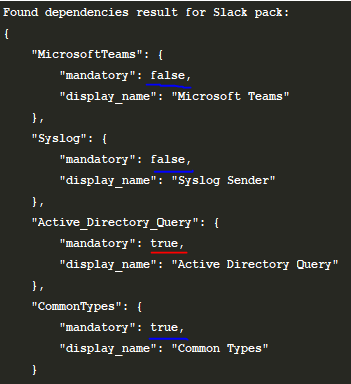
1. Understand the dependencies. We have two optional dependencies which do not cause an issue. We also have two required dependencies. The first is the **CommonTypes** content pack. This is a core pack, and does not cause an issue. The Active Directory Query content pack, however, should not be required for the Slack content pack to work.
2. Locate the reason for the dependency. In this case, we find that the playbook Slack - General Failed Logins v2.1 uses the command `ad-expire-password` in the **Expire Password** task.
3. Solve the problem. In this case, we can add a condition before the **Expire Password** task, that checks if Active Directory is enabled. If not, a different path is taken and the Active Directory content pack is no longer required for the Slack content pack to work.
4. Change the `mandatory` value to `false` in `pack_metadata.json`.
### Example: Cortex XDR Pack dependency on PortScan Pack
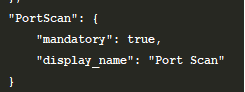
1. Reviewing the content of the Cortex XDR pack shows that the `Cortex XDR Port Scan` incident type is configured to run the `Port Scan - Generic` playbook from the PortScan pack, creating a dependency. This is a bug, as the correct playbook should be `Cortex XDR - Port Scan` and not the generic port scan playbook.
2. Change the playbook that the incident type is associated with.
3. Change the `mandatory` value to `false` in `pack_metadata.json`.
**Note**
You should use a conditional task to check if an integration is available when a playbook uses a task that is tied to a specific integration. The **Skip this branch if this script/playbook is unavailable** option should be used to check for sub-playbooks.
**Important**
Any content from the Core pack should not be changed to `"mandatory": false"`.