Event collector integrations enable fetching events and logs from external products, for example from OKTA and [Jira](https://github.com/demisto/content/tree/master/Packs/Jira/Integrations/JiraEventCollector). They are developed the same as other integrations, with a few extra configuration parameters and APIs.
### Create a Cortex XSIAM event collector integration
To create an event collector integration use the `demisto-sdk init --xsiam` command. This creates a new content pack with all necessary Cortex XSIAM content items. The event collector integration can be found at `Packs/Integrations/${VENDOR_NAME}EventCollector`.
### Event collector integration naming conventions
Event collector integration names (`id`, `name`, and `display` fields) should end with `EventCollector` so users can easily understand what the integration is used for.
### Required event collector YAML keys
Use the `demisto-sdk init --xsiam` command to automatically generate the necessary integration YAML configuration keys for an event collector. If you create the YAML manually, verify the following keys are set:
* `isfetchevents` key in the integration YAML file to indicate the integration is an event collector integration.
* Must have the `fromversion: 6.8.0` field.
* The `marketplaces` key set with the `-marketplacev2` value. This ensures that the event collector is only available for installation on Cortex XSIAM.
#### Event collector YAML example
```programlisting
script:
isfetchevents: true
fromversion: 6.8.0
marketplaces:
- marketplacev2
```
### Configure Collect section parameters
For event collector integration instance settings, the event collector related parameters should be organized in one section by adding the `Collect` key to each relevant parameter in the integration YAML file:
```programlisting
sectionOrder:
- Connect
- Collect
configuration:
# ...
- name: ...
# ...
section: Collect
```
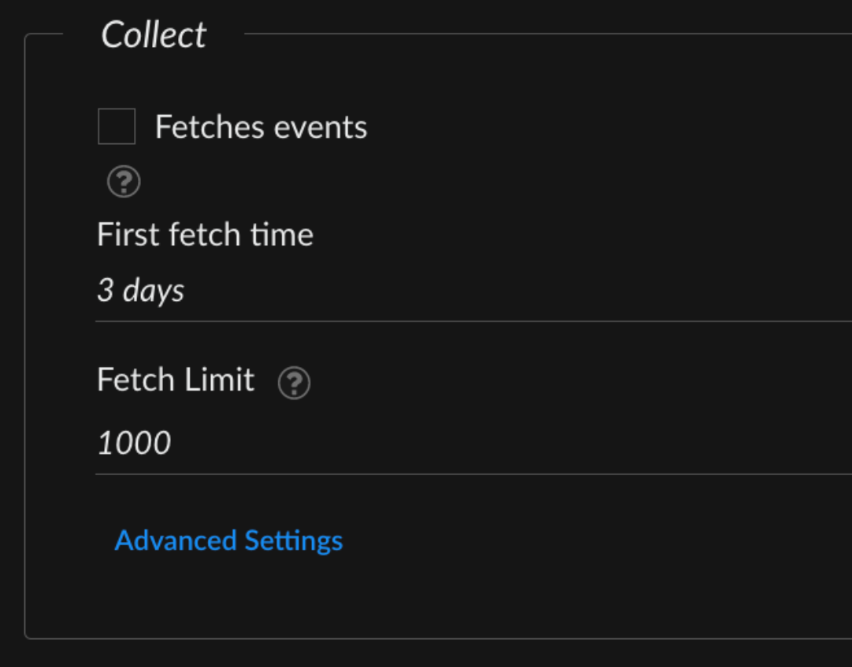
For example, since the `first_fetch` and `fetch_limit` are event collector related parameters, add them to the `Collect` section:
```programlisting
- name: first_fetch
defaultvalue: 3 days
display: First fetch time
required: false
type: 0
section: Collect # <--- Added
- name: fetch_limit
defaultvalue: '1000'
display: Fetch Limit
additionalinfo: Maximum amount of detections to fetch. Audits API does not include a fetch limit therefore this configuration is only relevant to detections.
required: false
type: 0
section: Collect # <--- Added
```
In the integration instance modal, it looks like this:
### Event collector integration commands
Every event collector integration supports at least three commands:
* `fetch-events` - This command initiates a fetch events request to specific external product endpoint(s) using the relevant chosen parameters, and sends the fetched events to the Cortex XSIAM dataset. If the integration instance setting is configured to `Fetch events`, then this command is executed at the specified `Events Fetch Interval`. By default, it runs every minute to retrieve and import events into Cortex XSIAM.
When creating an event collector integration with the `demisto-sdk init --xsiam` command, the `Packs/Integrations/${VENDOR_NAME}EventCollector/${VENDOR_NAME}EventCollector.yml` file includes the key `script.isfetchevents: true`, which indicates that the integration can fetch events.
* `test-module` - This command runs when the `Test` button is clicked in the integration instance settings configuration.
* `<product-prefix>-get-events` - This command fetches a limited number of events from the external source and displays them in the War Room. Replace `<product-prefix>` with the name of the product or vendor source providing the events. For example, for an event collector integration for Microsoft Intune, the command might be called `msintune-get-events`.
In the `Packs/Integrations/${VENDOR_NAME}EventCollector/${VENDOR_NAME}EventCollector.yml` file under the `script.commands` path, the SDK by default provides a `hello-world-get-events` command. This command is used primarily for debugging to retrieve the events that the `fetch-events` command would run. It includes an optional argument, `should_push_events` , that has the same functionality as `fetch-events` when set to `true`.
### Send events with `send_events_to_xsiam`
Call the `send_events_to_xsiam()` function from `CommonServerPython` when the `fetch-events` command is executed.
This command expects the following arguments:
* `events` The events to send to the Cortex XSIAM tenant. Should consist of one of the following:
* List of strings or dictionaries where each string or dictionary represents an event.
* String containing raw events separated by new lines.
* `vendor` (string): The vendor represented by the event collector integration.
* `product` (string): The specific product integrated in the event collector integration.
* `data_format` (string) - Should only be included if the events parameter contains a string in the `leef` or `cef` format. Otherwise the `data_format` is set automatically.
Example: `main()` function from an event collector integration:
This example assumes the events are not in `cef` or `leef` formats, therefore the `data_format` argument is not used.
```programlisting
def main():
params = demisto.params()
client = Client(params.get('insecure'),
params.get('proxy'))
command = demisto.command()
demisto.info(f'Command being called is {command}')
# Switch case
try:
if demisto.command() == 'fetch-events':
events, last_run = fetch_events_command(client)
# we submit the indicators in batches
send_events_to_xsiam(events=events, vendor='MyVendor', product='MyProduct')
demisto.setLastRun(next_fetch)
else:
results = get_events_command(client)
return_results(results)
except Exception as e:
raise Exception(f'Error in {SOURCE_NAME} Integration [{e}]')
```
**Important**
* The `send_events_to_xsiam()` function should only be used with a system integration. For custom data ingestion needs, use the [HTTP Log Collector](https://docs-cortex.paloaltonetworks.com/r/Cortex-XSIAM/Cortex-XSIAM-3.x-Documentation/Set-up-an-HTTP-log-collector-to-receive-logs) or contact support to request an official integration.
* Always pass events to the `send_events_to_xsiam()` function, even if no events were fetched, because the `send_events_to_xsiam()` function also updates the UI for the number of events fetched, which could also be 0. Empty data will not be sent to the database.
* Only call `demisto.setLastRun` after calling `send_events_to_xsiam()`.
For more info on the `send_events_to_xsiam()` function, see the [API reference](https://xsoar.pan.dev/docs/reference/api/common-server-python#send_events_to_xsiam).
### Send event data with multiple types
If within `fetch-events` different API endpoints are called, then events may consist of multiple types with different structures. In this case, call `send_events_to_xsiam()` with an aggregated list of events from both endpoints. For example, for `detections: List[Dict[str, Any]]` and `audits: List[Dict[str, Any]]`, send them as:
```programlisting
audits, detections, last_run = fetch_events_command(client)
send_events_to_xsiam(events=audits + detections, vendor='MyVendor', product='MyProduct')
```
For more details, see [https://xsoar.pan.dev/docs/reference/api/common-server-python#send\_events\_to\_xsiam](https://xsoar.pan.dev/docs/reference/api/common-server-python#send_events_to_xsiam).
### Configure the first event collection run
When an integration runs for the first time, the last run time is not in the integration context. To set up the first run properly, use an `if` statement with a time that is specified in the integration settings.
It is best practice to specify in the integration settings how far back in time to fetch events for the first run.
### Configure event queries and parameters
Queries and parameters are configurable parameters in the integration settings that enable filtering events. For example, to import only certain event types into Cortex XSIAM, you need to query the API for only that specific event type.
The following example uses the `First Run` `if` statement and `query`.
```programlisting
# usually there will be some kind of query based on event creation date,
# or get all the events with id greater than X id and their status is New
query = 'status=New'
day_ago = datetime.now() - timedelta(days=1)
start_time = day_ago.time()
if last_run and 'start_time' in last_run:
start_time = last_run.get('start_time')
# execute the query and get the events
events = query_events(query, start_time)
```
### Create event collector parsing rules
When developing an event collector integration, you can implement [parsing rules](https://app.gitbook.com/s/FOhYBYLdbwpnbJgr6uaX/cortex-xdr-3.x-documentation/data-management/parsing-rules/create-parsing-rules) in the event collector code.
The most common parsing rule is the `_time` system property, which indicates the event time from the remote system. For example, using the following events:
```programlisting
{ "id": "1234",
"message": "New user added 'root2'",
"type": "audit",
"op": "add",
"result": "success",
"host_info": {
"host": "prod-01",
"os": "Windows" },
"created": "1676764803" }
```
The `created` event property is a `str` representation of a timestamp (without milliseconds). However, the `_time` system property expects the result to be an `str` in format `%Y-%m-%dT%H:%M:%S.000Z`. Transform it using the [`timestamp_to_datestring`](https://xsoar.pan.dev/docs/reference/api/common-server-python#timestamp_to_datestring) function from `CommonServerPython`:
```programlisting
from datetime import datetime
from CommonServerPython import *
# ...
events: List[Dict[str, Any]] = get_events()
for event in events:
event["_time"] = timestamp_to_datestring(float(event.get("created")) * 1000)
# ...
```
To ensure the parsing rule has been applied and is working as expected, run an [XQL query](https://app.gitbook.com/s/FOhYBYLdbwpnbJgr6uaX/cortex-xdr-xql/build-xql-queries/how-to-build-xql-queries) to compare the `_time` and `created` fields:
```programlisting
dataset = "MyVendor_MyProduct_raw" | fields _time, created
```
### View collected event data in Cortex XSIAM
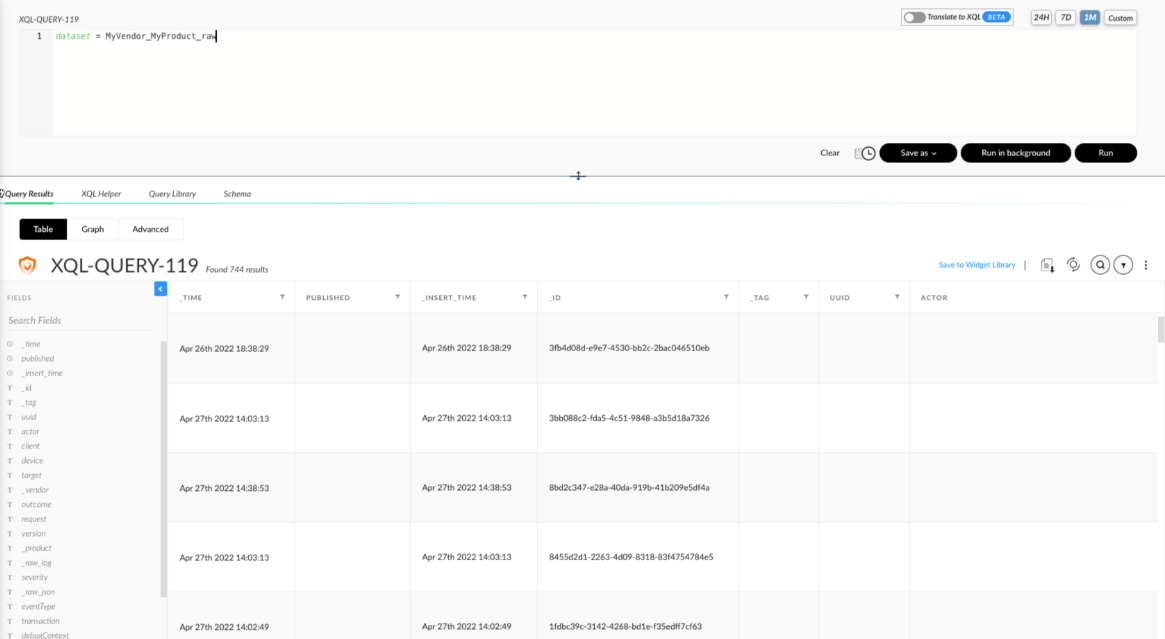
After events are received by Cortex XSIAM, they are stored in a dataset in the structure of \<vendor>\_\<product>\_raw. If it's the first time fetching events, this dataset will be created. For more information about dataset management, see [Dataset management](https://app.gitbook.com/s/FOhYBYLdbwpnbJgr6uaX/cortex-xdr-3.x-documentation/data-management/dataset-management).
To see the events sent by the `send_events_to_xsiam()` function in your Cortex XSIAM instance:
1. Go to the left toolbar and navigate to **Incident response** → **Investigation** → **Query Builder** .
2. Click the **XQL** button.
3. In the query builder box, type a query to search for the events you want to view. For example, to view all events type the following and then click **Run**.
```programlisting
dataset = MyVendor_MyProduct_raw
```
You should see the events sent by your integration in the table of results.