You can use long running containers to run specific processes in an integration indefinitely. To use long running containers, the integration must be written in Python.
### Enable the `longRunning` integration property
To make an integration long running, to enable the `longRunning` property:
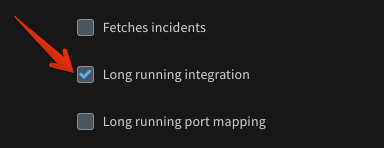
You can then see the **Long running integration** parameter in the instance configuration options.
When you select the checkbox, the server launches a long running container each time an instance is enabled. When the checkbox is cleared or the instance is disabled, the container dies. Long running containers contain **LongRunning** in the container name.

### Integrations that run continuously by default
Some integrations are long running by default. These integrations do not include the **Long running integration** checkbox. Example of such integrations include:
* Generic Export Indicators Service (EDL)
* Generic Webhook
* AWS SNS Listener
* TAXII2 Server
* TAXIIServer
For these integrations, the long-running behavior is inherent and cannot be modified.
These integrations can operate in **Single engine** mode or **No engine** mode. When using single engine mode, select your engine in the integration configuration and specify the port number for the **Listen Port**. When using no engine mode, select **No engine** in the integration configuration. The server automatically assigns a port for the instance.
### Implement a long-running integration command
When the container runs, it calls a dedicated command in the integration, similar to `fetch-incidents`. The command is called `long-running-execution`. To use a long running container, you need to implement `long-running-execution` in your integration code. For the code to run code forever, it must never stop executing. For example, you can use a never ending loop (`while True`).
### Interact with the Cortex XSIAM server
Since the long running container does not run within a scope of an incident, it has no standard place to output results to. Instead there are dedicated functions to interact with the server:
* `addEntry` - Adds an entry to a specified incident War Room. For more details, see the [API reference](https://xsoar.pan.dev/docs/reference/api/demisto-class#addentry).
* `createIncidents` - Creates incidents according to a provided JSON. For more details, see the [API reference](https://xsoar.pan.dev/docs/reference/api/demisto-class#createincidents).
* `findUser` - Finds a Cortex XSIAM user by a name or email. Useful for creating incidents. For more details, see the [API reference](https://xsoar.pan.dev/docs/reference/api/demisto-class#finduser).
* `handleEntitlementForUser` - Adds an entry with entitlement to a provided investigation. For more details, see the [API reference](https://xsoar.pan.dev/docs/reference/api/demisto-class#handleentitlementforuser).
* `updateModuleHealth` - Updates the instance status. This is a way to reflect the container state to the user. For more details, see the [API reference](https://xsoar.pan.dev/docs/reference/api/demisto-class#updatemodulehealth).

* `mirrorInvestigation` - For chat based integrations, mirrors a provided Cortex XSIAM investigation to the corresponding chat module.
* `directMessage` - For chat based integrations, handles free text sent from a user to the chat module and processes it in the server.
### Manage long-running container states
One of the most important and useful aspects of the long running process is the integration context: `demisto.setIntegrationContext(context)` `demisto.getIntegrationContext()` You can use the integration context to store information and manage the state of the container per integration instance. This context is stored in a format of a dict of `{'key': 'value'}`, where the value must be a string. To store complex objects as values, parse them to JSON.
Use logging to notify and report different states inside the long running process: `demisto.info(str)` and `demisto.error(str)`. These will show up in the server log.
### Troubleshoot long-running containers
Use `updateModuleHealth`, `info` and `error` to report errors and debug. It's also important to segregate the logic into functions so you can unit test them.
### Long-running container best practices
* Do not use `sys.exit()`, use `return_error` instead.
* Always catch exceptions and log them.
* Run in a never ending loop.
To run multiple processes in parallel, you can use async code. For example, view the **Slack v2** and **Microsoft Teams** integrations.
### Invoke long-running HTTP integrations
For details, see [Invoking long running HTTP integrations via server's HTTPS endpoint](https://xsoar.pan.dev/docs/reference/articles/long-running-invoke).