You can update issue fields by running the `setIssue` and `setIssueStatus` commands in the CLI, in a script, or a playbook task in Cortex XSIAM.
* **`setIssue`:** Sets values for specific issue fields. The supported fields are presented in the list of arguments.
#### Examples of the setIssue command in the CLI
The following examples show how to run the `setIssue` command in the CLI. You can run CLI commands in the **War Room**. When you start typing the CLI provides the available options and if you select an enum field, the CLI provides the available values.
* To change the issue severity to `high`, run
```
!setIssue severity=high
```
* To change the issue severity to `high` and star the issue, run
```
!setIssue severity=high starred=true
```
* **`setIssueStatus`:** Sets the status or resolution value for an issue. This command supports the `status` argument, which presents a list of status and resolution type values. The selected status is set in the `custom_status` field.
If you specify a resolution status, the issue is closed and the `resolution_status` and `closeReason` fields are updated to the same value as the `custom_status` field. If you specify a New, Reopened, or Under Investigation status, the issue remains open and the `resolution_status` and `closeReason` fields are empty.
<div data-gb-custom-block data-tag="hint" data-style="info" class="hint hint-info"><h4>Tip</h4><p>You can create custom issue statuses and resolution reasons, and use the <code>setIssueStatus</code> command to set these custom statuses for issues.</p><p>For example, when a user starts investigating an issue, the issue status is automatically changed from <strong>New</strong> to <strong>Under Investigation</strong>. In some cases, it is useful to create an interim status, such as <strong>Triage</strong>. After you create the custom status, the new status will be available for selection. To create a custom status, follow the instructions in <a href="../../../../configure-cortex-xsiam/customize-cases-and-issues/create-custom-case-statuses-and-resolution-reasons">Create custom case statuses and resolution reasons</a>.</p></div>
#### Examples of using the setIssueStatus command in the CLI
The following examples show how to run the `setIssueStatus` command in the CLI. You can run CLI commands in the **War Room**. When you start typing, the CLI provides the available options and if you select an enum field, the CLI provides the available values.
* To change the issue status to `Resolved - Known Issue`, run
```
!setIssueStatus status="Resolved - Known Issue"
```
* To change the issue status to custom status `Triage`, run
```
!setIssueStatus status=Triage
```
<div data-gb-custom-block data-tag="hint" data-style="info" class="hint hint-info"><p>You must create a custom status before you can select it.</p></div>
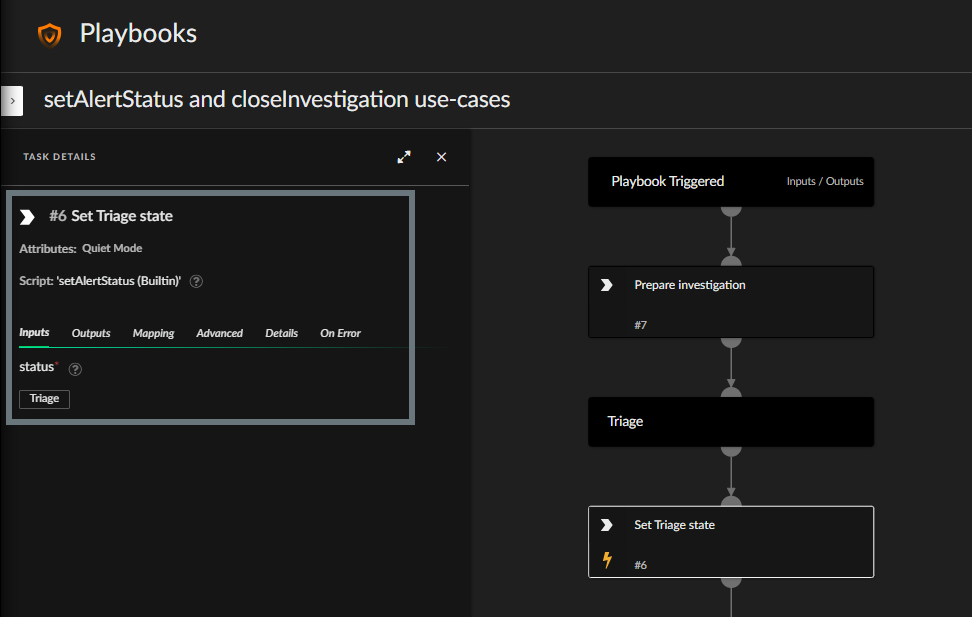
#### Example of using the setIssueStatus command in a playbook
The following example shows how the `setIssueStatus` command can be used in a playbook task. In this example, the task sets a custom issue status (Triage). The custom issue status was created before setting up the playbook.