1. On a domain controller or a system with Remote Server Administration Tools (RSAT) installed, open the **Group Policy Management Console** (GPMC).
2. Create a new Group Policy Object (GPO): Right-click on the domain or organizational unit (OU) where your domain controllers reside, then select **Create a GPO in this domain, and Link it here...**. Give it a descriptive name, e.g. Domain Controller Registry Settings.
3. Edit the GPO.
1. Right-click on the newly created GPO and select **Edit**.
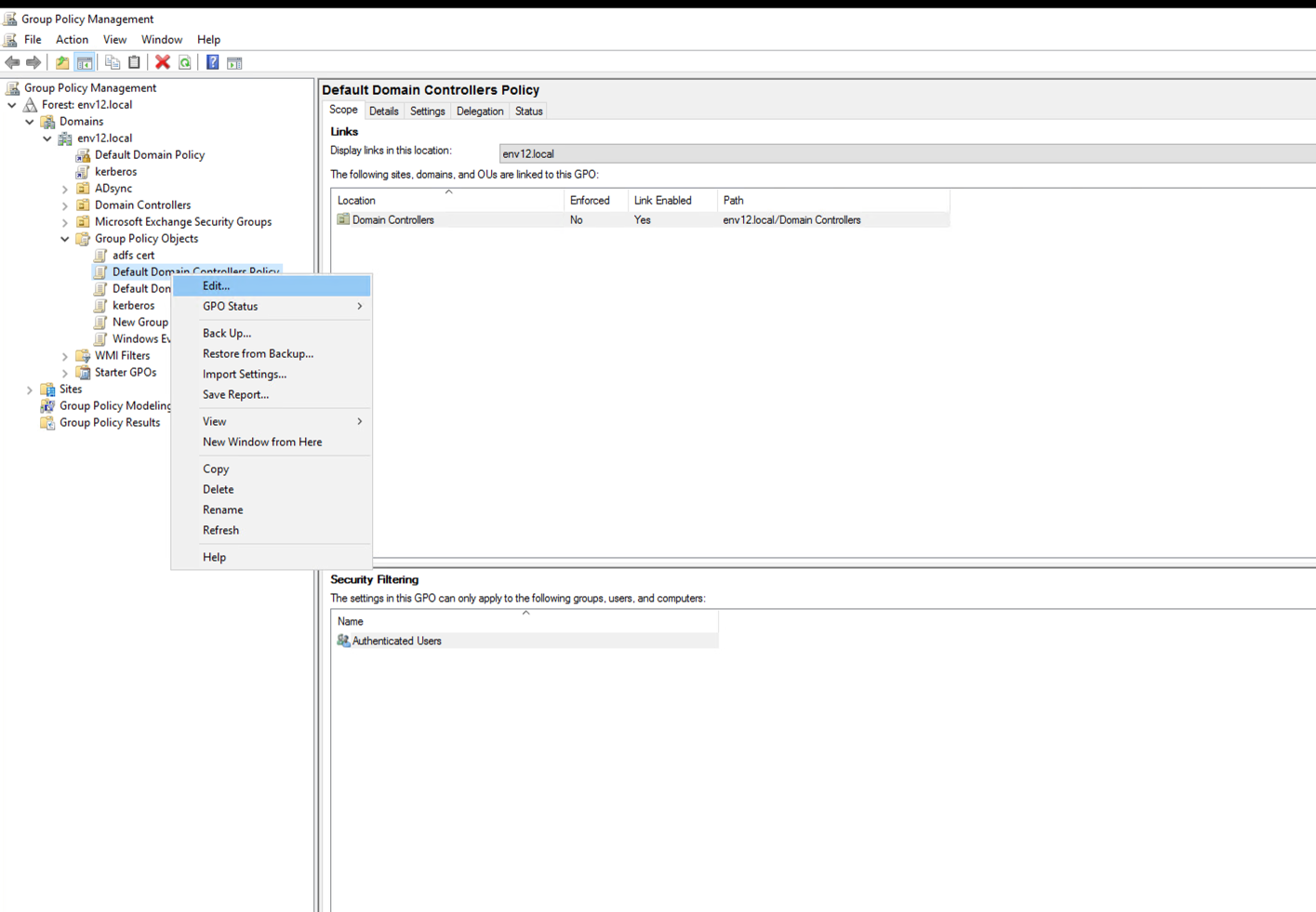
2. In the **Group Policy Management Editor**, navigate to **Computer Configuration** → **Preferences** → **Windows Settings** → **Registry**.
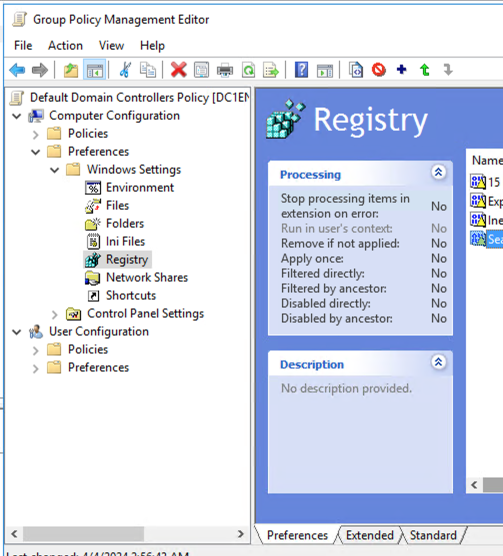
3. Add Registry Items: Right-click on **Registry** and select **New** → **Registry Item**.
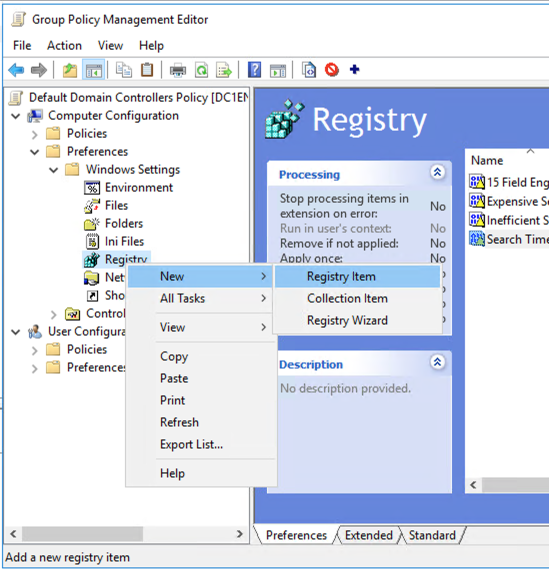
4. Configure Registry Keys: For each of the registry keys you want to set, create a new Registry Item.
### \[HKEY_LOCAL_MACHINE\SYSTEM\CurrentControlSet\Services\NTDS\Diagnostics\]
Create the following Registry item:
15 Field Engineering
* Action: Update
* Hive: HKEY\_LOCAL\_MACHINE
* Key Path: SYSTEM\CurrentControlSet\Services\NTDS\Diagnostics
* Value name: 15 Field Engineering
* Value type: REG\_DWORD
* Value data: 5
| [](https://docs-cortex.paloaltonetworks.com/viewer/attachment/5CAbsl8idaK8R43ZLhoTOw/vEZJTcCs9lKn5Amq5W3xRg-5CAbsl8idaK8R43ZLhoTOw) |
| ----------------------------------------------------------------------------------------------------------------------------------------------------------------------------------------------------------------------------------------------------------------------------------------------------------------------------------------------------- |
### [HKEY_LOCAL_MACHINE\SYSTEM\CurrentControlSet\Services\NTDS\Parameters]
Create the following Registry items:
Expensive Search Results Threshold
* Action: Update
* Hive: HKEY\_LOCAL\_MACHINE
* Key Path: SYSTEM\CurrentControlSet\Services\NTDS\Parameters
* Value name: Expensive Search Results Threshold
* Value type: REG\_DWORD
* Value data: 1
| [](https://docs-cortex.paloaltonetworks.com/viewer/attachment/5CAbsl8idaK8R43ZLhoTOw/2HpxdNC8WZhPpJH2eq4eSg-5CAbsl8idaK8R43ZLhoTOw) |
| ----------------------------------------------------------------------------------------------------------------------------------------------------------------------------------------------------------------------------------------------------------------------------------------------------------------------------------------------------- |
Inefficient Search Results Threshold
* Action: Update
* Hive: HKEY\_LOCAL\_MACHINE
* Key Path: SYSTEM\CurrentControlSet\Services\NTDS\Parameters
* Value name: Inefficient Search Results Threshold
* Value type: REG\_DWORD
* Value data: 1
| [](https://docs-cortex.paloaltonetworks.com/viewer/attachment/5CAbsl8idaK8R43ZLhoTOw/NbalKIbhQXzRh44l6w2tTQ-5CAbsl8idaK8R43ZLhoTOw) |
| ---------------------------------------------------------------------------------------------------------------------------------------------------------------------------------------------------------------------------------------------------------------------------------------------------------------------------------------------------- |
Search Time Threshold (msecs)
* Action: Update
* Hive: HKEY\_LOCAL\_MACHINE
* Key Path: SYSTEM\CurrentControlSet\Services\NTDS\Parameters
* Value name: Search Time Threshold (msecs)
* Value type: REG\_DWORD
* Value data: 1
| [](https://docs-cortex.paloaltonetworks.com/viewer/attachment/5CAbsl8idaK8R43ZLhoTOw/K7YtRnvJDve3NnJv4HSaKg-5CAbsl8idaK8R43ZLhoTOw) |
| ----------------------------------------------------------------------------------------------------------------------------------------------------------------------------------------------------------------------------------------------------------------------------------------------------------------------------------------------------- |
4. Close the Group Policy Management Editor.
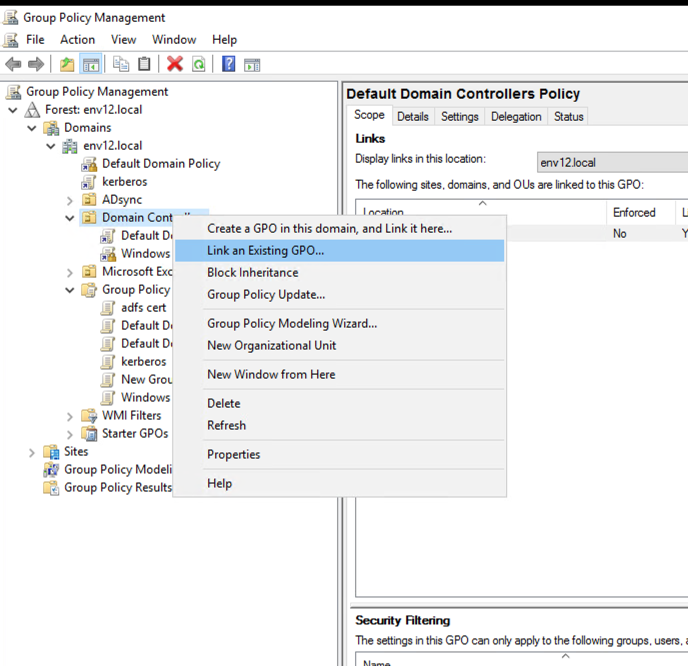
5. To link the GPO to the OU where your domain controllers reside, in Group Policy Management, right-click the OU, select Link an Existing GPO, then select the GPO you just created.\
6. Force Group Policy Update: Force a Group Policy update using the `gpupdate /force` command on each domain controller or by restarting them.