Cortex Xpanse by Palo Alto Networks (Deprecated) v1.10.61 Hidden
Deprecated. Use Cortex Xpanse instead.
- Author:
- Cortex XSOAR
- Support:
- xsoar
Incident fields (28)
- Expanse Activity Status
- Expanse Asset
- Expanse Asset Organization Unit
- Expanse Asset Owner
- Expanse Assignee
- Expanse Business Units
- Expanse Category
- Expanse Certificate
- Expanse Cloud Management Status
- Expanse Created
- Expanse Domain
- Expanse Geolocation
- Expanse IP
- Expanse Initial Evidence
- Expanse Issue ID
- Expanse Issue Type
- Expanse Latest Evidence
- Expanse ML Features
- Expanse Modified
- Expanse Port
- Expanse Priority
- Expanse Progress Status
- Expanse Protocol
- Expanse Provider
- Expanse Region
- Expanse Service
- Expanse Shadow IT
- Expanse Tags
Indicator fields (15)
- Expanse Asset Type
- Expanse Business Units
- Expanse Certificate Advertisement Status
- Expanse Date Added
- Expanse Dns Resolution Status
- Expanse Domain
- Expanse First Observed
- Expanse Last Observed
- Expanse Properties
- Expanse Provider Name
- Expanse Service Status
- Expanse Source Domain
- Expanse Tags
- Expanse Tenant Name
- Expanse Type
Integrations (2)
- ExpanseV2 Deprecated
- FeedExpanse Deprecated
Playbooks (11)
- Expanse Attribution Deprecated
- Expanse Enrich Cloud Assets Deprecated
- Expanse Find Cloud IP Address Region and Service Deprecated
- Expanse Load-Create List Deprecated
- Expanse Unmanaged Cloud Deprecated
- Expanse VM Enrich Deprecated
- Extract and Enrich Expanse Indicators Deprecated
- Handle Expanse Incident Deprecated
- Handle Expanse Incident - Attribution Only Deprecated
- NSA - 5 Security Vulnerabilities Under Active Nation-State Attack Deprecated
- Xpanse Incident Handling - Generic Deprecated
Scripts (10)
- ExpanseAggregateAttributionCI Deprecated
- ExpanseAggregateAttributionDevice Deprecated
- ExpanseAggregateAttributionIP Deprecated
- ExpanseAggregateAttributionUser Deprecated
- ExpanseEnrichAttribution Deprecated
- ExpanseEvidenceDynamicSection Deprecated
- ExpanseGenerateIssueMapWidgetScript Deprecated
- ExpansePrintSuggestions Deprecated
- ExpanseRefreshIssueAssets Deprecated
- MatchIPinCIDRIndicators Deprecated
README
Note: This Pack, is intended for use with Cortex Xpanse Expander v1, for customers utilizing Expander 2.X (i.e. Active ASM) with Cortex XSOAR, please utilize the Cortex Xpanse pack.
The Cortex Xpanse pack for Cortex XSOAR provides full coverage of the Cortex Xpanse Expander v1 product and allows SOCs to automate the defense of their company’s attack surface. The integrations included in the pack enable fetching and mirroring of Cortex Xpanse Issues into Cortex XSOAR incidents, and ingestion of indicators (IPs, domains, and certificates) referring to the corporate network perimeter as discovered by Cortex Xpanse, a Palo Alto Networks company.
Through a powerful set of playbooks, analysts can correlate the discovered information with data provided from internal security systems (Palo Alto Networks Cortex Data Lake, Prisma Cloud, and Panorama, Active Directory, Splunk SIEM, etc.) to help pinpoint the right owners of assets and automate remediation.
Note: This Pack, as well as its previously named Expanse v2 Integration, were renamed to Cortex Xpanse. All other content items are still named the same.
What does this pack do?
- Provides the Cortex Xpanse integration (for Cortex Xpanse Expander), which allows XSOAR to collect Xpanse Issues and bi-directionally mirror them. Several commands are available to search, tag, and update issues and assets in Expander. The integration also supports the services API.
- Provides a feed integration named Expanse Expander Feed, which is compatible with the Cortex XSOAR Threat Intel Management capabilities to retrieve and store discovered assets (IPs, IP ranges, domains, certificates) in Cortex XSOAR for analysis and correlation.
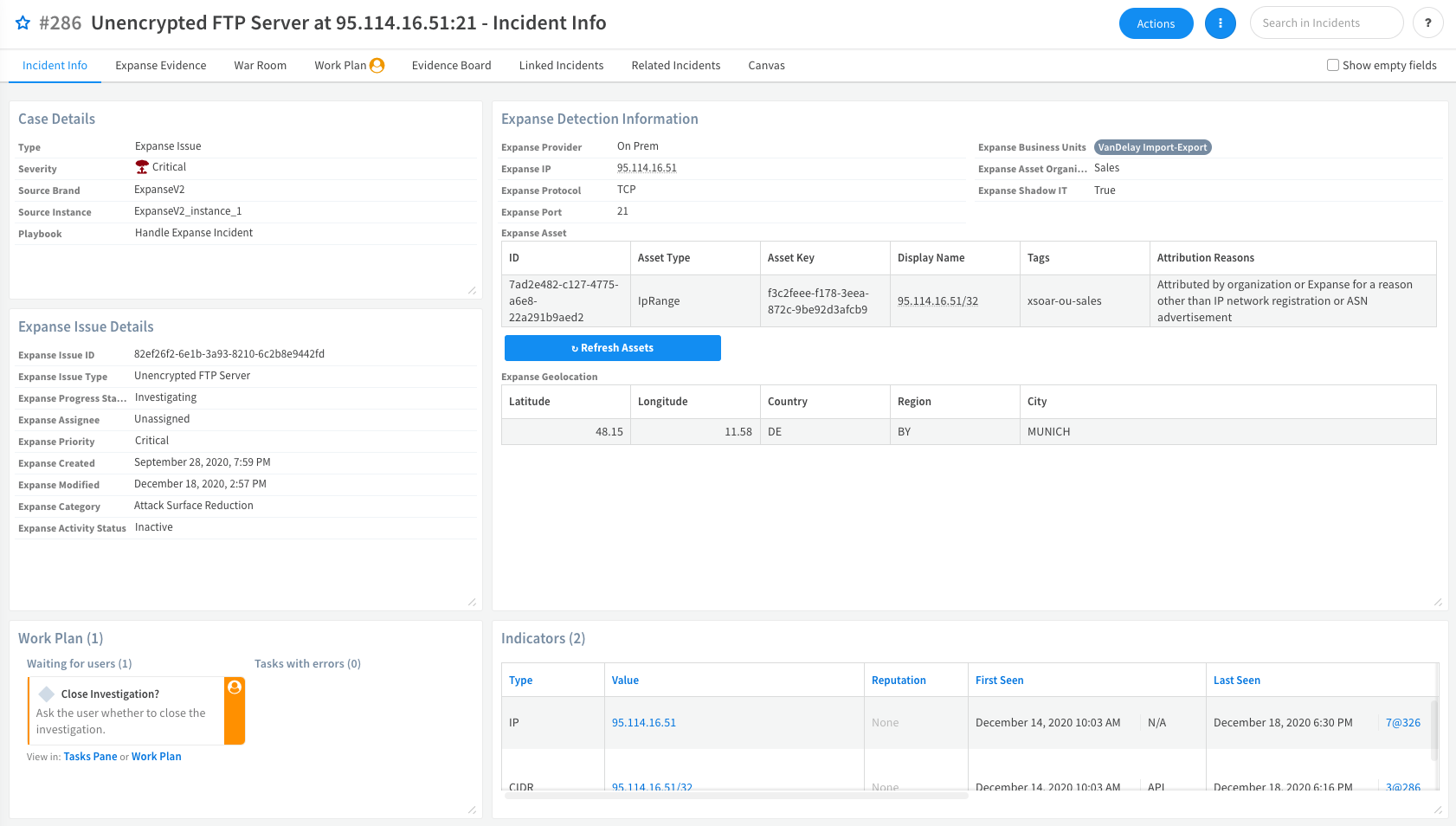
- Provides an Expanse Issue incident type with dedicated fields and layouts.
- Provides a rich set of playbooks and sub-playbooks that handle the investigation and remediation of Xpanse Issues.
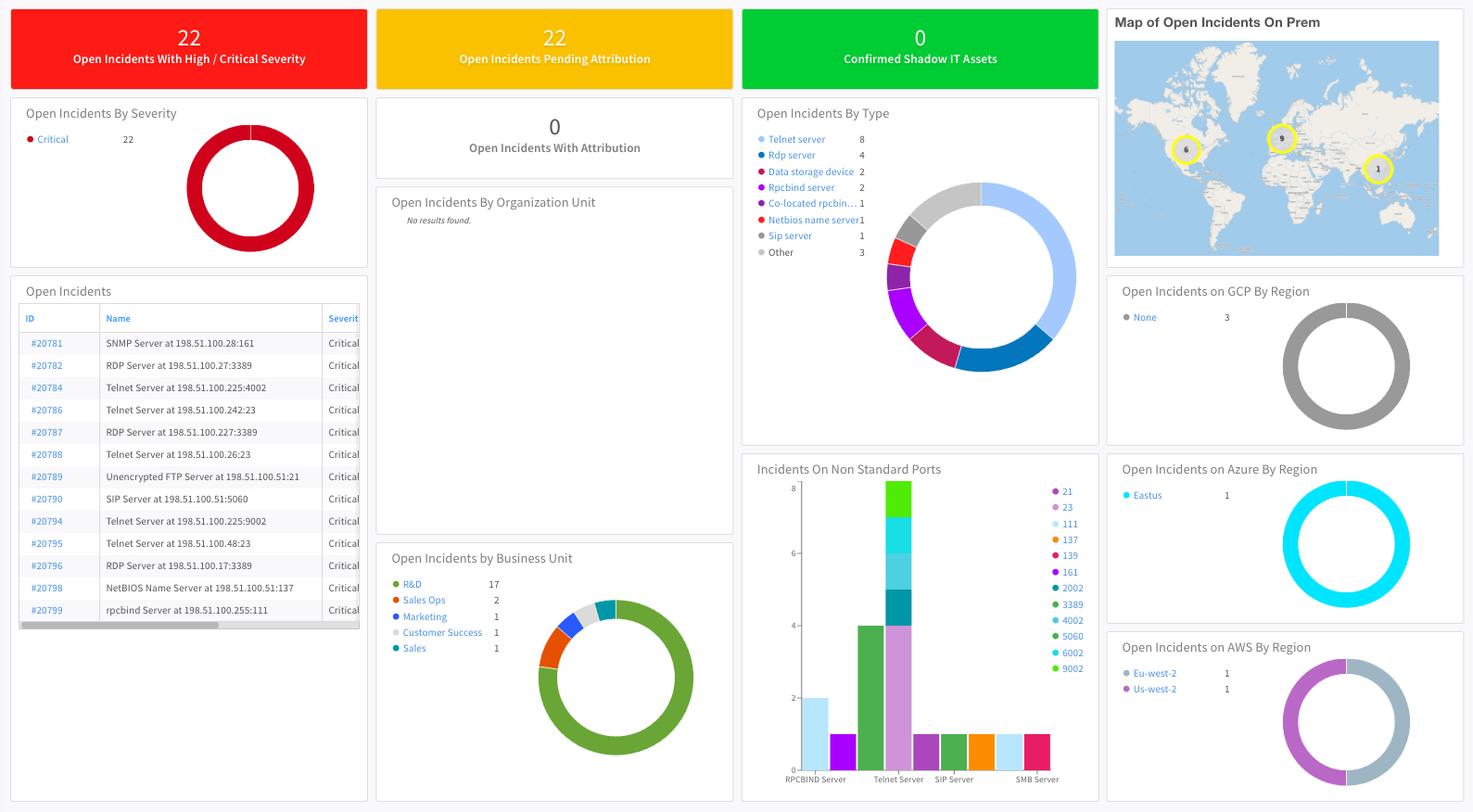
- Provides dashboards that display the network perimeter as discovered by Xpanse and the status of Xpanse Issues.
How to use this pack?
- After the Xpanse API key is added in the Cortex Xpanse integration and the parameters are set, the Xpanse issues will start getting mapped to the Expanse incident type and the Handle Expanse Incident playbook will automatically be launched.
- If you are only interested in enrichment and attribution, you can use the Handle Expanse Incident - Attribution Only playbook instead, by assigning it to the Expanse Issue incident type.
- This pack also includes a generic playbook called Xpanse Incident Handling - Generic. In order to use it, configure the instance without any classifier and choose Xpanse Issue - Generic as the incident type.
Screenshots
-
Expanse Incidents Dashboard: The main dashboard for all the Xpanse incidents.
-
Expanse Incident Layout: The included default layout for Xpanse incidents.
-
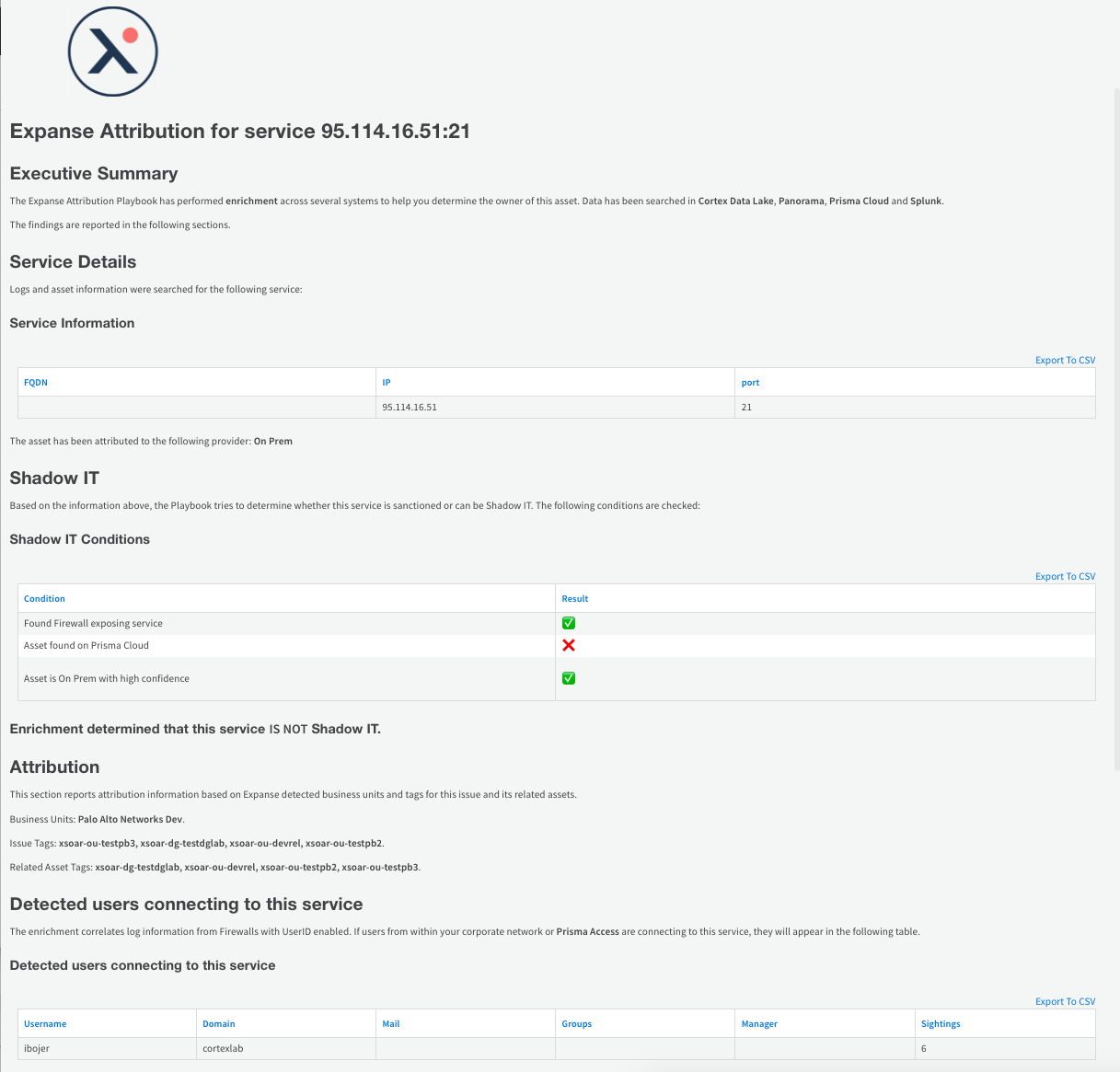
Expanse Attribution Report: The report generated by the main playbook attribution stage after checking multiple log sources and Prisma Cloud environments.
-
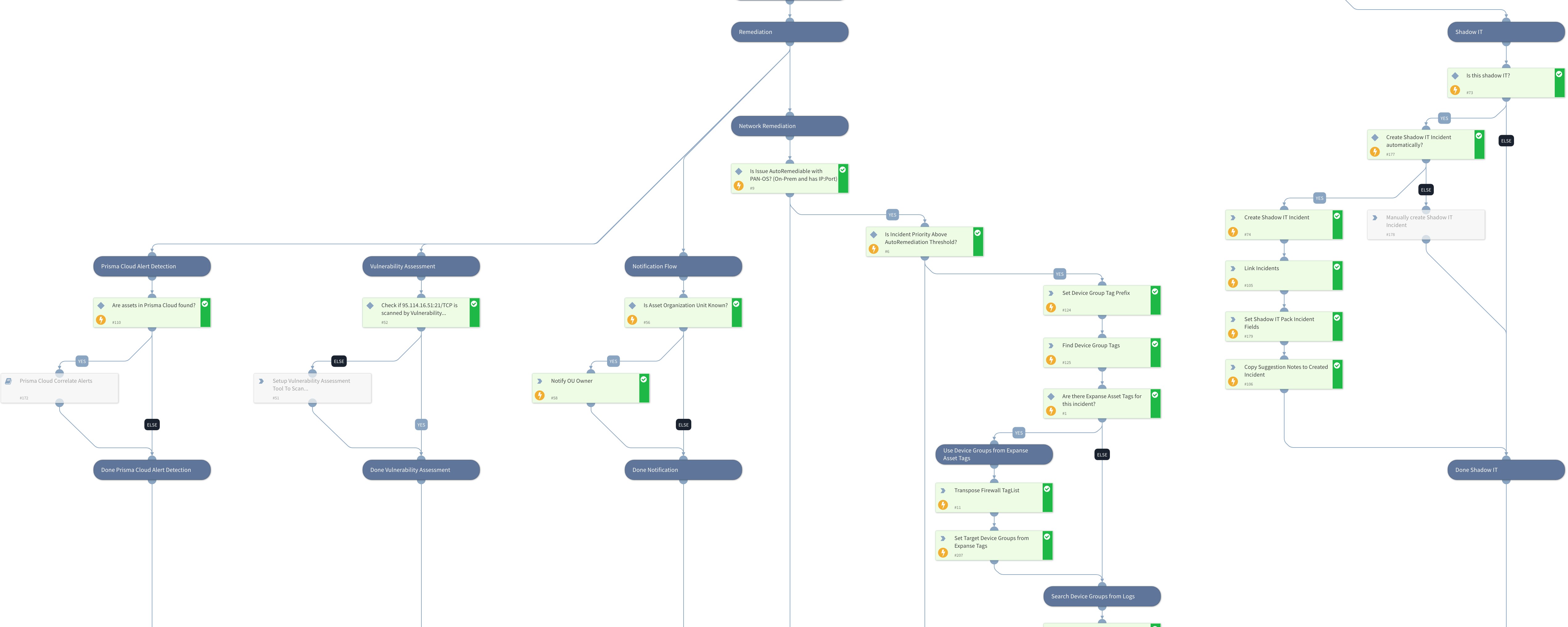
Handle Expanse Incident - Remediation: An excerpt of the remediation stage of the main playbook. Note the different branches handling notifications, automatic network remediation, and follow up Shadow IT investigation if the asset is marked as Shadow IT by the incident assignee.
Video