ManageEngine ADManager Plus v1.0.7
An Active Directory (AD) management and reporting solution that allows IT administrators and technicians to manage AD objects easily and generate instant reports at the click of a button.
Modeling rules (1)
Parsing rules (1)
README
ManageEngine ADManager Plus
This pack includes Cortex XSIAM content.
<~XSIAM>
Configuration on Server Side
Steps to enable Syslog Logging in ADManager Plus:
- Log in to ADManager Plus.
- Go to Admin > Personlize > Integration
- Click the Syslog Server option.
- Enter the details on the Syslog Settings form, including the Syslog Server Name, Port Number and Port Protocol. In addition, select the RFC 5424 Syslog Standard (recommended), and specify the requested data format for your Cortex XSIAM parser.
- Click Save.
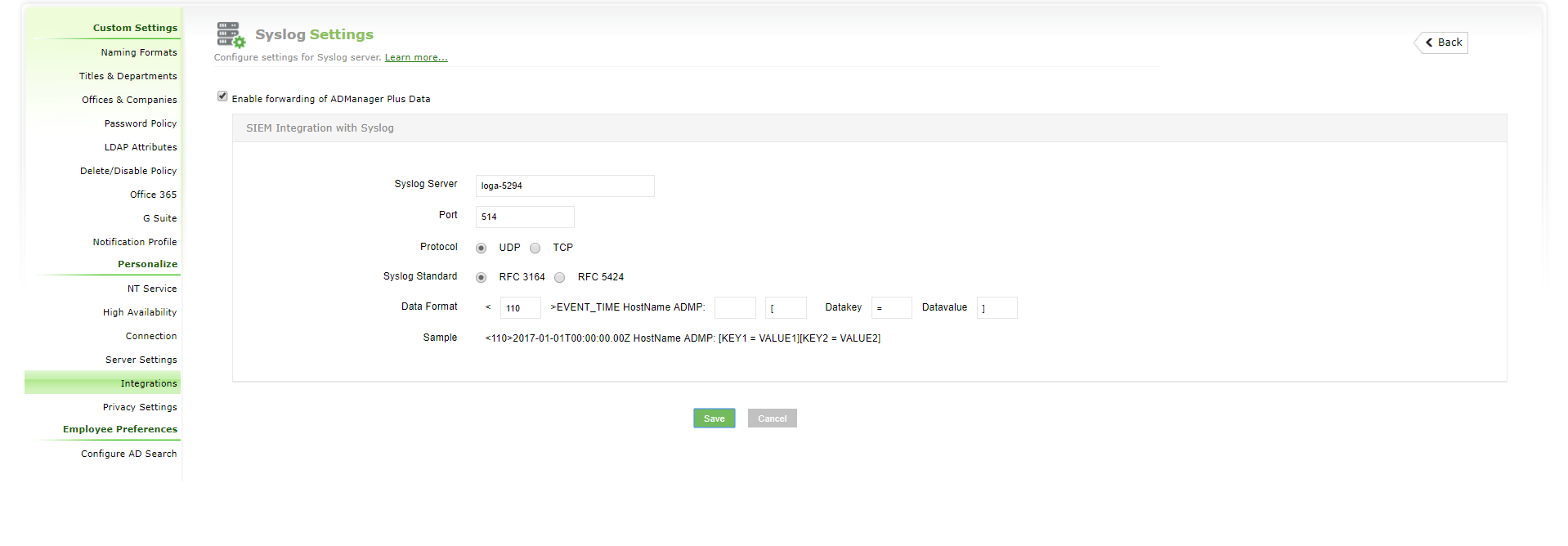
Please note: Although Cortex XSIAM supports both RFC 5424 and RFC 3164 syslog standards, it is highly recommended you choose the more modern RFC 5424 standard over the obsolete RFC 3164. In contrast to the verbose timestamp format defined in RFC 5424, the RFC 3164 timestamp format lacks a timezone, which might cause time-difference issues for machines in different timezones.
More information on a SIEM integration can be found here.
Collect Events from Vendor
In order to use the collector, use the Broker VM option.
Broker VM
To create or configure the Broker VM, use the information described here.
You can configure the specific vendor and product for this instance.
- Navigate to Settings > Configuration > Data Broker > Broker VMs.
- Right-click, and select Syslog Collector > Configure.
- When configuring the Syslog Collector, set the following values:
- vendor as vendor - ManageEngine
- product as product - ADManager
</~XSIAM>