CrowdStrike Falcon Sandbox - Detonate file Deprecated
Deprecated. Use the cs-falcon-sandbox-submit-file command with polling=true instead.
CrowdStrike Falcon Sandbox · 9 tasks · 4 inputs · 14 outputs
Details
| ID | CrowdStrike Falcon Sandbox - Detonate file |
|---|---|
| From Version | 5.0.0 |
| Tasks | 9 |
README
(Deprecated). Use the command cs-falcon-sandbox-submit-file with polling=true instead.
Dependencies
This playbook uses the following sub-playbooks, integrations, and scripts.
Sub-playbooks
- GenericPolling
Integrations
- VxStream
Scripts
- Set
Commands
- crowdstrike-submit-sample
Playbook Inputs
| Name | Description | Default Value | Source | Required |
|---|---|---|---|---|
| File | The file object of the file to detonate. | None | File | Optional |
| EnvironmentID | The environment ID to submit the file to. To get all of the IDs run the crowdstrike -get -environments command. |
100 | - | Optional |
| Interval | How often the polling command should run (in minutes). | 5 | - | Optional |
| Timeout | How much time to wait before a timeout occurs (in minutes). | 30 | - | Optional |
Playbook Outputs
| Path | Description | Type |
|---|---|---|
| File.SHA256 | The SHA256 hash of the file. | string |
| File.Malicious | The file’s malicious description. | unknown |
| File.Type | The file type. For example, “PE”. | string |
| File.Size | The file size. | number |
| File.MD5 | The MD5 hash of the file. | string |
| File.Name | The filename. | string |
| File.SHA1 | The SHA1 hash of the file. | string |
| File | The file object. | unknown |
| File.Malicious.Vendor | The vendor that made the decision that the file is malicious. | string |
| DBotScore | The DBotScore object. | unknown |
| DBotScore.Indicator | The indicator that was tested. | string |
| DBotScore.Type | The type of the indicator. | string |
| DBotScore.Vendor | The vendor used to calculate the score. | string |
| DBotScore.Score | The actual score. | number |
Playbook Image
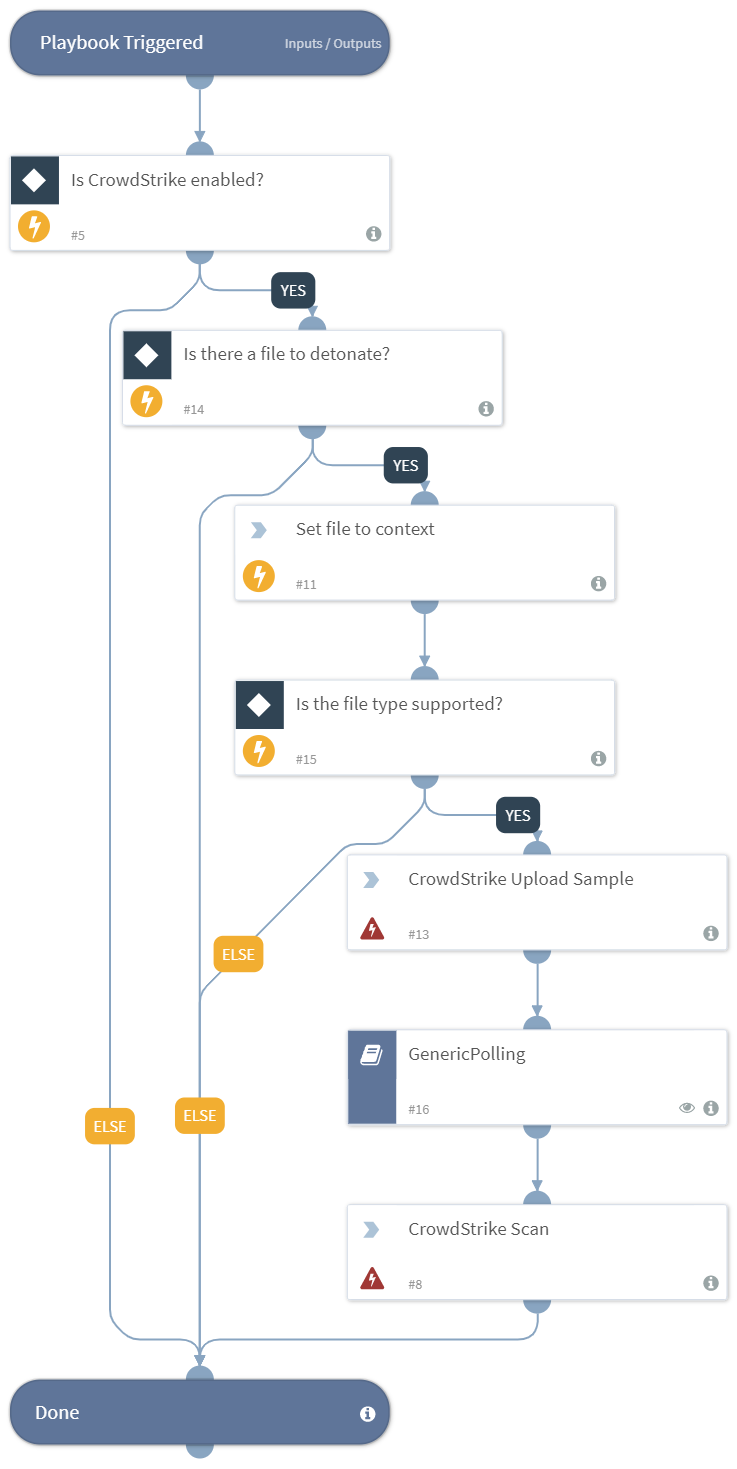
Inputs
File— The file object of the file to detonate.EnvironmentID— The environment ID to submit the file to. To get all IDs run the crowdstrike-get-environments command.Interval— Polling frequency - how often the polling command should run (minutes).Timeout— How much time to wait before a timeout occurs (minutes).
Outputs
File.SHA256— The SHA256 hash of the file.File.Malicious— The file malicious description.File.Type— The file type, for example "PE".File.Size— The file size.File.MD5— The MD5 hash of the file.File.Name— The file name.File.SHA1— The SHA1 hash of the file.File— The file object.File.Malicious.Vendor— The vendor that decided the file was malicious.DBotScore— The DBotScore object.DBotScore.Indicator— The tested indicator.DBotScore.Type— The indicator type.DBotScore.Vendor— The vendor used to calculate the score.DBotScore.Score— The actual score.
Commands used
crowdstrike-scan
crowdstrike-submit-sample
Flowchart
id: CrowdStrike Falcon Sandbox - Detonate file
version: -1
name: CrowdStrike Falcon Sandbox - Detonate file
description: Deprecated. Use the cs-falcon-sandbox-submit-file command with polling=true instead.
fromversion: 5.0.0
starttaskid: "0"
tasks:
  "0":
    id: "0"
    taskid: 29dcbc1e-0bb0-45f1-82ed-eb65b6ce039d
    type: start
    task:
      id: 29dcbc1e-0bb0-45f1-82ed-eb65b6ce039d
      version: -1
      name: ""
      description: ""
      iscommand: false
      brand: ""
    nexttasks:
      '#none#':
      - "5"
    separatecontext: false
    view: |-
      {
        "position": {
          "x": 50,
          "y": 50
        }
      }
    note: false
  "5":
    id: "5"
    taskid: 3e2a6ea9-7f88-4d10-8d29-3ed2d10eba4f
    type: condition
    task:
      id: 3e2a6ea9-7f88-4d10-8d29-3ed2d10eba4f
      version: -1
      name: Is CrowdStrike enabled?
      description: |
        Verify that there is a valid instance of CrowdStrike enabled.
      type: condition
      iscommand: false
      brand: ""
    nexttasks:
      '#default#':
      - "6"
      "yes":
      - "14"
    separatecontext: false
    conditions:
    - label: "yes"
      condition:
      - - operator: isExists
          left:
            value:
              complex:
                root: modules
                filters:
                - - operator: isEqualString
                    left:
                      value:
                        simple: modules.brand
                      iscontext: true
                    right:
                      value:
                        simple: VxStream
                    ignorecase: true
                - - operator: isEqualString
                    left:
                      value:
                        simple: modules.state
                      iscontext: true
                    right:
                      value:
                        simple: active
                    ignorecase: true
                accessor: brand
            iscontext: true
    view: |-
      {
        "position": {
          "x": 50,
          "y": 195
        }
      }
    note: false
  "6":
    id: "6"
    taskid: e6a670a6-eff4-4b16-883b-f08e7d7e7bd3
    type: title
    task:
      id: e6a670a6-eff4-4b16-883b-f08e7d7e7bd3
      version: -1
      name: Done
      description: Done
      type: title
      iscommand: false
      brand: ""
    separatecontext: false
    view: |-
      {
        "position": {
          "x": 50,
          "y": 1420
        }
      }
    note: false
  "8":
    id: "8"
    taskid: 7226fb9e-9b1c-4e40-8823-428a6ef19aaa
    type: regular
    task:
      id: 7226fb9e-9b1c-4e40-8823-428a6ef19aaa
      version: -1
      name: CrowdStrike Scan
      description: Downloads the PDF report to the War Room.
      script: VxStream|||crowdstrike-scan
      type: regular
      iscommand: true
      brand: VxStream
    nexttasks:
      '#none#':
      - "6"
    scriptarguments:
      file:
        complex:
          root: File.SHA256
    separatecontext: false
    view: |-
      {
        "position": {
          "x": 387.5,
          "y": 1245
        }
      }
    note: false
  "11":
    id: "11"
    taskid: 8377ba6f-c57d-4cd1-8a1f-5989f89978ac
    type: regular
    task:
      id: 8377ba6f-c57d-4cd1-8a1f-5989f89978ac
      version: -1
      name: Set file to context
      description: Sets the file object into context.
      scriptName: Set
      type: regular
      iscommand: false
      brand: ""
    nexttasks:
      '#none#':
      - "15"
    scriptarguments:
      append: {}
      key:
        simple: File
      value:
        complex:
          root: inputs.File
    separatecontext: false
    view: |-
      {
        "position": {
          "x": 275,
          "y": 545
        }
      }
    note: false
  "13":
    id: "13"
    taskid: ab929de2-d71d-487e-8200-68a9178aca32
    type: regular
    task:
      id: ab929de2-d71d-487e-8200-68a9178aca32
      version: -1
      name: CrowdStrike Upload Sample
      description: Submits a sample to CrowdStrike.
      script: VxStream|||crowdstrike-submit-sample
      type: regular
      iscommand: true
      brand: VxStream
    nexttasks:
      '#none#':
      - "16"
    scriptarguments:
      entryId:
        complex:
          root: File.EntryID
      environmentID:
        complex:
          root: inputs.EnvironmentID
    separatecontext: false
    view: |-
      {
        "position": {
          "x": 387.5,
          "y": 895
        }
      }
    note: false
  "14":
    id: "14"
    taskid: a15cdef0-f6bd-48e3-8198-3f7c20e668fe
    type: condition
    task:
      id: a15cdef0-f6bd-48e3-8198-3f7c20e668fe
      version: -1
      name: Is there a file to detonate?
      description: Asserts there's a file to detonate.
      type: condition
      iscommand: false
      brand: ""
    nexttasks:
      '#default#':
      - "6"
      "yes":
      - "11"
    separatecontext: false
    conditions:
    - label: "yes"
      condition:
      - - operator: isExists
          left:
            value:
              simple: inputs.File
            iscontext: true
    view: |-
      {
        "position": {
          "x": 162.5,
          "y": 370
        }
      }
    note: false
  "15":
    id: "15"
    taskid: a0565f2c-c720-4196-84d2-21e057c23637
    type: condition
    task:
      id: a0565f2c-c720-4196-84d2-21e057c23637
      version: -1
      name: Is the file type supported?
      description: Asserts the file type is supported.
      type: condition
      iscommand: false
      brand: ""
    nexttasks:
      '#default#':
      - "6"
      "yes":
      - "13"
    separatecontext: false
    conditions:
    - label: "yes"
      condition:
      - - operator: isExists
          left:
            value:
              complex:
                root: File
                filters:
                - - operator: match
                    left:
                      value:
                        simple: File.Type
                      iscontext: true
                    right:
                      value:
                        simple: .*(?:PE32|EXE|DLL|JAR|JS|PDF|DOC|DOCX|RTF|XLS|PPT|PPTX|XML|ZIP|VBN|SEP|XZ|GZ|BZ2|TAR|MHTML|SWF|LNK|URL|MSI|JTD|JTT|JTDC|JTTC|HWP|HWT|HWPX|BAT|HTA|PS1|VBS|WSF|JSE|VBE|CHM)\b
                    ignorecase: true
                  - operator: match
                    left:
                      value:
                        simple: File.Info
                      iscontext: true
                    right:
                      value:
                        simple: .*(?:PE32|EXE|DLL|JAR|JS|PDF|DOC|DOCX|RTF|XLS|PPT|PPTX|XML|ZIP|VBN|SEP|XZ|GZ|BZ2|TAR|MHTML|SWF|LNK|URL|MSI|JTD|JTT|JTDC|JTTC|HWP|HWT|HWPX|BAT|HTA|PS1|VBS|WSF|JSE|VBE|CHM)\b
                    ignorecase: true
                  - operator: match
                    left:
                      value:
                        simple: File.Extension
                      iscontext: true
                    right:
                      value:
                        simple: .*(?:PE32|EXE|DLL|JAR|JS|PDF|DOC|DOCX|RTF|XLS|PPT|PPTX|XML|ZIP|VBN|SEP|XZ|GZ|BZ2|TAR|MHTML|SWF|LNK|URL|MSI|JTD|JTT|JTDC|JTTC|HWP|HWT|HWPX|BAT|HTA|PS1|VBS|WSF|JSE|VBE|CHM)\b
                    ignorecase: true
            iscontext: true
    view: |-
      {
        "position": {
          "x": 275,
          "y": 720
        }
      }
    note: false
  "16":
    id: "16"
    taskid: c6e5c638-5c9e-470c-8f57-7931c2689dba
    type: playbook
    task:
      id: c6e5c638-5c9e-470c-8f57-7931c2689dba
      version: -1
      name: GenericPolling
      description: Initiates the generic polling playbook that will do the polling command.
      playbookName: GenericPolling
      type: playbook
      iscommand: false
      brand: ""
    nexttasks:
      '#none#':
      - "8"
    scriptarguments:
      Ids:
        complex:
          root: File.SHA256
      Interval:
        complex:
          root: inputs.Interval
      PollingCommandArgName:
        simple: file
      PollingCommandName:
        simple: crowdstrike-scan
      Timeout:
        complex:
          root: inputs.Timeout
      dt:
        simple: File(val.state === 'NO_CONTENT').hash
    separatecontext: true
    loop:
      iscommand: false
      exitCondition: ""
      wait: 1
    view: |-
      {
        "position": {
          "x": 387.5,
          "y": 1070
        }
      }
    note: false
view: |-
  {
    "linkLabelsPosition": {
      "15_6_#default#": 0.38
    },
    "paper": {
      "dimensions": {
        "height": 1435,
        "width": 717.5,
        "x": 50,
        "y": 50
      }
    }
  }
inputs:
- key: File
  value:
    complex:
      root: File
  required: false
  description: The file object of the file to detonate.
- key: EnvironmentID
  value:
    simple: "100"
  required: false
  description: The environment ID to submit the file to. To get all IDs run the crowdstrike-get-environments command.
- key: Interval
  value:
    simple: "5"
  required: false
  description: Polling frequency - how often the polling command should run (minutes).
- key: Timeout
  value:
    simple: "30"
  required: false
  description: How much time to wait before a timeout occurs (minutes).
outputs:
- contextPath: File.SHA256
  description: The SHA256 hash of the file.
  type: string
- contextPath: File.Malicious
  description: The file malicious description.
  type: unknown
- contextPath: File.Type
  description: The file type, for example "PE".
  type: string
- contextPath: File.Size
  description: The file size.
  type: number
- contextPath: File.MD5
  description: The MD5 hash of the file.
  type: string
- contextPath: File.Name
  description: The file name.
  type: string
- contextPath: File.SHA1
  description: The SHA1 hash of the file.
  type: string
- contextPath: File
  description: The file object.
  type: unknown
- contextPath: File.Malicious.Vendor
  description: The vendor that decided the file was malicious.
  type: string
- contextPath: DBotScore
  description: The DBotScore object.
  type: unknown
- contextPath: DBotScore.Indicator
  description: The tested indicator.
  type: string
- contextPath: DBotScore.Type
  description: The indicator type.
  type: string
- contextPath: DBotScore.Vendor
  description: The vendor used to calculate the score.
  type: string
- contextPath: DBotScore.Score
  description: The actual score.
  type: number
tests:
- No test - deprecated.
deprecated: true