Block IP - Generic Deprecated Hidden
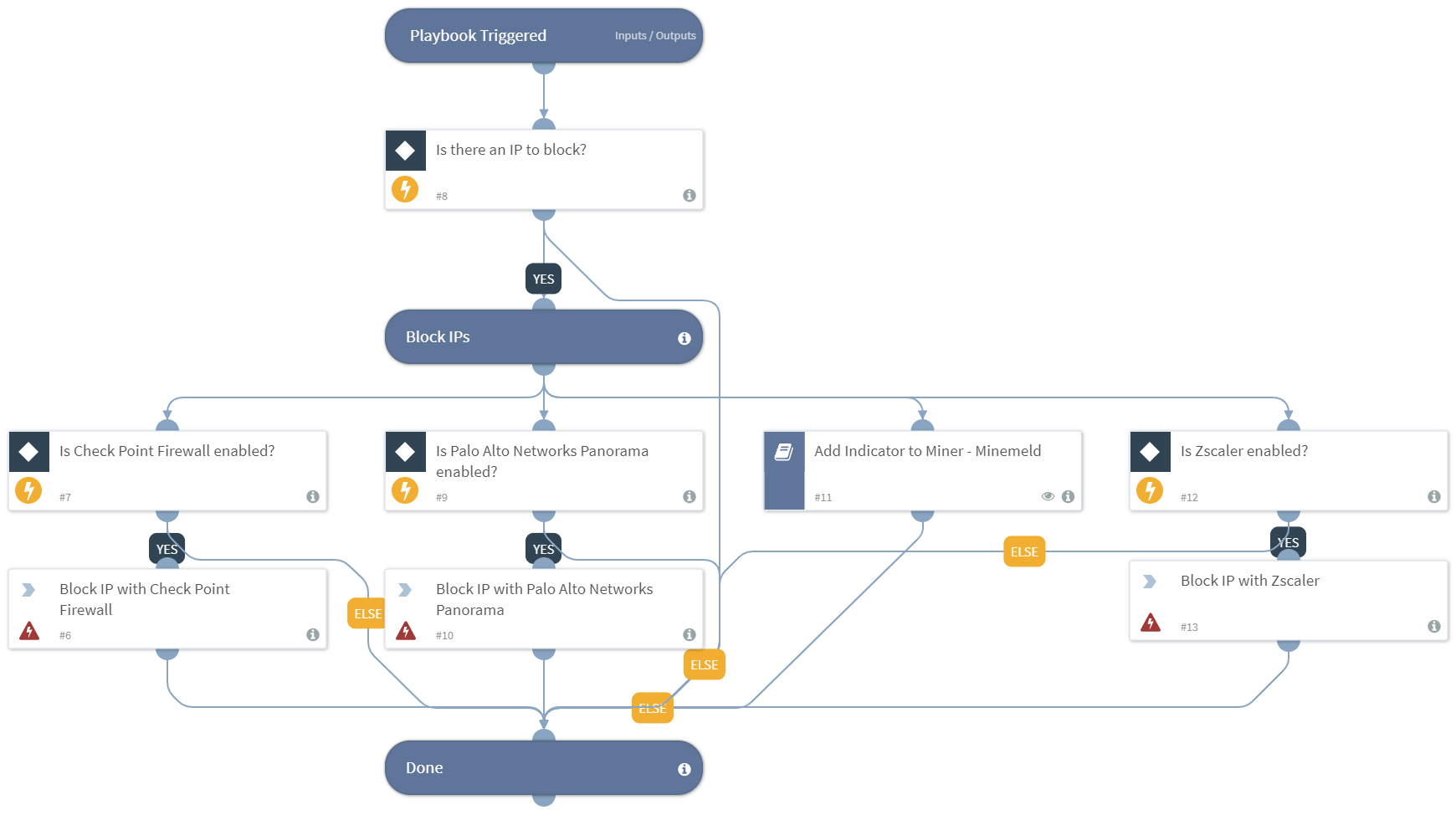
Deprecated. Use "Block IP - Generic v2" playbook instead. This playbook blocks malicious IPs using all integrations that you have enabled. Supported integrations for this playbook: * Check Point Firewall * Palo Alto Networks Minemeld * Palo Alto Networks Panorama * Zscaler
Deprecated Content (Deprecated) · 11 tasks · 2 inputs · 28 outputs
Details
| ID | block_ip_-_generic |
|---|---|
| From Version | 5.0.0 |
| Tasks | 11 |
README
DEPRECATED. Use “Block IP - Generic v2” playbook instead. Blocks malicious IP addresses using all integrations that you have enabled.
Supported integrations for this playbook:
- Check Point Firewall
- Palo Alto Networks Minemeld
- Palo Alto Networks Panorama
- Zscaler
Dependencies
This playbook uses the following sub-playbooks, integrations, and scripts.
Sub-playbooks
- Add Indicator to Miner - Minemeld
Integrations
- Zscaler
Scripts
- PanoramaBlockIP
Commands
- zscaler-blacklist-ip
- checkpoint-block-ip
Playbook Inputs
| Name | Description | Required |
|---|---|---|
| IPBlacklistMiner | The name of the IP address block list Miner in Minemeld. | Optional |
| IP | The array of malicious IP addresses to block. | Optional |
Playbook Outputs
| Path | Description | Type |
|---|---|---|
| CheckpointFWRule.Destination | The collection of network objects identified by the name or UID. How much details are returned depends on the details-level field of the request. This table shows the level of detail shown when details-level is set to standard. | unknown |
| CheckpointFWRule.DestinationNegate | True if negate is set for destination. | unknown |
| PanoramaRule.Direction | The direction of the panorama rule. Can be, “to”,”from”, or “both”. | string |
| PanoramaRule.IP | The IP address the Panorama rule blocks. | string |
| CheckpointFWRule.Name | The object name. This should be unique in the domain. | unknown |
| PanoramaRule.Name | The name of the panorama rule | string |
| CheckpointFWRule.UID | The object unique identifier. | unknown |
| PanoramaRule | The list of panorama rules. | unknown |
| CheckpointFWRule.Type | The type of the object. | unknown |
| CheckpointFWRule.Action | The Accept, Drop, Apply Layer, Ask, Info. How much details are returned depends on the details-level field of the request. This table shows the level of detail shown when details-level is set to standard. | unknown |
| CheckpointFWRule.ActionSetting | The action settings. | unknown |
| CheckpointFWRule.CustomFields | The custom fields. | unknown |
| CheckpointFWRule.Data | How many details are returned depends on the details-level field of the request. This table shows the level of detail shown when details-level is set to standard. | unknown |
| CheckpointFWRule.DataDirection | Which direction the file types processing is applied to. | unknown |
| CheckpointFWRule.DataNegate | True if negate is set for data. | unknown |
| CheckpointFWRule.Domain | The information about the domain the object belongs to. | unknown |
| CheckpointFWRule.Enabled | Whether to enable or disable the rule. | unknown |
| CheckpointFWRule.Hits | The hits count object. | unknown |
| CheckpointFWRule.Data.Name | The object name. Should be unique in domain. | unknown |
| CheckpointFWRule.Data.Domain | The information about the domain the object belongs to. | unknown |
| CheckpointFWRule.Domain.Name | The object name. This should be unique in the domain. | unknown |
| CheckpointFWRule.Domain.UID | The objects unique identifier. | unknown |
| CheckpointFWRule.Domain.Type | The domain type. | unknown |
| CheckpointFWRule.Hits.FirstDate | The first of hits. | unknown |
| CheckpointFWRule.Hits.LastDate | The last date of hits. | unknown |
| CheckpointFWRule.Hits.Level | The level of hits. | unknown |
| CheckpointFWRule.Hits.Percentage | The percentage of hits | unknown |
| CheckpointFWRule.Hits.Value | The value of hits. | unknown |
Playbook Image
Inputs
IPBlacklistMiner— The name of the IP block list Miner in Minemeld.IP— Array of malicious IPs to block.
Outputs
CheckpointFWRule.Destination— Collection of Network objects identified by the name or UID. How much details are returned depends on the details-level field of the request. This table shows the level of detail shown when details-level is set to standard.CheckpointFWRule.DestinationNegate— True if negate is set for destination.PanoramaRule.Direction— Direction of the Panorama rule, could be 'to','from', 'both'PanoramaRule.IP— The IP the Panorama rule blocksCheckpointFWRule.Name— Object name. Should be unique in domain.PanoramaRule.Name— Name of the Panorama ruleCheckpointFWRule.UID— Object unique identifier.PanoramaRule— List of Panorama rulesCheckpointFWRule.Type— Type of the object.CheckpointFWRule.Action— Accept, Drop, Apply Layer, Ask, Info. How much details are returned depends on the details-level field of the request. This table shows the level of detail shown when details-level is set to standard.CheckpointFWRule.ActionSetting— Action settings.CheckpointFWRule.CustomFields— Custom fields.CheckpointFWRule.Data— How much details are returned depends on the details-level field of the request. This table shows the level of detail shown when details-level is set to standard.CheckpointFWRule.DataDirection— On which direction the file types processing is applied.CheckpointFWRule.DataNegate— True if negate is set for data.CheckpointFWRule.Domain— Information about the domain the object belongs to.CheckpointFWRule.Enabled— Enable/Disable the rule.CheckpointFWRule.Hits— Hits count object.CheckpointFWRule.Data.Name— Object name. Should be unique in domain.CheckpointFWRule.Data.Domain— Information about the domain the object belongs to.CheckpointFWRule.Domain.Name— Object name. Should be unique in domain.CheckpointFWRule.Domain.UID— Object unique identifier.CheckpointFWRule.Domain.Type— Domain type.CheckpointFWRule.Hits.FirstDate— First of hits.CheckpointFWRule.Hits.LastDate— Last date of hits.CheckpointFWRule.Hits.Level— Level of hits.CheckpointFWRule.Hits.Percentage— Percentage of hitsCheckpointFWRule.Hits.Value— Value of hits.
Commands used
checkpoint-block-ip
zscaler-blacklist-ip
Flowchart
id: block_ip_-_generic
version: -1
name: Block IP - Generic
fromversion: 5.0.0
description: |-
  Deprecated. Use "Block IP - Generic v2" playbook instead. This playbook blocks malicious IPs using all integrations that you have enabled.

  Supported integrations for this playbook:
  * Check Point Firewall
  * Palo Alto Networks Minemeld
  * Palo Alto Networks Panorama
  * Zscaler
starttaskid: "0"
hidden: true
tasks:
  "0":
    id: "0"
    taskid: b95110b7-ba18-42a5-87ad-c5d37915401c
    type: start
    task:
      id: b95110b7-ba18-42a5-87ad-c5d37915401c
      version: -1
      name: ""
      description: ""
      iscommand: false
      brand: ""
    nexttasks:
      '#none#':
      - "8"
    separatecontext: false
    view: |-
      {
        "position": {
          "x": 500,
          "y": 10
        }
      }
    note: false
    timertriggers: []
    ignoreworker: false
  "2":
    id: "2"
    taskid: 1808d949-f921-4957-8796-7bbedd822ad9
    type: title
    task:
      id: 1808d949-f921-4957-8796-7bbedd822ad9
      version: -1
      name: Done
      description: ""
      type: title
      iscommand: false
      brand: ""
    separatecontext: false
    view: |-
      {
        "position": {
          "x": 500,
          "y": 885
        }
      }
    note: false
    timertriggers: []
    ignoreworker: false
  "5":
    id: "5"
    taskid: cea4b9a9-d2a5-42c6-84e7-7eab6d6ab7a8
    type: title
    task:
      id: cea4b9a9-d2a5-42c6-84e7-7eab6d6ab7a8
      version: -1
      name: Block IPs
      description: ""
      type: title
      iscommand: false
      brand: ""
    nexttasks:
      '#none#':
      - "7"
      - "9"
      - "11"
      - "12"
    separatecontext: false
    view: |-
      {
        "position": {
          "x": 500,
          "y": 370
        }
      }
    note: false
    timertriggers: []
    ignoreworker: false
  "6":
    id: "6"
    taskid: 077714b6-f53e-4ab4-8679-d2c172e67a59
    type: regular
    task:
      id: 077714b6-f53e-4ab4-8679-d2c172e67a59
      version: -1
      name: Block IP with Check Point Firewall
      description: Block the IPs using Check Point Firewall.
      script: '|||checkpoint-block-ip'
      type: regular
      iscommand: true
      brand: ""
    nexttasks:
      '#none#':
      - "2"
    scriptarguments:
      direction:
        simple: both
      ip:
        complex:
          root: inputs.IP
      ipname:
        simple: IP-${inputs.IP}
      rulename:
        simple: Block-${inputs.IP}
    separatecontext: false
    view: |-
      {
        "position": {
          "x": 50,
          "y": 680
        }
      }
    note: false
    timertriggers: []
    ignoreworker: false
  "7":
    id: "7"
    taskid: cc26e2d3-b22c-4e90-819e-5a1dc485c2db
    type: condition
    task:
      id: cc26e2d3-b22c-4e90-819e-5a1dc485c2db
      version: -1
      name: Is Check Point Firewall enabled?
      description: Verify that there is a valid instance of Check Point Firewall enabled.
      type: condition
      iscommand: false
      brand: ""
    nexttasks:
      '#default#':
      - "2"
      "yes":
      - "6"
    separatecontext: false
    conditions:
    - label: "yes"
      condition:
      - - operator: isExists
          left:
            value:
              complex:
                root: modules
                filters:
                - - operator: isEqualString
                    left:
                      value:
                        simple: modules.brand
                      iscontext: true
                    right:
                      value:
                        simple: Check Point
                    ignorecase: true
                - - operator: isEqualString
                    left:
                      value:
                        simple: modules.state
                      iscontext: true
                    right:
                      value:
                        simple: Active
                    ignorecase: true
                accessor: brand
            iscontext: true
          ignorecase: true
    view: |-
      {
        "position": {
          "x": 50,
          "y": 515
        }
      }
    note: false
    timertriggers: []
    ignoreworker: false
  "8":
    id: "8"
    taskid: 3f8eeba3-99f9-484c-8f73-a0c6d9bd02bb
    type: condition
    task:
      id: 3f8eeba3-99f9-484c-8f73-a0c6d9bd02bb
      version: -1
      name: Is there an IP to block?
      description: Verify that the playbook input includes at least one IP to block.
      type: condition
      iscommand: false
      brand: ""
    nexttasks:
      '#default#':
      - "2"
      "yes":
      - "5"
    separatecontext: false
    conditions:
    - label: "yes"
      condition:
      - - operator: isExists
          left:
            value:
              simple: inputs.IP
            iscontext: true
    view: |-
      {
        "position": {
          "x": 500,
          "y": 155
        }
      }
    note: false
    timertriggers: []
    ignoreworker: false
  "9":
    id: "9"
    taskid: bebb5a4e-9e67-4334-86e2-4cf1064abc72
    type: condition
    task:
      id: bebb5a4e-9e67-4334-86e2-4cf1064abc72
      version: -1
      name: Is Palo Alto Networks Panorama enabled?
      description: Verify that there is a valid instance of Palo Alto Networks Panorama enabled.
      type: condition
      iscommand: false
      brand: ""
    nexttasks:
      '#default#':
      - "2"
      "yes":
      - "10"
    separatecontext: false
    conditions:
    - label: "yes"
      condition:
      - - operator: isExists
          left:
            value:
              complex:
                root: modules
                filters:
                - - operator: isEqualString
                    left:
                      value:
                        simple: modules.brand
                      iscontext: true
                    right:
                      value:
                        simple: Panorama
                    ignorecase: true
                - - operator: isEqualString
                    left:
                      value:
                        simple: modules.state
                      iscontext: true
                    right:
                      value:
                        simple: active
                    ignorecase: true
                accessor: brand
            iscontext: true
          ignorecase: true
    view: |-
      {
        "position": {
          "x": 500,
          "y": 515
        }
      }
    note: false
    timertriggers: []
    ignoreworker: false
  "10":
    id: "10"
    taskid: 7e800325-00ed-4c5a-8838-a40f28680299
    type: regular
    task:
      id: 7e800325-00ed-4c5a-8838-a40f28680299
      version: -1
      name: Block IP with Palo Alto Networks Panorama
      description: Block the IPs using Palo Alto Networks Panorama.
      scriptName: PanoramaBlockIP
      type: regular
      iscommand: false
      brand: ""
    nexttasks:
      '#none#':
      - "2"
    scriptarguments:
      direction:
        simple: both
      ip:
        complex:
          root: inputs.IP
      rulename:
        simple: Block-${inputs.IP}
    separatecontext: false
    view: |-
      {
        "position": {
          "x": 500,
          "y": 680
        }
      }
    note: false
    timertriggers: []
    ignoreworker: false
  "11":
    id: "11"
    taskid: dbee1e60-454a-4043-8676-7f5bb3006b00
    type: playbook
    task:
      id: dbee1e60-454a-4043-8676-7f5bb3006b00
      version: -1
      name: Add Indicator to Miner - Minemeld
      description: ""
      playbookName: Add Indicator to Miner - Palo Alto MineMeld
      type: playbook
      iscommand: false
      brand: ""
    nexttasks:
      '#none#':
      - "2"
    scriptarguments:
      Indicator:
        complex:
          root: inputs.IP
      MinerName:
        complex:
          root: inputs.IPBlacklistMiner
    separatecontext: true
    loop:
      iscommand: false
      exitCondition: ""
      wait: 1
    view: |-
      {
        "position": {
          "x": 952.5,
          "y": 515
        }
      }
    note: false
    timertriggers: []
    ignoreworker: false
  "12":
    id: "12"
    taskid: 43617e2e-a00d-4569-8d43-80b6e732798e
    type: condition
    task:
      id: 43617e2e-a00d-4569-8d43-80b6e732798e
      version: -1
      name: Is Zscaler enabled?
      description: Verify that there is a valid instance of Zscaler enabled.
      type: condition
      iscommand: false
      brand: ""
    nexttasks:
      '#default#':
      - "2"
      "yes":
      - "13"
    separatecontext: false
    conditions:
    - label: "yes"
      condition:
      - - operator: isExists
          left:
            value:
              complex:
                root: modules
                filters:
                - - operator: isEqualString
                    left:
                      value:
                        simple: modules.brand
                      iscontext: true
                    right:
                      value:
                        simple: Zscaler
                    ignorecase: true
                - - operator: isEqualString
                    left:
                      value:
                        simple: modules.state
                      iscontext: true
                    right:
                      value:
                        simple: active
                    ignorecase: true
                accessor: brand
            iscontext: true
          ignorecase: true
    view: |-
      {
        "position": {
          "x": 1390,
          "y": 515
        }
      }
    note: false
    timertriggers: []
    ignoreworker: false
  "13":
    id: "13"
    taskid: 6c6d1f99-8689-49d7-8c7c-f9ddcdd2a782
    type: regular
    task:
      id: 6c6d1f99-8689-49d7-8c7c-f9ddcdd2a782
      version: -1
      name: Block IP with Zscaler
      description: Block the IPs using Zscaler.
      script: Zscaler|||zscaler-blacklist-ip
      type: regular
      iscommand: true
      brand: Zscaler
    nexttasks:
      '#none#':
      - "2"
    scriptarguments:
      ip:
        complex:
          root: inputs.IP
    separatecontext: false
    view: |-
      {
        "position": {
          "x": 1390,
          "y": 670
        }
      }
    note: false
    timertriggers: []
    ignoreworker: false
view: |-
  {
    "linkLabelsPosition": {
      "12_2_#default#": 0.32,
      "7_2_#default#": 0.51
    },
    "paper": {
      "dimensions": {
        "height": 940,
        "width": 1720,
        "x": 50,
        "y": 10
      }
    }
  }
inputs:
- key: IPBlacklistMiner
  value: {}
  required: false
  description: The name of the IP block list Miner in  Minemeld.
- key: IP
  value: {}
  required: false
  description: Array of malicious IPs to block.
outputs:
- contextPath: CheckpointFWRule.Destination
  description: Collection of Network objects identified by the name or UID. How much details are returned depends on the details-level field of the request. This table shows the level of detail shown when details-level is set to standard.
- contextPath: CheckpointFWRule.DestinationNegate
  description: True if negate is set for destination.
- contextPath: PanoramaRule.Direction
  description: Direction of the Panorama rule, could be 'to','from', 'both'
  type: string
- contextPath: PanoramaRule.IP
  description: The IP the Panorama rule blocks
  type: string
- contextPath: CheckpointFWRule.Name
  description: Object name. Should be unique in domain.
- contextPath: PanoramaRule.Name
  description: Name of the Panorama rule
  type: string
- contextPath: CheckpointFWRule.UID
  description: Object unique identifier.
- contextPath: PanoramaRule
  description: List of Panorama rules
- contextPath: CheckpointFWRule.Type
  description: Type of the object.
- contextPath: CheckpointFWRule.Action
  description: Accept, Drop, Apply Layer, Ask, Info. How much details are returned depends on the details-level field of the request. This table shows the level of detail shown when details-level is set to standard.
- contextPath: CheckpointFWRule.ActionSetting
  description: Action settings.
- contextPath: CheckpointFWRule.CustomFields
  description: Custom fields.
- contextPath: CheckpointFWRule.Data
  description: How much details are returned depends on the details-level field of the request. This table shows the level of detail shown when details-level is set to standard.
- contextPath: CheckpointFWRule.DataDirection
  description: On which direction the file types processing is applied.
- contextPath: CheckpointFWRule.DataNegate
  description: True if negate is set for data.
- contextPath: CheckpointFWRule.Domain
  description: Information about the domain the object belongs to.
- contextPath: CheckpointFWRule.Enabled
  description: Enable/Disable the rule.
- contextPath: CheckpointFWRule.Hits
  description: Hits count object.
- contextPath: CheckpointFWRule.Data.Name
  description: Object name. Should be unique in domain.
- contextPath: CheckpointFWRule.Data.Domain
  description: Information about the domain the object belongs to.
- contextPath: CheckpointFWRule.Domain.Name
  description: Object name. Should be unique in domain.
- contextPath: CheckpointFWRule.Domain.UID
  description: Object unique identifier.
- contextPath: CheckpointFWRule.Domain.Type
  description: Domain type.
- contextPath: CheckpointFWRule.Hits.FirstDate
  description: First of hits.
- contextPath: CheckpointFWRule.Hits.LastDate
  description: Last date of hits.
- contextPath: CheckpointFWRule.Hits.Level
  description: Level of hits.
- contextPath: CheckpointFWRule.Hits.Percentage
  description: Percentage of hits
- contextPath: CheckpointFWRule.Hits.Value
  description: Value of hits.
tests:
- No test - Deprecated playbook
deprecated: true