Detonate URL - ThreatGrid Deprecated
Deprecated. Use Detonate URL - ThreatGrid v2 instead.
Cisco Secure Malware Analytics · 7 tasks · 9 inputs · 16 outputs
Details
| ID | detonate_url_-_threatgrid |
|---|---|
| From Version | 5.0.0 |
| Tasks | 7 |
README
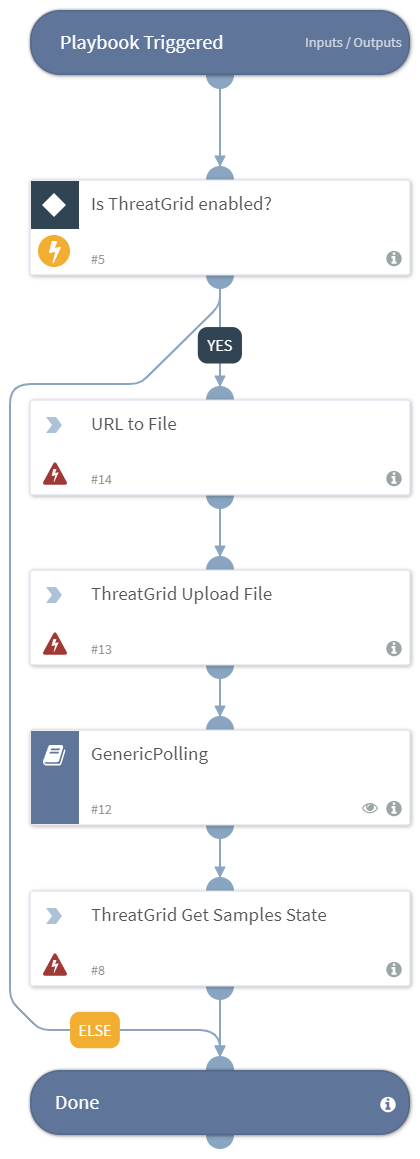
Detonates one or more URLs using the ThreatGrid integration. This playbook returns relevant reports to the War Room and URL reputations to the context data.
Dependencies
This playbook uses the following sub-playbooks, integrations, and scripts.
Sub-playbooks
- GenericPolling
Integrations
- Threat Grid
Scripts
This playbook does not use any scripts.
Commands
- threat-grid-url-to-file
- threat-grid-get-samples-state
- threat-grid-upload-sample
Playbook Inputs
| Name | Description | Default Value | Source | Required |
|---|---|---|---|---|
| URL | The URL of the sites to detonate. | Data | URL | Optional |
| FileName | The name of the file to detonate. | file-detonated-via-demisto | - | Optional |
| VM | The VM to use (string). | - | - | Optional |
| Playbook | The name of the Threat Grid playbook to apply to this sample run. | default | - | Optional |
| Private | The sample is marked private if this is present. If it is set to any other value then it will not be private. | - | - | Optional |
| Source | The string used for identifying the source of the detonation (user defined). | - | - | Optional |
| Tags | A comma-separated list of tags applied to the sample. | - | - | Optional |
| Interval | The polling frequency. How often the polling command should run (in minutes). | 1 | - | Optional |
| Timeout | How much time to wait before a timeout occurs (in minutes). | 15 | - | Optional |
Playbook Outputs
| Path | Description | Type |
|---|---|---|
| File.SHA256 | The SHA256 hash of the file. | string |
| File.Malicious | The File malicious description | unknown |
| File.Type | The file type. For example, “PE”. | string |
| File.Size | THe file size. | number |
| File.MD5 | The MD5 hash of the file. | string |
| File.Name | The filename. | string |
| File.SHA1 | The SHA1 hash of the file. | string |
| File | The file object. | unknown |
| File.Malicious.Vendor | The vendor that made the decision that the file is malicious. | string |
| DBotScore | The DBotScore object. | unknown |
| DBotScore.Indicator | The indicator that was tested. | string |
| DBotScore.Type | The type of the indicator. | string |
| DBotScore.Vendor | The vendor used to calculate the score. | string |
| DBotScore.Score | The actual score. | number |
| Sample.State | The sample state. | unknown |
| Sample.ID | The sample ID. | unknown |
Playbook Image
Inputs
URL— URL of the sites to detonate.FileName— Name of the file to detonate.VM— The VM to use (string)Playbook— Name of the Threat Grid playbook to apply to this sample runPrivate— The sample is marked private if this is present, and set to any value other than false. privateSource— a string used for identifying the source of the detonation (user defined)Tags— A comma-separated list of tags applied to the sample.Interval— Polling frequency - how often the polling command should run (minutes)Timeout— How much time to wait before a timeout occurs (minutes)
Outputs
File.SHA256— SHA256 hash of the fileFile.Malicious— The File malicious descriptionFile.Type— File type e.g. "PE"File.Size— File sizeFile.MD5— MD5 hash of the fileFile.Name— FilenameFile.SHA1— SHA1 hash of the fileFile— The File objectFile.Malicious.Vendor— For malicious files, the vendor that made the decisionDBotScore— The DBotScore objectDBotScore.Indicator— The indicator we testedDBotScore.Type— The type of the indicatorDBotScore.Vendor— Vendor used to calculate the scoreDBotScore.Score— The actual scoreThreatGrid.Sample.State— The sample stateThreatGrid.Sample.ID— The sample ID
Commands used
threat-grid-get-samples-state
threat-grid-upload-sample
threat-grid-url-to-file
Flowchart
id: detonate_url_-_threatgrid
version: -1
name: Detonate URL - ThreatGrid
description: Deprecated. Use Detonate URL - ThreatGrid v2 instead.
starttaskid: "0"
deprecated: true
fromversion: "5.0.0"
tasks:
  "0":
    id: "0"
    taskid: 29dcbc1e-0bb0-45f1-82ed-eb65b6ce039d
    type: start
    task:
      id: 29dcbc1e-0bb0-45f1-82ed-eb65b6ce039d
      version: -1
      name: ""
      iscommand: false
      brand: ""
      description: ""
    nexttasks:
      '#none#':
      - "5"
    separatecontext: false
    view: |-
      {
        "position": {
          "x": 140,
          "y": 220
        }
      }
    note: false
  "5":
    id: "5"
    taskid: cacefc85-644c-48de-8ff3-545308a282eb
    type: condition
    task:
      id: cacefc85-644c-48de-8ff3-545308a282eb
      version: -1
      name: Is ThreatGrid enabled?
      description: |
        Verify that there is a valid instance of Threat Grid enabled.
      type: condition
      iscommand: false
      brand: ""
    nexttasks:
      '#default#':
      - "6"
      "yes":
      - "14"
    separatecontext: false
    conditions:
    - label: "yes"
      condition:
      - - operator: isExists
          left:
            value:
              complex:
                root: modules
                filters:
                - - operator: isEqualString
                    left:
                      value:
                        simple: modules.brand
                      iscontext: true
                    right:
                      value:
                        simple: Threat Grid
                    ignorecase: true
                - - operator: isEqualString
                    left:
                      value:
                        simple: modules.state
                      iscontext: true
                    right:
                      value:
                        simple: active
                    ignorecase: true
                accessor: brand
            iscontext: true
    view: |-
      {
        "position": {
          "x": 140,
          "y": 390
        }
      }
    note: false
  "6":
    id: "6"
    taskid: e6a670a6-eff4-4b16-883b-f08e7d7e7bd3
    type: title
    task:
      id: e6a670a6-eff4-4b16-883b-f08e7d7e7bd3
      version: -1
      name: Done
      type: title
      iscommand: false
      brand: ""
      description: "Done"
    separatecontext: false
    view: |-
      {
        "position": {
          "x": 140,
          "y": 1280
        }
      }
    note: false
  "8":
    id: "8"
    taskid: 1c8055d2-4a2e-46cb-8022-90113cbf80c1
    type: regular
    task:
      id: 1c8055d2-4a2e-46cb-8022-90113cbf80c1
      version: -1
      name: ThreatGrid Get Samples State
      description: Download the pdf report to the War Room.
      script: Threat Grid|||threat-grid-get-samples-state
      type: regular
      iscommand: true
      brand: Threat Grid
    nexttasks:
      '#none#':
      - "6"
    scriptarguments:
      ids:
        complex:
          root: ThreatGrid
          accessor: Sample.ID
    separatecontext: false
    view: |-
      {
        "position": {
          "x": 140,
          "y": 1101
        }
      }
    note: false
  "12":
    id: "12"
    taskid: 7bd8d248-92aa-4d9f-8133-a468f9c72d21
    type: playbook
    task:
      id: 7bd8d248-92aa-4d9f-8133-a468f9c72d21
      version: -1
      name: GenericPolling
      description: |-
        Use as a sub-playbook to block execution of the master playbook until a remote action is complete.
        This playbook implements polling by continually running the command in Step #2 until the operation completes.
        The remote action should have the following structure:

        1. Initiate the operation.
        2. Poll to check if the operation completed.
        3. (optional) Get the results of the operation.
      playbookName: GenericPolling
      type: playbook
      iscommand: false
      brand: ""
    nexttasks:
      '#none#':
      - "8"
    scriptarguments:
      Ids:
        complex:
          root: ThreatGrid
          accessor: Sample.ID
      Interval:
        complex:
          root: inputs.Interval
      PollingCommandArgName:
        simple: ids
      PollingCommandName:
        simple: threat-grid-get-samples-state
      Timeout:
        complex:
          root: inputs.Timeout
      dt:
        simple: ThreatGrid.Sample(val.State!=='succ' && val.State!=='fail').ID
    separatecontext: true
    loop:
      iscommand: false
      exitCondition: ""
      wait: 1
    view: |-
      {
        "position": {
          "x": 140,
          "y": 940
        }
      }
    note: false
  "13":
    id: "13"
    taskid: 409321e3-f6ef-4943-8dae-3bf0f34b6a8d
    type: regular
    task:
      id: 409321e3-f6ef-4943-8dae-3bf0f34b6a8d
      version: -1
      name: ThreatGrid Upload File
      description: Uplads a sample to threat grid
      script: Threat Grid|||threat-grid-upload-sample
      type: regular
      iscommand: true
      brand: Threat Grid
    nexttasks:
      '#none#':
      - "12"
    scriptarguments:
      file-id:
        complex:
          root: File
          accessor: EntryID
      filename:
        complex:
          root: inputs.FileName
      playbook:
        complex:
          root: inputs.Playbook
      private:
        complex:
          root: inputs.Private
      source:
        complex:
          root: inputs.Source
      tags:
        complex:
          root: inputs.Tags
      vm:
        complex:
          root: inputs.VM
    separatecontext: false
    view: |-
      {
        "position": {
          "x": 140,
          "y": 780
        }
      }
    note: false
  "14":
    id: "14"
    taskid: 41ac2f94-eae1-4116-8773-8912d1f99d37
    type: regular
    task:
      id: 41ac2f94-eae1-4116-8773-8912d1f99d37
      version: -1
      name: URL to File
      description: Create a file from url
      script: Threat Grid|||threat-grid-url-to-file
      type: regular
      iscommand: true
      brand: Threat Grid
    nexttasks:
      '#none#':
      - "13"
    scriptarguments:
      urls:
        complex:
          root: inputs.URL
    separatecontext: false
    view: |-
      {
        "position": {
          "x": 140,
          "y": 610
        }
      }
    note: false
view: |-
  {
    "linkLabelsPosition": {
      "5_14_yes": 0.58,
      "5_6_#default#": 0.87
    },
    "paper": {
      "dimensions": {
        "height": 1125,
        "width": 380,
        "x": 140,
        "y": 220
      }
    }
  }
inputs:
- key: URL
  value:
    complex:
      root: URL
      accessor: Data
  required: false
  description: URL of the sites to detonate.
- key: FileName
  value:
    simple: file-detonated-via-demisto
  required: false
  description: Name of the file to detonate.
- key: VM
  value: {}
  required: false
  description: The VM to use (string)
- key: Playbook
  value:
    simple: default
  required: false
  description: Name of the Threat Grid playbook to apply to this sample run
- key: Private
  value: {}
  required: false
  description: The sample is marked private if this is present, and set to any value other than false. private
- key: Source
  value: {}
  required: false
  description: a string used for identifying the source of the detonation (user defined)
- key: Tags
  value: {}
  required: false
  description: A comma-separated list of tags applied to the sample.
- key: Interval
  value:
    simple: "1"
  required: false
  description: Polling frequency - how often the polling command should run (minutes)
- key: Timeout
  value:
    simple: "15"
  required: false
  description: How much time to wait before a timeout occurs (minutes)
outputs:
- contextPath: File.SHA256
  description: SHA256 hash of the file
  type: string
- contextPath: File.Malicious
  description: The File malicious description
  type: unknown
- contextPath: File.Type
  description: File type e.g. "PE"
  type: string
- contextPath: File.Size
  description: File size
  type: number
- contextPath: File.MD5
  description: MD5 hash of the file
  type: string
- contextPath: File.Name
  description: Filename
  type: string
- contextPath: File.SHA1
  description: SHA1 hash of the file
  type: string
- contextPath: File
  description: The File object
  type: unknown
- contextPath: File.Malicious.Vendor
  description: For malicious files, the vendor that made the decision
  type: string
- contextPath: DBotScore
  description: The DBotScore object
  type: unknown
- contextPath: DBotScore.Indicator
  description: The indicator we tested
  type: string
- contextPath: DBotScore.Type
  description: The type of the indicator
  type: string
- contextPath: DBotScore.Vendor
  description: Vendor used to calculate the score
  type: string
- contextPath: DBotScore.Score
  description: The actual score
  type: number
- contextPath: ThreatGrid.Sample.State
  description: The sample state
- contextPath: ThreatGrid.Sample.ID
  description: The sample ID
tests:
- No tests (deprecated)