AlphaSOC Network Behavior Analytics
Retrieve alerts from the AlphaSOC Analytics Engine.
Analytics & SIEM · AlphaSOC Network Behavior Analytics
Details
| ID | AlphaSOC Network Behavior Analytics |
|---|---|
| Provider | AlphaSOC |
| Category | Analytics & SIEM |
| From Version | 5.0.0 |
| Supported Modules | Agentix XSIAM |
README
Overview
Use the AlphaSOC Network Behavior Analysis integration to instantly retrieve alerts from the AlphaSOC Analytics Engine (either from the cloud or an on-premise instance).
Network telemetry is sent to AlphaSOC (primarily DNS and IP events) from Network Behavior Analytics for Splunk, Network Flight Recorder, or direct API integrations, processed, and alerts generated. AlphaSOC is able to flag infected hosts, policy violations, anomalies, and threats requiring attention.
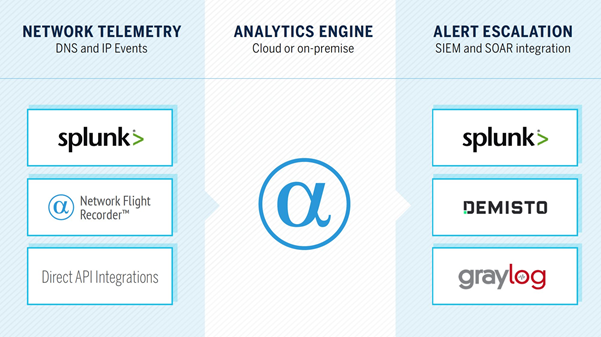
The AlphaSOC Analytics Engine is free to evaluate without restriction for 30 days and you can instantly create an API key within Network Flight Recorder or our Splunk apps to evaluate and use the service.
Configure the AlphaSOC Network Behavior Analysis Integration on Cortex XSOAR
- Navigate to Settings > Integrations > Servers & Services.
- Search for AlphaSOC Network Behavior Analysis.
- Click Add instance to create and configure a new integration instance.
- Name: a textual name for the integration instance.
- AlphaSOC Analysis Engine URL: efaults to cloud.
- AlphaSOC Analysis API Key:your AlphaSOC API key.
- Click Test to validate the API key and connection.
Tune the Integration
Within the settings, the Ignore events below severity field defaults to 3 and is used to filter the content that you are loading into Cortex XSOAR from AlphaSOC. The severity values we use are as follows:
- 5 (critical)
- 4 (high)
- 3 (medium)
- 2 (low)
- 1 (informational).
Critical and high severity alerts include C2 callbacks, ransomware, cryptomining, DNS tunneling, port scanning, DGA traffic, and phishing traffic.
Medium severity alerts have lower fidelity and include beaconing to a suspicious domain, ICMP tunneling, and policy violations, for example, P2P activity, third-party VPN use, potentially unwanted programs or browser extensions present. We recommend leaving this field set to 3, but if you only want to load high-fidelity / high-confidence details of infected hosts into Cortex XSOAR, you can set this to 4.
The Include policy violations field defaults to true and can be set to false if you wish to suppress alerting of items that indicate poor hygiene within the environment, such as potentially unwanted programs (PUPs), unwanted browser extensions, P2P applications (such as BitTorrent), third-party VPN utilities, and remote access software, for example TeamViewer and GoToMyPC.
Test the Integration
When you have telemetry flowing into the AlphaSOC Analytics Engine and the Cortex XSOAR integration configured, you can synthesize malicious traffic and generate alerts for threats including C2 callbacks, DNS tunneling, DGA traffic, and port scanning using our open source Network Flight Simulator utility.
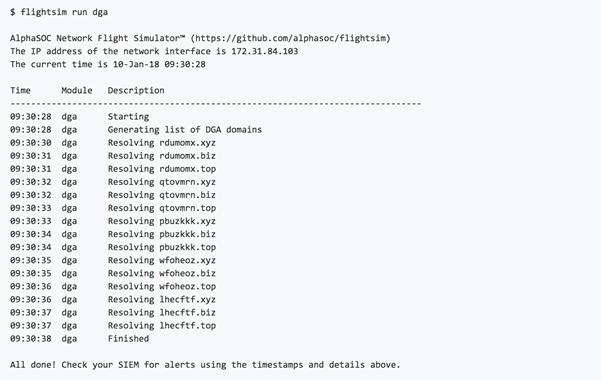
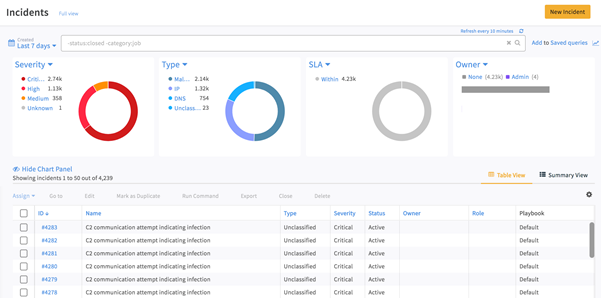
The utility is available for both Windows and Linux, and will generate malicious traffic that in-turn will create incidents within Cortex XSOAR. If you click into the Incidents view, you can review the list.
Configuration parameters
server— AlphaSOC Analytics Engine URL (required)APIKey— AlphaSOC API Key (required)severity— Ignore events below severity (required)policy— Include policy violationsproxy— Use system proxy settingsinsecure— Trust any certificate (not secure)isFetch— Fetch incidentsincidentType— Incident typeincidentFetchInterval— Incidents Fetch Interval
Commands (0)
This integration defines no commands.
commonfields:
  id: AlphaSOC Network Behavior Analytics
  version: -1
name: AlphaSOC Network Behavior Analytics
display: AlphaSOC Network Behavior Analytics
category: Analytics & SIEM
sectionorder:
- Connect
- Collect
provider: AlphaSOC
description: Retrieve alerts from the AlphaSOC Analytics Engine.
configuration:
- display: AlphaSOC Analytics Engine URL
  name: server
  defaultvalue: https://api.alphasoc.net
  type: 0
  required: true
  section: Connect
- display: AlphaSOC API Key
  name: APIKey
  defaultvalue: ""
  type: 4
  required: true
  section: Connect
- display: Ignore events below severity
  name: severity
  defaultvalue: "4"
  additionalinfo: "AlphaSOC alert severity: (1) info, (2) low, (3) medium, (4) high, (5) critical"
  type: 0
  required: true
  section: Collect
- display: Include policy violations
  name: policy
  defaultvalue: "true"
  type: 8
  required: false
  section: Collect
- display: Use system proxy settings
  name: proxy
  type: 8
  required: false
  section: Connect
- display: Trust any certificate (not secure)
  name: insecure
  type: 8
  required: false
  section: Connect
- display: Fetch incidents
  name: isFetch
  type: 8
  required: false
  section: Collect
- display: Incident type
  name: incidentType
  type: 13
  required: false
  section: Collect
- display: Incidents Fetch Interval
  name: incidentFetchInterval
  defaultvalue: '1'
  required: false
  type: 19
  advanced: true
  section: Collect
script:
  script: ''
  type: javascript
  isfetch: true
tests:
- No tests
fromversion: 5.0.0