Details
| ID | Awake Security |
|---|---|
| Provider | Arista Networks |
| Category | Network Security |
| From Version | 5.0.0 |
| Docker Image | demisto/python3:3.12.13.10116658 |
| Supported Modules | Agentix XSIAM |
README
Overview
Use the Awake Security integration to manage and respond to network threats.
Configure Awake Security on Cortex XSOAR
- Navigate to Settings > Integrations > Servers & Services.
- Search for Awake Security.
- Click Add instance to create and configure a new integration instance.
- Name: a textual name for the integration instance.
- Credentials
- Awake Security server address
- Trust any certificate (not secure)
- Fetch incidents
- Incident type
- Use system proxy settings
- Comma-separated list of threat behaviors to generate incidents for, e.g., "Exfiltration: SSL upload from non-browser to notable domain, Lateral Movement: Unix-based PSEXEC, C2: Possible ICMP tunnel"
- Period between incident fetch interval (in minutes)
- Minimum threshold to determine an indicator suspicious in Cortex XSOAR
- Minimum threshold to determine an indicator malicious in Cortex XSOAR
- Click Test to validate the URLs, token, and connection.
Commands
You can execute these commands from the Cortex XSOAR CLI, as part of an automation, or in a playbook. After you successfully execute a command, a DBot message appears in the War Room with the command details.
- Query devices: awake-query-devices
- Query activities: awake-query-activities
- Query domains: awake-query-domains
- Download a PCAP: awake-pcap-download
- Lookup and enrich a domain: domain
- Lookup and enrich an IP address: ip
- Lookup and enrich an email address: email
- Lookup and enrich a device: device
1. Query devices
Query devices in Awake Security.
Base Command
awake-query-devices
Input
| Argument Name | Description | Required |
|---|---|---|
| queryExpression | A query expression in Awake Query Language | Optional |
| startTime | Query start time ("2000-01-01T00:00:00Z") | Required |
| endTime | Query end time ("2000-01-01T00:00:00Z") | Required |
| ipAddress | IP address to filter by (exact match) | Optional |
| deviceName | Device name to filter by (regular expression) | Optional |
| domainName | Domain name to filter by (regular expression) | Optional |
| protocol | Protocol to filter by (all uppercase, i.e. "TLS") | Optional |
| tag | Tag to filter by (regular expression) | Optional |
Context Output
| Path | Type | Description |
|---|---|---|
| AwakeSecurity.Devices.deviceId | string | Awake Security unique identifier for the specified device |
| AwakeSecurity.Devices.deviceName | string | Device name |
| AwakeSecurity.Devices.firstSeen | string | Date that the specified device was first seen |
| AwakeSecurity.Devices.lastSeen | string | Date that the specified device was last seen |
| AwakeSecurity.Devices.os | string | Operating system associated with the specified device |
| AwakeSecurity.Devices.deviceType | string | Device type |
| AwakeSecurity.Devices.ips | unknown | List of IP addresses associated with the specified device |
| AwakeSecurity.Devices.monitoringPointIds | string | List of monitoring point IDs the specified device was seen on |
| AwakeSecurity.Devices.application | string | List of applications the specified device was seen using |
| AwakeSecurity.Devices.notabilityPercentile | number | How the notability of this device compares to other devices |
| AwakeSecurity.Devices.numberSimilarDevices | number | Number of devices that are similar to this device |
| AwakeSecurity.Devices.numberSessions | number | Number of TCP sessions for this device |
| AwakeSecurity.Devices.ackTime | number | Date of the last TCP session acknowledgment of the device associated with the specified email address |
| AwakeSecurity.Devices.whiteListed | bool | Is the device associated with the specified email address in the allow list |
Command Example
!awake-query-devices startTime="2018-07-18T07:00:00Z" endTime="2018-07-18T07:30:00Z"
Human Readable Output

2. Query activities
Query activities in Awake Security
Base Command
awake-query-activities
Input
| Argument Name | Description | Required |
|---|---|---|
| queryExpression | A query expression in the Awake Query Language | Optional |
| startTime | Query start time ("2000-01-01T00:00:00Z") | Required |
| endTime | Query end time ("2000-01-01T00:00:00Z") | Required |
| ipAddress | IP address to filter by (exact match) | Optional |
| deviceName | Device name to filter by (regular expression) | Optional |
| domainName | Domain name to filter by (regular expression) | Optional |
| protocol | Protocol to filter by (all uppercase, e.g., "TLS") | Optional |
| tag | Tag to filter by (regular expression) | Optional |
Context Output
| Path | Type | Description |
|---|---|---|
| AwakeSecurity.Activities.activityId | string | UUID that uniquely identifies the activity |
| AwakeSecurity.Activities.sessionId | string | UUID that uniquely identifies the corresponding session |
| AwakeSecurity.Activities.sourceIP | string | IP address of the source |
| AwakeSecurity.Activities.sourceHost | string | Hostname of the source |
| AwakeSecurity.Activities.sourcePort | number | Port of the source |
| AwakeSecurity.Activities.destinationIP | string | IP address of the destination |
| AwakeSecurity.Activities.destinationHost | string | Hostname of the destination |
| AwakeSecurity.Activities.destinationPort | number | Port of the destination |
| AwakeSecurity.Activities.directionKnown | bool | Do we know for sure which endpoint was the client? |
| AwakeSecurity.Activities.activityDeviceName | string | Device name for the endpoint within your network |
| AwakeSecurity.Activities.activityStart | string | Date when the activity began |
| AwakeSecurity.Activities.activityEnd | string | Date when the activity ended |
| AwakeSecurity.Activities.protocols | string | Protocols that the activity used |
Command Example
!awake-query-activities startTime="2018-07-01T00:00:00Z" endTime="2018-08-01T00:00:00Z" domainName="kck.st"
Human Readable Output

3. Query domains
Query domains in Awake Security
Base Command
awake-query-domains
Input
| Argument Name | Description | Required |
|---|---|---|
| queryExpression | A query expression in the Awake Query Language | Optional |
| startTime | Query start time ("2000-01-01T00:00:00Z") | Required |
| endTime | Query end time ("2000-01-01T00:00:00Z") | Required |
| ipAddress | IP address to filter by (exact match) | Optional |
| deviceName | Device name to filter by (regular expression) | Optional |
| domainName | Domain name to filter by (regular expression) | Optional |
| protocol | Protocol to filter by (all uppercase, e.g., "TLS") | Optional |
| tag | Tag to filter by (regular expression) | Optional |
Context Output
| Path | Type | Description |
|---|---|---|
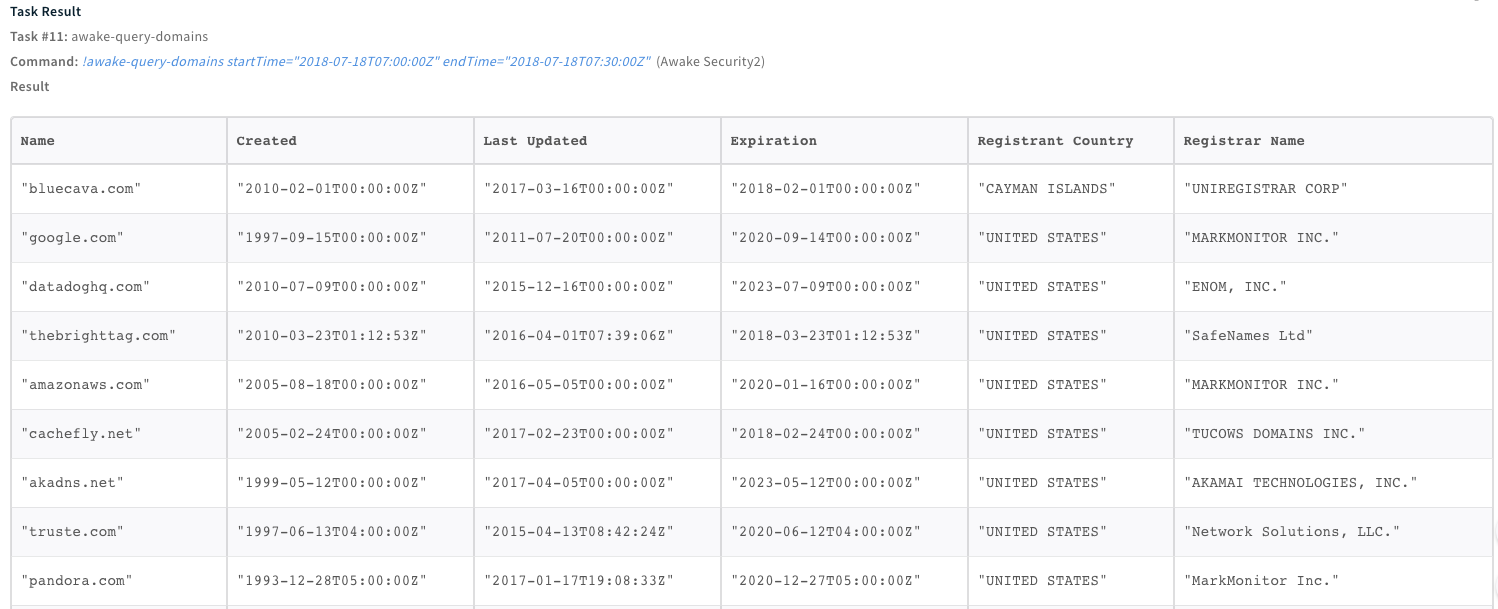
| AwakeSecurity.Domains.name | string | Domain name |
| AwakeSecurity.Domains.created | string | Date the specified domain was created |
| AwakeSecurity.Domains.lastUpdated | string | Date the specified domain was last updated |
| AwakeSecurity.Domains.registrantOrg | string | Organization of the registrant |
| AwakeSecurity.Domains.registrantCountry | string | Country of the registrant |
| AwakeSecurity.Domains.registrarName | string | Name of the registrar |
| AwakeSecurity.Domains.whoisServer | string | Address of the WHOIS server |
| AwakeSecurity.Domains.whoisFound | bool | Was this domain found via WHOIS |
| AwakeSecurity.Domains.deviceCount | number | Number of devices currently interacting with the specified domain |
| AwakeSecurity.Domains.totalDevices | number | Total number of devices that have interacted with the specified domain |
| AwakeSecurity.Domains.intelCount | number | Number of matches of imported intel against the specified domain |
| AwakeSecurity.Domains.lastSeen | number | Date of the most recent interaction with the specified domain |
| AwakeSecurity.Domains.nameservers | string | List of authoritative nameservers for the specified domain |
| AwakeSecurity.Domains.notability | number | Notability score of the domain |
| AwakeSecurity.Domains.whiteListed | bool | Is the specified domain in allow list |
Command Example
!awake-query-domains startTime="2018-07-18T07:00:00Z" endTime="2018-07-18T07:30:00Z"
Human Readable Output
4. Download a PCAP
Download a PCAP.
Base Command
awake-pcap-download
Input
| Argument Name | Description | Required |
|---|---|---|
| protocol | Protocol to filter by (all uppercase, e.g., "TLS") | Optional |
| hostA | First host's address | Optional |
| portA | First host's port | Optional |
| hostB | Second host's address | Optional |
| portB | Second host's port | Optional |
| startTime | Query start time ("2000-01-01T00:00:00Z") | Optional |
| endTime | Query end time ("2000-01-01T00:00:00Z") | Optional |
Context Output
| Path | Type | Description |
|---|---|---|
| File.Size | number | File size |
| File.MD5 | string | MD5 of the file |
| File.SHA1 | string | SHA-1 of the file |
| File.SHA256 | string | SHA-256 of the file |
| File.Name | string | File name |
| File.SSDeep | string | SSDeep hash of the file |
| File.EntryID | string | War Room Entry ID of the file |
| File.Info | string | File common metadata |
| File.Type | string | File type |
| File.Extension | string | File Extension e.g., "pcap" |
Command Example
!awake-pcap-download hostA="10.200.103.100" hostB="10.200.103.100" portA="67" portB="68"
Human Readable Output

5. Lookup and enrich a domain
Lookup and enrich a domain.
Base Command
domain
Input
| Argument Name | Description | Required |
|---|---|---|
| domain | The domain name | Required |
| lookback_minutes | How many minutes of history to query from the current time. Default is 480. | Optional |
Context Output
| Path | Type | Description |
|---|---|---|
| AwakeSecurity.Domains.approxBytesTransferred | number | Approximate bytes the indicator transferred |
| AwakeSecurity.Domains.DomainWithSameRegistrant | unknown | Domains with the same registrant |
| AwakeSecurity.Domains.domainsWithSameRegistrant.registrationDate | string | Date that the domain with the same registrant as the specified domain was registered |
| AwakeSecurity.Domains.IntelSources | string | Indicators of compromise from Awake Security |
| AwakeSecurity.Domains.ipAddresses | string | IP addresses associated with the domain |
| AwakeSecurity.Domains.isAlexaTopOneMillion | string | Does the domain appear in Alexa 1 million list |
| AwakeSecurity.Domains.isDGA | boolean | Is domain generation algorithm |
| AwakeSecurity.Domains.lastSeen | string | Last time the domain was seen |
| AwakeSecurity.Domains.notabillity | number | Notability score of the domain |
| AwakeSecurity.Domains.numAssociatedActivities | number | Number of network activities associated with the domain |
| AwakeSecurity.Domains.numAssociatedADevices | number | Number of devices associated with the domain |
| AwakeSecurity.Domains.protocols | string | List of protocols used in the domain activities |
| AwakeSecurity.Domains.relatedSubdomains | string | Related subdomains of the specified domain |
| AwakeSecurity.Domains.subdomains | string | Subdomains of the specified domain |
| AwakeSecurity.Domains.topDevices | string | List of devices that accessed the specified domain (maximum is 10) |
| AwakeSecurity.Domains.totalNumDevices | number | Total number of devices that accessed the specified domain |
| AwakeSecurity.Domains.whiteListed | boolean | Is the specified domain in allow list |
| DBotScore.Indicator | string | The specified domain |
| DBotScore.Score | number | Severity score of the specified domain in Cortex XSOAR |
| DBotScore.Type | string | Indicator type in Cortex XSOAR |
| DBotScore.Vendor | string | Vendor used to assess the specified domain |
Command Example
!domain domain="adobesc.com"
Human Readable Output

6. Lookup and enrich an IP address
Lookup and enrich an IP address.
Base Command
ip
Input
| Argument Name | Description | Required |
|---|---|---|
| ip | The IP address | Required |
| lookback_minutes | How many minutes of history to query from the current time. Default is 480. | Optional |
Context Output
| Path | Type | Description |
|---|---|---|
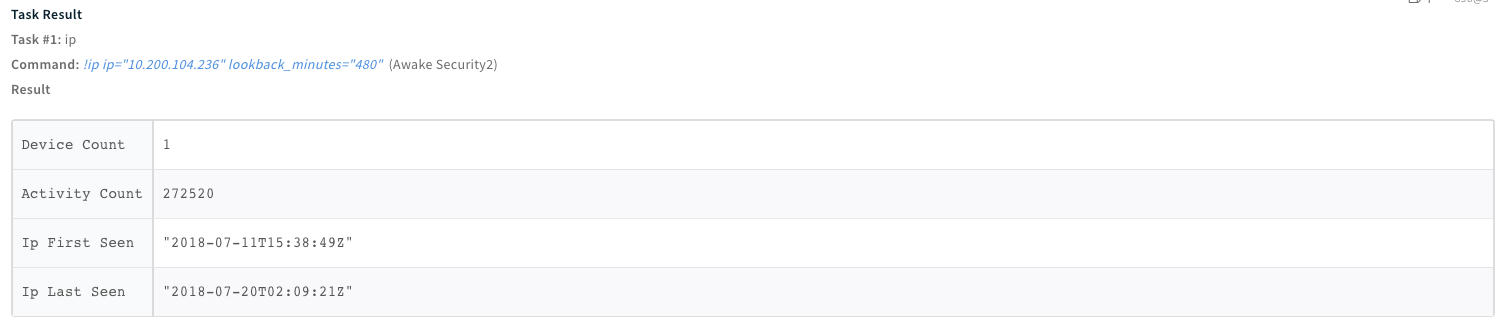
| AwakeSecurity.IPs.activityCount | number | Number of activities associated with the specified IP address |
| AwakeSecurity.IPs.deviceCount | number | Number of devices associated with the specified IP address |
| AwakeSecurity.IPs.devices | unknown | Device object associated with the specified IP address |
| AwakeSecurity.IPs.domains | unknown | Domain object associated with the specified IP address |
| AwakeSecurity.IPs.ipFirstSeen | string | Date that the IP address was first seen in Awake Security |
| AwakeSecurity.IPs.ipLastSeen | string | Date that the IP address was last seen in Awake Security |
| DBotScore.Indicator | string | The specified IP address |
| DBotScore.Score | number | Severity score of the specified IP address in Cortex XSOAR |
| DBotScore.Vendor | string | Vendor used to assess the specified IP address |
| DBotScore.Type | string | Indicator type in Cortex XSOAR |
Command Example
!ip ip="10.200.104.236"
Human Readable Output
7. Lookup and enrich and enrich an email address
Lookup and enrich an email address.
Base Command
email
Input
| Argument Name | Description | Required |
|---|---|---|
| The email address | Optional | |
| lookback_minutes | How many minutes of history to query from the current time. Default is 480. | Optional |
Context Output
| Path | Type | Description |
|---|---|---|
| AwakeSecurity.Emails.deviceId | string | Device ID associated with the specified email address |
| AwakeSecurity.Emails.deviceName | string | Device name associated with the specified email address |
| AwakeSecurity.Emails.firstSeen | string | Date that the email address was first seen in Awake Security |
| AwakeSecurity.Emails.lastSeen | string | Date that the email address was last seen in Awake Security |
| AwakeSecurity.Emails.duration | string | Time (in seconds) between the email address first seen date and last seen date in Awake Security |
| AwakeSecurity.Emails.os | string | Operating system of the device associated with the specified email address |
| AwakeSecurity.Emails.deviceType | string | Device type associated with the specified email address |
| AwakeSecurity.Emails.ips | string | IP addresses that the device associated with the specified email address accessed |
| AwakeSecurity.Emails.monitoringPointIds | string | Monitoring point IDs on which the device associated with the specified email address were seen |
| AwakeSecurity.Emails.application | string | Email applications associated with this email address |
| AwakeSecurity.Emails.notabilityPercentile | number | Notability (risk score) of the specified email address |
| AwakeSecurity.Emails.numberSimilarDevices | number | Number of similar devices associated with the device of the specified email addresses |
| AwakeSecurity.Emails.numberSessions | number | Number of TCP sessions the device associated with this email address initiated |
| AwakeSecurity.Emails.ackTime | string | Date of the last TCP session acknowledgment of the device associated with the specified email address |
| AwakeSecurity.Emails.whiteListed | bool | Is the device associated with the specified email address in the allow list |
| DBotScore.Score | number | Severity score of the specified email address in Cortex XSOAR |
| DBotScore.Type | string | Indicator type in Cortex XSOAR |
| DBotScore.Vendor | string | Vendor used to assess the specified email address |
| DBotScore.Indicator | string | The specified email address |
Command Example
!email email="rajguru2003@yahoo.com"
Human Readable Output

8. Lookup and enrich a device
Lookup and enrich a device.
Base Command
device
Input
| Argument Name | Description | Required |
|---|---|---|
| device | The device ID | Required |
| lookback_minutes | How many minutes of history to query from the current time. Default is 480. | Optional |
Context Output
| Path | Type | Description |
|---|---|---|
| AwakeSecurity.Devices.deviceScore | number | Risk score of the specified device |
| AwakeSecurity.Devices.notableDomainCount.value | number | Number of suspicious domains accessed by the specified device |
| AwakeSecurity.Devices.notableDomainCount.percentile | number | Percentile of the specified device for notable domains accessed |
| AwakeSecurity.Devices.notableDomainCount.weight | number | Importance given to the suspicious domains when calculating the specified device risk score |
| AwakeSecurity.Devices.iocCount.value | number | Number of suspicious IOCs associated with the specified device |
| AwakeSecurity.Devices.iocCount.percentile | number | Percentile of the specified device for notable IOCs |
| AwakeSecurity.Devices.iocCount.weight | number | Importance given to the IOCs when calculating the specified device risk score |
| AwakeSecurity.Devices.watchlistCount.value | number | Total number of current threat behaviors associated with the specified device |
| AwakeSecurity.Devices.watchlistCount.percentile | number | How this device compares to other devices for number of threat behaviors |
| AwakeSecurity.Devices.watchlistCount.weight | number | Importance given to the threat behaviors when calculating the specified device risk score |
| AwakeSecurity.Devices.activityCount.value | number | Number of characteristic artifacts associated with the specified device |
| AwakeSecurity.Devices.activityCount.percentile | number | How this device compares to other devices for characteristic artifacts |
| AwakeSecurity.Devices.activityCount.weight | number | Importance given to the characteristic artifacts when calculating the specified device risk score |
| AwakeSecurity.Devices.deviceName | string | Device name |
| AwakeSecurity.Devices.deviceType | string | Device type |
| AwakeSecurity.Devices.os | string | Operating system associated with the specified device |
| AwakeSecurity.Devices.recentIp | string | Most recent IP address associated with the specified device |
| AwakeSecurity.Devices.activeIp | string | Most common IP address associated with the specified device |
| AwakeSecurity.Devices.commonEmail | string | Most common email address associated with the specified device |
| AwakeSecurity.Devices.commonUsername | string | Most common username associated with the specified device |
| AwakeSecurity.Devices.commonMpid | string | Most common monitoring point ID the specified device was seen on |
| AwakeSecurity.Devices.nSimilarDevices | number | Number of devices that are similar to the specified device |
| AwakeSecurity.Devices.tags | string | Tags applied to the specified device |
| AwakeSecurity.Devices.ipCount | number | Number of IP addresses associated with the specified device |
| AwakeSecurity.Devices.emailCount | number | Number of email addresses associated with this device |
| AwakeSecurity.Devices.usernameCount | number | Number of usernames associated with the specified device |
| AwakeSecurity.Devices.applicationCount | number | Number of applications associated with the specified device |
| AwakeSecurity.Devices.mpids | string | List of monitoring point IDs associated with the specified device |
| AwakeSecurity.Devices.protocols.count | number | Number of time this protocol was used by the specified device |
| AwakeSecurity.Devices.firstSeen | string | Date that the specified device was first seen |
| AwakeSecurity.Devices.lastSeen | string | Date that the specified device was last seen |
| AwakeSecurity.Devices.osVersion | string | Operating system version of the specified device |
| AwakeSecurity.Devices.deviceGuid | string | Awake Security unique identifier for the specified device |
| AwakeSecurity.Devices.ips | unknown | List of IP addresses associated with the specified device |
| AwakeSecurity.Devices.usernames | string | List of usernames that were inferred as accounts on the specified device |
| AwakeSecurity.Devices.emails | string | List of email addresses associated with the specified device |
| AwakeSecurity.Devices.ackTs | string | Date of the last TCP session acknowledgment of the specified device |
| AwakeSecurity.Devices.whiteListed | bool | Is the device associated with the specified email address in the allow list |
| AwakeSecurity.Devices.protocols.name | string | Type of protocol used by the specified device |
Command Example
!device device="dae6720d-0588-d23b-c006-63cf1134537b"
Human Readable Output

Configuration parameters
credentials— Credentials (required)server— Awake Security server address (required)unsecure— Trust any certificate (not secure)isFetch— Fetch incidentsincidentType— Incident typeincidentFetchInterval— Incidents Fetch Intervalproxy— Use system proxy settingsthreat_behaviors— Comma-separated list of threat behaviors to generate incidents for, e.g., "Exfiltration: SSL upload from non-browser to notable domain, Lateral Movement: Unix-based PSEXEC, C2: Possible ICMP tunnel"fetch_interval— Period between incident fetch interval (in minutes) (required)suspicious_threshold— Minimum threshold to determine an indicator suspicious in Demisto (required)malicious_threshold— Minimum threshold to determine an indicator malicious in Demisto (required)integrationReliability— Source ReliabilityfeedExpirationPolicy—feedExpirationInterval—
Commands (8)
-
awake-pcap-downloadDownload a PCAP.
-
awake-query-activitiesQuery activities in Awake Security.
-
awake-query-devicesQuery devices in Awake Security.
-
awake-query-domainsQuery domains in Awake Security.
-
deviceLookup and enrich a device.
-
domainLookup and enrich a domain.
-
emailLookup and enrich an email address.
-
ipLookup and enrich an IP address.
import demistomock as demisto  # noqa: F401
from CommonServerPython import *  # noqa: F401

""" IMPORTS """
import base64
import re

import requests
import urllib3

# disable insecure warnings
urllib3.disable_warnings()

""" GLOBALS """
handle_proxy()
params = demisto.params()
server = params["server"].rstrip("/")
prefix = server + "/awakeapi/v1"
verify = not params.get("unsecure", False)
credentials = params["credentials"]
identifier = credentials["identifier"]
password = credentials["password"]
suspicious_threshold = params["suspicious_threshold"]
malicious_threshold = params["malicious_threshold"]
authTokenRequest = {"loginUsername": identifier, "loginPassword": password}
authTokenResponse = requests.post(prefix + "/authtoken", json=authTokenRequest, verify=verify)
authToken = authTokenResponse.json()["token"]["value"]
headers = {"Authentication": ("access " + authToken)}
command = demisto.command()
args = demisto.args()
request = {}

""" HELPERS """


# Convenient utility to marshal command arguments into the request body


def slurp(fields):
    for field in fields:
        if field in args:
            request[field] = args[field]


# Render a subset of the fields of the Contents as a markdown table


def displayTable(contents, fields):
    # We don't use a set() because we want to preserve field order
    #
    # The fields are ordered to put the most relevant information first
    presentFields = []  # type: List[str]
    # Omit table columns that are all empty
    for content in contents:
        for field in fields:
            if field in content and content[field] and field not in presentFields:
                presentFields.append(field)
    line0 = "| "
    line1 = "| "
    for field in presentFields:
        # Translate camel-case field names to title-case space-separated words
        tokens = re.findall("[a-zA-Z][A-Z]*[^A-Z]*", field)
        name = " ".join(token.title() for token in tokens)
        line0 += name + " | "
        line1 += "--- | "
    line0 += "\n"
    line1 += "\n"
    body = ""
    for content in contents:
        body += "| "
        for field in presentFields:
            if field in content:
                value = json.dumps(content[field])
            else:
                value = ""
            body += value + " | "
        body += "\n"
    if presentFields:
        return line0 + line1 + body
    else:
        return "Empty results"


def returnResults(contents, outerKey, innerKey, humanReadable, dbotScore, genericContext=None):
    demisto.results(create_result_entry(contents, outerKey, innerKey, humanReadable, dbotScore, genericContext))


def create_result_entry(contents, outerKey, innerKey, humanReadable, dbotScore, genericContext=None):
    machineReadable = {
        "AwakeSecurity": contents,
    }
    entryContext = {
        ("AwakeSecurity." + outerKey + "(val." + innerKey + "== obj." + innerKey + ")"): contents,
    }
    if dbotScore is not None:
        machineReadable["DBotScore"] = dbotScore
        entryContext["DBotScore"] = dbotScore

    if genericContext:
        entryContext.update(genericContext)

    return {
        "Type": entryTypes["note"],
        "ContentsFormat": formats["json"],
        "Contents": json.dumps(machineReadable),
        "HumanReadable": humanReadable,
        "ReadableContentsFormat": formats["markdown"],
        "EntryContext": entryContext,
    }


def toDBotScore(indicator_type, percentile, lookup_key):
    if percentile <= suspicious_threshold:
        score = 1
    elif percentile <= malicious_threshold:
        # Something doing something out of the ordinary
        score = 2
    else:
        # Probably bad or at least not compliant with
        # company policy.
        score = 3
    return {
        "Vendor": "Awake Security",
        "Type": indicator_type,
        "Indicator": lookup_key,
        "Score": score,
        "Reliability": demisto.params().get("integrationReliability"),
    }


""" COMMANDS """


def lookup(lookup_type, lookup_key):
    path = "/lookup/" + lookup_type
    request["lookup_key"] = lookup_key
    # default value of lookback_minutes is 480
    if "lookback_minutes" not in args:
        args["lookback_minutes"] = 480
    request["lookback_minutes"] = int(args["lookback_minutes"])
    response = requests.post(prefix + path, json=request, headers=headers, verify=verify)
    if response.status_code < 200 or response.status_code >= 300:
        return_error(
            f"Request Failed.\nStatus code: {response.status_code!s}"
            f" with body {response.content!s} with headers {response.headers}"
        )

    return response.json()


def lookupDevice():
    lookup_key = args["device"]
    contents = lookup("device", lookup_key)
    humanReadableFields = [
        "deviceScore",
        "deviceName",
        "deviceType",
        "os",
        "osVersion",
        "commonEmail",
        "commonUsername",
        "tags",
        "recentIP",
        "activeIP",
        "nSimilarDevices",
        "ipCount",
        "applicationCount",
        # "protocols",
        "firstSeen",
        "lastSeen",
    ]
    if "deviceScore" in contents:
        dbotScore = toDBotScore("device", contents["deviceScore"], lookup_key)
    else:
        dbotScore = {
            "Vendor": "Awake Security",
            "Type": "device",
            "Indicator": lookup_key,
            "Score": 0,
            "Reliability": demisto.params().get("integrationReliability"),
        }
    humanReadable = displayTable([contents], humanReadableFields)
    contents["device"] = lookup_key
    returnResults(contents, "Devices", "device", humanReadable, dbotScore)


def lookupDomain():
    lookup_keys = argToList(args["domain"])
    results = []
    for lookup_key in lookup_keys:
        contents = lookup("domain", lookup_key)
        humanReadableFields = [
            "notability",
            "isAlexaTopOneMillion",
            "isDGA",
            "intelSources",
            "numAssociatedDevices",
            "numAssociatedActivities",
            "approxBytesTransferred",
            "protocols",
            "firstSeen",
            "lastSeen",
        ]
        if "notability" in contents:
            dbotScore = toDBotScore("domain", contents["notability"], lookup_key)
        else:
            dbotScore = {
                "Vendor": "Awake Security",
                "Type": "domain",
                "Indicator": lookup_key,
                "Score": 0,
                "Reliability": demisto.params().get("integrationReliability"),
            }
        humanReadable = displayTable([contents], humanReadableFields)
        contents["domain"] = lookup_key
        genericContext = {"Domain": {"Name": lookup_key}}
        results.append(create_result_entry(contents, "Domains", "domain", humanReadable, dbotScore, genericContext))
    demisto.results(results)


def lookupEmail():
    lookup_keys = argToList(args["email"])
    results = []
    for lookup_key in lookup_keys:
        contents = lookup("email", lookup_key)
        humanReadableFields = [
            "notabilityPercentile",
            "deviceName",
            "os",
            "deviceType",
            "application",
            "numberSimilarDevices",
            "numberSessions",
            "firstSeen",
            "lastSeen",
            "duration",
            "deviceId",
        ]
        if "notabilityPercentile" in contents:
            dbotScore = toDBotScore("email", contents["notabilityPercentile"], lookup_key)
        else:
            dbotScore = {
                "Vendor": "Awake Security",
                "Type": "email",
                "Indicator": lookup_key,
                "Score": 0,
                "Reliability": demisto.params().get("integrationReliability"),
            }
        humanReadable = displayTable(contents, humanReadableFields)
        for content in contents:
            content["email"] = lookup_key
        results.append(create_result_entry(contents, "Emails", "email", humanReadable, dbotScore))
    demisto.results(results)


def lookupIp():
    lookup_keys = argToList(args["ip"])
    results = []
    for lookup_key in lookup_keys:
        contents = lookup("ip", lookup_key)
        humanReadableFields = [
            "deviceCount",
            "activityCount",
            "ipFirstSeen",
            "ipLastSeen",
        ]
        dbotScore = {
            "Vendor": "Awake Security",
            "Type": "ip",
            "Indicator": lookup_key,
            "Score": 0,
            "Reliability": demisto.params().get("integrationReliability"),
        }
        # Note: No DBotScore for IP addresses as we do not score them.
        # Our product scores devices rather than IP addresses.
        humanReadable = displayTable([contents], humanReadableFields)
        contents["ip"] = lookup_key
        genericContext = {"IP": {"Address": lookup_key}}
        results.append(create_result_entry(contents, "IPs", "ip", humanReadable, dbotScore, genericContext))
    demisto.results(results)


def query(lookup_type):
    # Default to an empty query if unset
    request["queryExpression"] = ""
    slurp(["queryExpression", "startTime", "endTime"])
    nameMappings = [
        ("ipAddress", "device.ip == {}"),
        ("deviceName", "device.name like r/{}/"),
        ("domainName", "domain.name like r/{}/"),
        ("protocol", 'activity.protocol == "{}"'),
        ("tags", '"{}" in device.tags'),
    ]
    for name, mapping in nameMappings:
        if name in args:
            if request.get("queryExpression"):
                request["queryExpression"] = request["queryExpression"] + " && " + mapping.format(args[name])
            else:
                request["queryExpression"] = mapping.format(args[name])
    path = "/query/" + lookup_type
    response = requests.post(prefix + path, json=request, headers=headers, verify=verify)
    if response.status_code < 200 or response.status_code >= 300:
        return_error(
            f"Request Failed.\nStatus code: {response.status_code!s}"
            f" with body {response.content!s} with headers {response.headers}"
        )
    contents = response.json()
    return request["queryExpression"], contents


def queryActivities():
    q, contents = query("activities")
    humanReadableFields = [
        "sourceIP",
        "sourceHost",
        "sourcePort",
        "destIP",
        "destHost",
        "destPort",
        "activityDeviceName",
        "activityStart",
        "activityEnd",
        "protocols",
    ]
    humanReadable = displayTable(contents, humanReadableFields)
    for content in contents:
        content["query"] = q
    returnResults(contents, "Activities", "activityId", humanReadable, None)


def queryDevices():
    q, contents = query("devices")
    humanReadableFields = [
        "notabilityPercentile",
        "deviceName",
        "os",
        "deviceType",
        "application",
        "numberSimilarDevices",
        "numberSessions",
        "firstSeen",
        "lastSeen",
        "duration",
        "deviceId",
    ]
    humanReadable = displayTable(contents, humanReadableFields)
    for content in contents:
        content["query"] = q
    returnResults(contents, "Devices", "deviceId", humanReadable, None)


def queryDomains():
    q, contents = query("domains")
    humanReadableFields = [
        "name",
        "notability",
        "created",
        "lastUpdated",
        "expiration",
        "registrantOrg",
        "registrantCountry",
        "registrarName",
        "nameservers",
        "deviceCount",
        "intelCount",
        "lastSeen",
    ]
    humanReadable = displayTable(contents, humanReadableFields)
    for content in contents:
        content["query"] = q
    returnResults(contents, "Domains", "name", humanReadable, None)


def pcapDownload():
    slurp(["monitoringPointID"])
    session = {}
    for field in ["hostA", "hostB", "startTimeRFC3339Nano", "endTimeRFC3339Nano"]:
        if field in args:
            session[field] = args[field]
    if "startTimeRFC3339Nano" in args:
        session["startTimeRFC3339Nano"] = args["startTime"]
    if "endTimeRFC3339Nano" in args:
        session["endTimeRFC3339Nano"] = args["endTime"]
    for field in ["protocol", "portA", "portB"]:
        if field in args:
            session[field] = int(args[field])
    request["sessions"] = [session]
    path = "/pcap/download"
    response = requests.post(prefix + path, json=request, headers=headers, verify=verify)
    if response.status_code < 200 or response.status_code >= 300:
        return_error(
            f"Request Failed.\nStatus code: {response.status_code!s} "
            f"with body {response.content!s} with headers {response.headers}"
        )
    b64 = response.json()["pcap"]
    bytes = base64.b64decode(b64)
    demisto.results(fileResult("download.pcap", bytes))


def fetchIncidents():
    threatBehaviorsString = params.get("threat_behaviors") or ""
    threatBehaviors = [threatBehavior.strip() for threatBehavior in threatBehaviorsString.split(",")]
    if threatBehaviors == [""]:
        threatBehaviors = []
    lastRun = demisto.getLastRun()
    formatString = "%Y-%m-%d %H:%M:%S+0000"
    earlyTimeString = "1970-01-01 00:00:00+0000"
    startTimeString = lastRun.get("time") or earlyTimeString
    startTime = datetime.strptime(startTimeString, formatString)
    endTime = datetime.utcnow()
    endTimeString = datetime.strftime(endTime, formatString)
    if timedelta(minutes=int(params["fetch_interval"])) <= endTime - startTime:
        jsonRequest = {"startTime": startTimeString, "endTime": endTimeString, "threatBehaviors": threatBehaviors}
        response = requests.post(prefix + "/threat-behavior/matches", json=jsonRequest, headers=headers, verify=verify)
        jsonResponse = response.json()
        matchingThreatBehaviors = jsonResponse.get("matchingThreatBehaviors", [])

        def toIncident(matchingThreatBehavior):
            # Currently the threat behavior API doesn't allow us to retrieve metadata for
            # the behaviors that matched, which is why this incident record is mostly empty
            #
            # However, we can provide the original query that the threat behavior corresponded
            # to plus the date range so that a playbook can feed them back into
            # `awake-query-{devices,activities}` to retrieving the matching devices or
            # activities that triggered the match to the threat behavior.
            return {
                "Name": matchingThreatBehavior["name"],
                "Query": matchingThreatBehavior["query"],
                "StartTime": startTimeString,
                "EndTime": endTimeString,
                "rawJSON": json.dumps(matchingThreatBehavior),
            }

        demisto.incidents(list(map(toIncident, matchingThreatBehaviors)))
        # Don't increase the low-water-mark until we actually find incidents
        #
        # This is a precaution because incidents sometimes appear in an old time
        # bucket after a delay
        if len(matchingThreatBehaviors) > 0:
            lastRun = {"time": endTimeString}
    else:
        demisto.incidents([])
    demisto.setLastRun(lastRun)


""" EXECUTION """
LOG(f"command is {command}")

try:
    if command == "test-module":
        # If we got this far we already successfully authenticated against the server
        demisto.results("ok")

    elif command == "fetch-incidents":
        fetchIncidents()

    elif command == "awake-query-devices":
        queryDevices()

    elif command == "awake-query-activities":
        queryActivities()

    elif command == "awake-query-domains":
        queryDomains()

    elif command == "awake-pcap-download":
        pcapDownload()

    elif command == "domain":
        lookupDomain()

    elif command == "email":
        lookupEmail()

    elif command == "ip":
        lookupIp()

    elif command == "device":
        lookupDevice()

except Exception as e:
    if command == "fetch-incidents":
        raise
    LOG(e)
    LOG.print_log()
    return_error(e)