Kafka V2 Deprecated
Deprecated. Use the Kafka v3 integration instead. The Open source distributed streaming platform.
Messaging and Conferencing · Kafka
Details
| ID | Kafka V2 |
|---|---|
| Provider | Open Source |
| Category | Messaging and Conferencing |
| From Version | 5.0.0 |
| Docker Image | demisto/pykafka:1.0.0.19034 |
| Supported Modules | Agentix XSIAM |
README
Use the Kafka integration to manage messages and partitions.
This integration was integrated and tested with version 2.6 of Kafka.
Configure Kafka v2 on Cortex XSOAR
- Navigate to Settings > Integrations > Servers & Services.
- Search for Kafka v2.
- Click Add instance to create and configure a new integration instance.
- Name: a meaningful name for the integration instance.
- Use proxy
-
CSV list of Kafka brokers to connect to, e.g.,
ip:port,ip2:port2 - Do not validate server certificate (insecure)
- CA certificate of Kafka server (.cer)
- Client certificate (.cer)
- Client certificate key (.key)
- Additional password (if required)
- Topic to fetch incidents from
- Offset to fetch incidents from
- Max number of messages to fetch
- Incident type
- Enable debug (will post Kafka connection logs to the War Room)
- Click Test to validate the URLs, token, and connection.
Commands
You can execute these commands from the Cortex XSOAR CLI, as part of an automation, or in a playbook. After you successfully execute a command, a DBot message appears in the War Room with the command details.
- Print all partitions for a topic: kafka-print-topics
- Publish a message to Kafka: kafka-publish-msg
- Consume a single Kafka message: kafka-consume-msg
- Print all partitions for a topic: kafka-fetch-partitions
1. Print all partitions for a topic
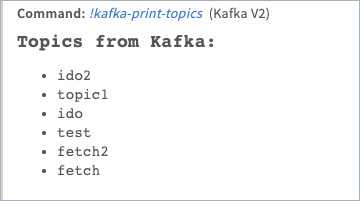
Prints all partitions of a topic.
Base Command
kafka-print-topics
Input
There is no input for this command.
Context Output
| Path | Type | Description |
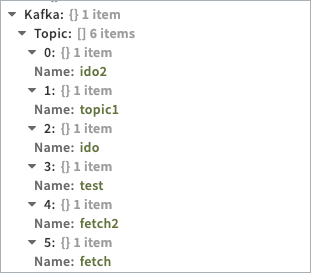
| Kafka.Topic.Name | string | Topic name. |
| Kafka.Topic.Partitions.ID | Number | Topic partition ID. |
| Kafka.Topic.Partitions.EarliestOffset | Number | Topic partition earliest offset. |
| Kafka.Topic.Partitions.LatestOffset | Number | Topic partition latest offset. |
Command Example
!kafka-print-topics
Context Example
Human Readable Output
2. Publish a message to Kafka
Publishes a message to Kafka.
Base Command
kafka-publish-msg
Input
| Argument Name | Description | Required |
| topic | A topic to filter by. | Required |
| value | Message value (string) | Required |
| partitioning_key | Message partition key (number) | Optional |
Context Output
There is no context output for this command.
Command Example
!kafka-publish-msg topic=test value="test message"
Human Readable Output

3. Consume a single Kafka message
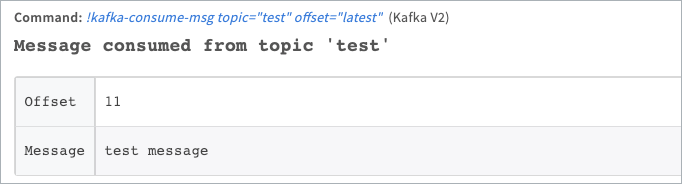
Consumes a single Kafka message.
Base Command
kafka-consume-msg
Input
| Argument Name | Description | Required |
| topic | A topic to filter by | Required |
| offset | Message offset to filter by ("Earliest", "Latest", or any other offset number) | Optional |
| partition | Partition (number) | Optional |
Context Output
| Path | Type | Description |
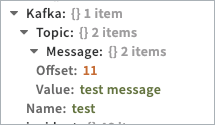
| Kafka.Topic.Name | string | Topic name |
| Kafka.Topic.Message.Value | string | Message value |
| Kafka.Topic.Message.Offset | number | Offset of the value in the topic |
Command Example
!kafka-consume-msg topic=test offset=latest
Context Example
Human Readable Output
4. Print all partitions for a topic
Prints all partitions for a topic.
Base Command
kafka-fetch-partitions
Input
| Argument Name | Description | Required |
| topic | A topic to filter by | Required |
Context Output
| Path | Type | Description |
| Kafka.Topic.Name | string | Topic name |
| Kafka.Topic.Partition | number | Number of partitions for the topic |
Command Example
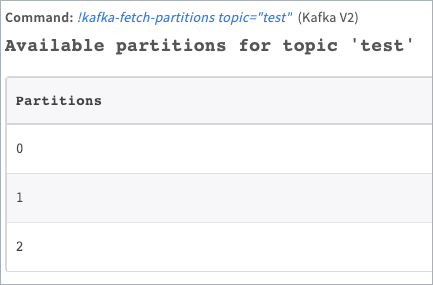
!kafka-fetch-partitions topic=test
Context Example
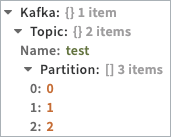
Human Readable Output
Configuration parameters
brokers— CSV list of Kafka brokers to connect to, e.g. 172.16.20.207:9092,172.16.20.234:9093 (required)use_ssl— Use TLS for connectionca_cert— CA certificate of Kafka server (.cer)client_cert— Client certificate (.cer)client_cert_key— Client certificate key (.key)additional_password— Client certificate key password (if required)topic— Topic to fetch incidents from (Required for fetch incidents)partition— CSV list of partitions to fetch messages fromoffset— Offset to fetch messages from (Exclusive)max_messages— Max number of messages to fetchisFetch— Fetch incidentsincidentType— Incident typemax_bytes_per_message— Max number of bytes per message
Commands (4)
-
kafka-consume-msgConsumes a single Kafka message.
-
kafka-fetch-partitionsFetch partitions for a topic.
-
kafka-print-topicsPrints all partitions of a topic.
-
kafka-publish-msgPublishes a message to Kafka.
category: Messaging and Conferencing
provider: Open Source
commonfields:
  id: Kafka V2
  version: -1
configuration:
- display: CSV list of Kafka brokers to connect to, e.g. 172.16.20.207:9092,172.16.20.234:9093
  name: brokers
  required: true
  type: 0
- display: Use TLS for connection
  name: use_ssl
  type: 8
  required: false
- display: CA certificate of Kafka server (.cer)
  name: ca_cert
  type: 12
  required: false
- display: Client certificate (.cer)
  name: client_cert
  type: 12
  required: false
- display: Client certificate key (.key)
  name: client_cert_key
  type: 12
  required: false
- display: Client certificate key password (if required)
  name: additional_password
  type: 4
  required: false
- display: Topic to fetch incidents from (Required for fetch incidents)
  name: topic
  type: 0
  required: false
- display: CSV list of partitions to fetch messages from
  name: partition
  type: 0
  required: false
- additionalinfo: The initial offset to start fetching from, not including the value set (e.g. if 3 is set, the first event that will be fetched will be with offset 4).
  display: Offset to fetch messages from (Exclusive)
  name: offset
  type: 0
  required: false
- defaultvalue: '50'
  display: Max number of messages to fetch
  name: max_messages
  type: 0
  required: false
- display: Fetch incidents
  name: isFetch
  type: 8
  required: false
- display: Incident type
  name: incidentType
  type: 13
  required: false
- additionalinfo: |-
    The max number of message bytes to retrieve in each attempted fetch request. Should be in multiples of 1024. If the fetching process is taking a long time, you should consider increasing this value. Default is '1048576'.
  defaultvalue: '1048576'
  display: Max number of bytes per message
  name: max_bytes_per_message
  type: 0
  required: false
description: 'Deprecated. Use the Kafka v3 integration instead. The Open source distributed streaming platform.'
display: Kafka v2 (Deprecated)
deprecated: true
name: Kafka V2
script:
  commands:
  - arguments:
    - auto: PREDEFINED
      defaultValue: 'true'
      description: Whether to fetch topics available offsets or not.
      name: include_offsets
      predefined:
      - 'true'
      - 'false'
    description: Prints all partitions of a topic.
    name: kafka-print-topics
    outputs:
    - contextPath: Kafka.Topic.Name
      description: Kafka topic name
      type: String
    - contextPath: Kafka.Topic.Partitions.ID
      description: Topic partition ID
      type: Number
    - contextPath: Kafka.Topic.Partitions.EarliestOffset
      description: Topic partition earliest offset
      type: Number
    - contextPath: Kafka.Topic.Partitions.LatestOffset
      description: Topic partition latest offset
      type: Number
  - arguments:
    - description: A topic to filter messages by
      name: topic
      required: true
    - description: Message value (string)
      name: value
      required: true
    - description: Message partition key (number)
      name: partitioning_key
    description: Publishes a message to Kafka.
    name: kafka-publish-msg
  - arguments:
    - description: A topic to filter by
      name: topic
      required: true
    - defaultValue: Earliest
      description: Message offset to filter by. Acceptable values are 'Earliest', 'Latest', or any other offest number.
      name: offset
    - description: Partition (number)
      name: partition
    description: Consumes a single Kafka message.
    name: kafka-consume-msg
    outputs:
    - contextPath: Kafka.Topic.Name
      description: Name of the topic.
      type: string
    - contextPath: Kafka.Topic.Message.Value
      description: Value of the message.
      type: string
    - contextPath: Kafka.Topic.Message.Offset
      description: Offset of the value in the topic.
      type: number
  - arguments:
    - description: A topic to filter by
      name: topic
    description: Fetch partitions for a topic.
    name: kafka-fetch-partitions
    outputs:
    - contextPath: Kafka.Topic.Name
      description: Name of topic.
      type: string
    - contextPath: Kafka.Topic.Partition
      description: Prints all partitions for a topic.
      type: number
  dockerimage: demisto/pykafka:1.0.0.19034
  isfetch: true
  runonce: false
  script: '-'
  subtype: python2
  type: python
tests:
- No Test - Can not connect to instance from remote
fromversion: 5.0.0