Details
| ID | Moloch |
|---|---|
| Provider | Open Source |
| Category | Network Security |
| From Version | 5.0.0 |
| Supported Modules | Agentix |
README
Overview
Use the Moloch integration to store and index network traffic in standard PCAP format.
This integration was integrated and tested with Moloch v1.5.1.
Configure Moloch on Cortex XSOAR
- Navigate to Settings > Integrations > Servers & Services.
- Search for Moloch.
- Click Add instance to create and configure a new integration instance.
- Name: a textual name for the integration instance.
- Server URL (e.g. https://192.168.0.1)
- Username
- Trust any certificate (not secure)
- Click Test to validate the URLs, token, and connection.
Commands
You can execute these commands from the Cortex XSOAR CLI, as part of an automation, or in a playbook.
After you successfully execute a command, a DBot message appears in the War Room with the command details.
- Retrieve connections data in JSON: moloch_connections_json
- Retrieve connections data in CSV: moloch_connections_csv
- Return a list of files: moloch_files_json
- Retrieve session data in JSON: moloch_sessions_json
- Retrieve session data in CSV: moloch_sessions_csv
- Retrieve session data in PCAP: moloch_sessions_pcap
- Retrieve Spigraph data in JSON: moloch_spigraph_json
- Retrieve Spiview data in JSON: moloch_spiview_json
- Retrieve unique data for a field in JSON: moloch_unique_json
1. Retrieve connections data in JSON
Retrieve the connections data in JSON format.
Base Command
moloch_connections_json
Input
| Argument Name | Description | Required |
|---|---|---|
| date | The number of hours to return data for (-1 returns all data) | Optional |
| dstField | The source database field name (Default: a2) | Optional |
| expression | The expression string | Optional |
| iDisplayLength | Number of items to return (Default: 5000, Max: 2000000) | Optional |
| iDisplayStart | The entry to start from (Default: 0) | Optional |
| length | The number of items to return (Default: 5000, Max: 2000000) | Optional |
| srcField | The source database field name (Default: a1) | Optional |
| start | The entry to start from (Default: 0) | Optional |
| startTime | If the date parameter is not set, this is the start time of the date to return. If an integer is used (the number of seconds since Unix EPOC), otherwise parsed using JavaScript Date parser. Usage example: !moloch_sessions_json startTime="2014/02/26 10:27:57". For more examples see here. |
Optional |
| stopTime | If the date parameter is not set, this is the stop time of the date to return. If an integer is used (the number of seconds since Unix EPOC), otherwise parsed using JavaScript Date parser. Usage example: !moloch_sessions_json startTime="2014/02/26 10:27:57". For more examples see here. |
Optional |
| strictly | When this argument is used, the entire session must be within the date range to be observed, otherwise if it overlaps it is displayed | Optional |
| view | The view name to apply before the expression | Optional |
Context Output
There is no context output for this command.
Command Example
!moloch_connections_json startTime="2014/02/26 10:27:57"
Human Readable Output
{
    "health": {
        "_timeStamp": 1534839251551,
        "active_primary_shards": 380,
        "active_shards": 380,
        "active_shards_percent_as_number": 100,
        "cluster_name": "Moloch",
        "delayed_unassigned_shards": 0,
        "initializing_shards": 0,
        "molochDbVersion": 51,
        "number_of_data_nodes": 1,
        "number_of_in_flight_fetch": 0,
        "number_of_nodes": 1,
        "number_of_pending_tasks": 0,
        "relocating_shards": 0,
        "status": "green",
        "task_max_waiting_in_queue_millis": 0,
        "timed_out": false,
        "unassigned_shards": 0,
        "version": "5.6.4"
    },
    "links": [
        {
            "by": 136284,
            "db": 121356,
            "node": {
                "demo": 1
            },
            "pa": 1866,
            "source": 0,
            "target": 1,
            "value": 4
        },
        {
            "by": 8999,
            "db": 8231,
            "node": {
                "demo": 1,
                "ip-10-97-23-168": 1
            },
            "pa": 96,
            "source": 2,
            "target": 3,
            "value": 4
        }
    ],
    "nodes": [
        {
            "by": 136284,
            "cnt": 1,
            "db": 121356,
            "id": "1.1.1.1",
            "pa": 1866,
            "pos": 0,
            "sessions": 4,
            "type": 1
        },
        {
            "by": 136284,
            "cnt": 1,
            "db": 121356,
            "id": "2.2.2.2",
            "pa": 1866,
            "pos": 1,
            "sessions": 4,
            "type": 2
        }
    ],
    "recordsFiltered": 145724
}
2. Retrieve connections data in CSV: moloch_connections_csv
Retrieve the connections data in CSV format.
Base Command
moloch_connections_csv
Input
| Argument Name | Description | Required |
|---|---|---|
| date | The number of hours to return data for (-1 returns all data) | Optional |
| dstField | The source database field name (Default: a2) | Optional |
| expression | The expression string | Optional |
| iDisplayLength | The number of items to return (Default: 5000, Max: 2000000) | Optional |
| iDisplayStart | The entry to start from (Default: 0) | Optional |
| length | The number of items to return (Default: 5000, Max: 2000000) | Optional |
| srcField | The source database field name (Default: a1) | Optional |
| start | The entry to start at (Default: 0) | Optional |
| startTime | If the date parameter is not set, this is the start time of the date to return. If an integer is used (the number of seconds since Unix EPOC), otherwise parsed using JavaScript Date parser. Usage example: !moloch_sessions_json startTime="2014/02/26 10:27:57". For more examples see here. |
Optional |
| stopTime | If the date parameter is not set, this is the stop time of the date to return. If an integer is used (the number of seconds since Unix EPOC), otherwise parsed using JavaScript Date parser. Usage example: !moloch_sessions_json startTime="2014/02/26 10:27:57". For more examples see here. |
Optional |
| strictly | When this argument is used, the entire session must be within the date range to be observed, otherwise if it overlaps it is displayed | Optional |
| view | The view name to apply before the expression | Optional |
Context Output
There is no context output for this command.
Command Example
!moloch_connections_csv date="-1"
Human Readable Output

3. Return a list of files
Return a list of files in the Moloch database.
Base Command
moloch_files_json
Input
| Argument Name | Description | Required |
|---|---|---|
| iDisplayLength | The number of items to return (Default: 500, Max: 10000) | Optional |
| iDisplayStart | The entry to start from (Default: 0) | Optional |
| length | The number of items to return (Default: 500, Max: 10000) | Optional |
| start | The entry to start at (Default: 0) | Optional |
Context Output
There is no context output for this command.
Command Example
!moloch_files_json length="10"
Human Readable Output
{
    "data": [
        {
            "filesize": 15819,
            "first": 1273057060,
            "id": "demo-1",
            "locked": 1,
            "name": "/moloch/1filtered.cap",
            "node": "demo",
            "num": 1
        },
        {
            "filesize": 2514,
            "first": 1249662076,
            "id": "demo-2",
            "locked": 1,
            "name": "/moloch/20090807_portal_prod_io0_01.cap",
            "node": "demo",
            "num": 2
        }
    ],
    "recordsFiltered": 434,
    "recordsTotal": 434
}
4. Retrieve session data in JSON
Retrieve the session data in JSON format.
Base Command
moloch_sessions_json
Input
| Argument Name | Description | Required |
|---|---|---|
| date | The number of hours to return data for (-1 returns all data) | Optional |
| expression | The expression string | Optional |
| facets | Also include the aggregation information for maps and time graphs | Optional |
| iDisplayLength | The number of items to return (Default: 100, Max: 2000000) | Optional |
| iDisplayStart | The entry to start from (Default: 0) | Optional |
| length | The number of items to return (Default: 100, Max: 2000000) | Optional |
| start | The entry to start at (Default: 0) | Optional |
| startTime | If the date parameter is not set, this is the start time of the date to return. If an integer is used (the number of seconds since Unix EPOC), otherwise parsed using JavaScript Date parser. Usage example: !moloch_sessions_json startTime="2014/02/26 10:27:57". For more examples see here. |
Optional |
| stopTime | If the date parameter is not set, this is the stop time of the date to return. If an integer is used (the number of seconds since Unix EPOC), otherwise parsed using JavaScript Date parser. Usage example: !moloch_sessions_json startTime="2014/02/26 10:27:57". For more examples see here. |
Optional |
| strictly | When this argument is used, the entire session must be within the date range to be observed, otherwise if it overlaps it is displayed | Optional |
| view | The view name to apply before the expression | Optional |
Context Output
There is no context output for this command.
Command Example
!moloch_sessions_json stopTime="2014/02/26 11:27:57"
Human Readable Output

5. Retrieve session data in CSV
Retrieve the session data in CSV format.
Base Command
moloch_sessions_csv
Input
| Argument Name | Description | Required |
|---|---|---|
| date | The number of hours to return data for (-1 returns all data) | Optional |
| expression | The expression string | Optional |
| facets | Also include the aggregation information for maps and time graphs | Optional |
| iDisplayLength | The number of items to return (Default: 100, Max: 2000000) | Optional |
| iDisplayStart | The entry to start from (Default: 0) | Optional |
| length | the number of items to return (Default: 100, Max: 2000000) | Optional |
| start | The entry to start at (Default: 0) | Optional |
| startTime | If the date parameter is not set, this is the start time of the date to return. If an integer is used (the number of seconds since Unix EPOC), otherwise parsed using JavaScript Date parser. Usage example: !moloch_sessions_json startTime="2014/02/26 10:27:57". For more examples see here. |
Optional |
| stopTime | If the date parameter is not set, this is the stop time of the date to return. If an integer is used (the number of seconds since Unix EPOC), otherwise parsed using JavaScript Date parser. Usage example: !moloch_sessions_json startTime="2014/02/26 10:27:57". For more examples see here. |
Optional |
| strictly | When this argument is used, the entire session must be within the date range to be observed, otherwise if it overlaps it is displayed | Optional |
| view | The view name to apply before the expression | Optional |
Context Output
There is no context output for this command.
Command Example
!moloch_sessions_csv
Human Readable Output

6. Retrieve raw session data in PCAP
Retrieve the raw session data in PCAP format.
Base Command
moloch_sessions_pcap
Input
| Argument Name | Description | Required |
|---|---|---|
| date | The number of hours to return data for (-1 returns all data) | Optional |
| expression | The expression string, used if ids not set | Optional |
| ids | The list of ids to return | Optional |
| iDisplayLength | The number of items to return (Default: 100, Max: 2000000) | Optional |
| iDisplayStart | The entry to start from (Default: 0) | Optional |
| length | The number of items to return (Default: 100, Max: 2000000) | Optional |
| segments | When set return linked segments | Optional |
| start | The entry to start at (Default: 0) | Optional |
| startTime | If the date parameter is not set, this is the start time of the date to return. If an integer is used (the number of seconds since Unix EPOC), otherwise parsed using JavaScript Date parser. Usage example: !moloch_sessions_json startTime="2014/02/26 10:27:57". For more examples see here. |
Optional |
| stopTime | If the date parameter is not set, this is the stop time of the date to return. If an integer is used (the number of seconds since Unix EPOC), otherwise parsed using JavaScript Date parser. Usage example: !moloch_sessions_json startTime="2014/02/26 10:27:57". For more examples see here. |
Optional |
| strictly | When this argument is used, the entire session must be within the date range to be observed, otherwise if it overlaps it is displayed | Optional |
| view | The view name to apply before the expression | Optional |
Context Output
There is no context output for this command.
Command Example
!moloch_sessions_pcap startTime="1520542248" stopTime="1533329500"
Human Readable Output

7. Retrieve Spigraph data in JSON
Retrieve the Spigraph data in JSON format.
Base Command
moloch_spigraph_json
Input
| Argument Name | Description | Required |
|---|---|---|
| date | The number of hours to return data for (-1 returns all data) | Optional |
| expression | The expression string | Optional |
| field | The database field name to spigraph on | Optional |
| size | The number of unique values to return | Optional |
| startTime | If the date parameter is not set, this is the start time of the date to return. If an integer is used (the number of seconds since Unix EPOC), otherwise parsed using JavaScript Date parser. Usage example: !moloch_sessions_json startTime="2014/02/26 10:27:57". For more examples see here. |
Optional |
| stopTime | If the date parameter is not set, this is the stop time of the date to return. If an integer is used (the number of seconds since Unix EPOC), otherwise parsed using JavaScript Date parser. Usage example: !moloch_sessions_json startTime="2014/02/26 10:27:57". For more examples see here. |
Optional |
| strictly | When this argument is used, the entire session must be within the date range to be observed, otherwise if it overlaps it is displayed | Optional |
| view | The view name to apply before the expression | Optional |
Context Output
There is no context output for this command.
Command Example
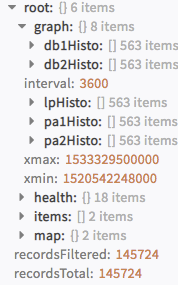
!moloch_spigraph_json startTime=1520542248 stopTime=1533329500
Human Readable Output

8. Retrieve Spiview data in JSON
Retrieve the Spiview data in JSON format.
Base Command
moloch_spiview_json
Input
| Argument Name | Description | Required |
|---|---|---|
| date | The number of hours of data to return (-1 returns all data) | Optional |
| expression | The expression string | Optional |
| spi | A comma-separated list of fields to return data for | Optional |
| startTime | If the date parameter is not set, this is the start time of the date to return. If an integer is used (the number of seconds since Unix EPOC), otherwise parsed using JavaScript Date parser. Usage example: !moloch_sessions_json startTime="2014/02/26 10:27:57". For more examples see here. |
Optional |
| stopTime | If the date parameter is not set, this is the stop time of the date to return. If an integer is used (the number of seconds since Unix EPOC), otherwise parsed using JavaScript Date parser. Usage example: !moloch_sessions_json startTime="2014/02/26 10:27:57". For more examples see here. |
Optional |
| strictly | When this argument is used, the entire session must be within the date range to be observed, otherwise if it overlaps it is displayed | Optional |
| view | The view name to apply before the expression | Optional |
Context Output
There is no context output for this command.
Command Example
!moloch_spiview_json startTime=1520542248 stopTime=1533329500
Human Readable Output

9. Retrieve unique data for a field in JSON
Retrieve unique data for a specified field in JSON format.
Base Command
moloch_unique_json
Input
| Argument Name | Description | Required |
|---|---|---|
| date | The number of hours of data to return (-1 returns all data) | Optional |
| expression | The expression string | Optional |
| field | The database field name to unique on | Required |
| startTime | If the date parameter is not set, this is the start time of the date to return. If an integer is used (the number of seconds since Unix EPOC), otherwise parsed using JavaScript Date parser. Usage example: !moloch_sessions_json startTime="2014/02/26 10:27:57". For more examples see here. |
Optional |
| stopTime | If the date parameter is not set, this is the stop time of the date to return. If an integer is used (the number of seconds since Unix EPOC), otherwise parsed using JavaScript Date parser. Usage example: !moloch_sessions_json startTime="2014/02/26 10:27:57". For more examples see here. |
Optional |
| strictly | When set the entire session must be inside the date range to be observed, otherwise if it overlaps it is displayed | Optional |
| view | The view name to apply before the expression | Optional |
Context Output
There is no context output for this command.
Command Example
!moloch_unique_json date="-1" field="https.status"
Configuration parameters
server— Server URL (e.g. https://192.168.0.1) (required)credentials— Username (required)insecure— Trust any certificate (not secure)
Commands (9)
-
moloch_connections_csvRetrieve the connections data in csv format
-
moloch_connections_jsonRetrieve the connections data in json format
-
moloch_files_jsonReturn a list of files that moloch knows about
-
moloch_sessions_csvRetrieve the session data in csv format
-
moloch_sessions_jsonRetrieve the session data in json format
-
moloch_sessions_pcapRetrieve the raw session data in pcap format
-
moloch_spigraph_jsonRetrieve the spigraph data in json format
-
moloch_spiview_jsonRetrieve the spiview data in json format
-
moloch_unique_jsonRetrieve the unique data for a field in json format
commonfields:
  id: Moloch
  version: -1
name: Moloch
display: Moloch (Deprecated)
deprecated: true
category: Network Security
provider: Open Source
description: Deprecated. Use Arkime instead.
configuration:
- display: Server URL (e.g. https://192.168.0.1)
  name: server
  defaultvalue: ""
  type: 0
  required: true
- display: Username
  name: credentials
  defaultvalue: ""
  type: 9
  required: true
- display: Trust any certificate (not secure)
  name: insecure
  type: 8
  required: false
script:
  script: ''
  type: javascript
  commands:
  - name: moloch_connections_json
    arguments:
    - name: date
      description: The number of hours of data to return, -1 means all data
    - name: dstField
      description: 'The source database field name (Default: a2)'
    - name: expression
      description: The expression string
    - name: iDisplayLength
      description: 'The number of items to return (Default: 5000, Max: 2000000)'
    - name: iDisplayStart
      description: 'The entry to start at (Default: 0)'
    - name: length
      description: 'The number of items to return (Default: 5000, Max: 2000000)'
    - name: srcField
      description: 'The source database field name (Default: a1)'
    - name: start
      description: 'The entry to start at (Default: 0)'
    - name: startTime
      description: 'If date parameter is not set, this is the start time of the date to return. If an interger, the number of seconds since Unix EPOC is used, otherwise parsed with javascript Date parser. Usage example: !moloch_connections_json startTime="2014/02/26 10:27:57". For further examples explore: https://developer.mozilla.org/en-US/docs/Web/JavaScript/Reference/Global_Objects/Date/parse'
    - name: stopTime
      description: 'If date parameter is not set, this is the stop time of the date to return. If an interger, the number of seconds since Unix EPOC is used, otherwise parsed with javascript Date parser. Usage example: !moloch_connections_json stopTime="2014/02/26 11:27:57". For further examples explore: https://developer.mozilla.org/en-US/docs/Web/JavaScript/Reference/Global_Objects/Date/parse'
    - name: strictly
      description: When set the entire session must be inside the date range to be observed, otherwise if it overlaps it is displayed
    - name: view
      description: The view name to apply before the expression
    description: Retrieve the connections data in json format
  - name: moloch_connections_csv
    arguments:
    - name: date
      description: The number of hours of data to return, -1 means all data
    - name: dstField
      description: 'The source database field name (Default: a2)'
    - name: expression
      description: The expression string
    - name: iDisplayLength
      description: 'The number of items to return (Default: 5000, Max: 2000000)'
    - name: iDisplayStart
      description: 'The entry to start at (Default: 0)'
    - name: length
      description: 'The number of items to return (Default: 5000, Max: 2000000)'
    - name: srcField
      description: 'The source database field name (Default: a1)'
    - name: start
      description: 'The entry to start at (Default: 0)'
    - name: startTime
      description: 'If date parameter is not set, this is the start time of the date to return. If an interger, the number of seconds since Unix EPOC is used, otherwise parsed with javascript Date parser. Usage example: !moloch_connections_csv startTime="2014/02/26 10:27:57". For further examples explore: https://developer.mozilla.org/en-US/docs/Web/JavaScript/Reference/Global_Objects/Date/parse'
    - name: stopTime
      description: 'If date parameter is not set, this is the stop time of the date to return. If an interger, the number of seconds since Unix EPOC is used, otherwise parsed with javascript Date parser. Usage example: !moloch_connections_csv stopTime="2014/02/26 11:27:57". For further examples explore: https://developer.mozilla.org/en-US/docs/Web/JavaScript/Reference/Global_Objects/Date/parse'
    - name: strictly
      description: When set the entire session must be inside the date range to be observed, otherwise if it overlaps it is displayed
    - name: view
      description: The view name to apply before the expression
    description: Retrieve the connections data in csv format
  - name: moloch_files_json
    arguments:
    - name: iDisplayLength
      description: 'The number of items to return (Default: 500, Max: 10000)'
    - name: iDisplayStart
      description: 'The entry to start at (Default: 0)'
    - name: length
      description: 'The number of items to return (Default: 500, Max: 10000)'
    - name: start
      description: 'The entry to start at (Default: 0)'
    description: Return a list of files that moloch knows about
  - name: moloch_sessions_json
    arguments:
    - name: date
      description: The number of hours of data to return, -1 means all data
    - name: expression
      description: The expression string
    - name: facets
      description: Also include the aggregation information for maps and time graphs
    - name: iDisplayLength
      description: 'The number of items to return (Default: 100, Max: 2000000)'
    - name: iDisplayStart
      description: 'The entry to start at (Default: 0)'
    - name: length
      description: 'The number of items to return (Default: 100, Max: 2000000)'
    - name: start
      description: 'The entry to start at (Default: 0)'
    - name: startTime
      description: 'If date parameter is not set, this is the start time of the date to return. If an interger, the number of seconds since Unix EPOC is used, otherwise parsed with javascript Date parser. Usage example: !moloch_sessions_json startTime="2014/02/26 10:27:57". For further examples explore: https://developer.mozilla.org/en-US/docs/Web/JavaScript/Reference/Global_Objects/Date/parse'
    - name: stopTime
      description: 'If date parameter is not set, this is the stop time of the date to return. If an interger, the number of seconds since Unix EPOC is used, otherwise parsed with javascript Date parser. Usage example: !moloch_sessions_json stopTime="2014/02/26 11:27:57". For further examples explore: https://developer.mozilla.org/en-US/docs/Web/JavaScript/Reference/Global_Objects/Date/parse'
    - name: strictly
      description: When set the entire session must be inside the date range to be observed, otherwise if it overlaps it is displayed
    - name: view
      description: The view name to apply before the expression
    description: Retrieve the session data in json format
  - name: moloch_sessions_csv
    arguments:
    - name: date
      description: The number of hours of data to return, -1 means all data
    - name: expression
      description: The expression string
    - name: facets
      description: Also include the aggregation information for maps and time graphs
    - name: iDisplayLength
      description: 'The number of items to return (Default: 100, Max: 2000000)'
    - name: iDisplayStart
      description: 'The entry to start at (Default: 0)'
    - name: length
      description: 'the number of items to return (Default: 100, Max: 2000000)'
    - name: start
      description: 'The entry to start at (Default: 0)'
    - name: startTime
      description: 'If date parameter is not set, this is the start time of the date to return. If an interger, the number of seconds since Unix EPOC is used, otherwise parsed with javascript Date parser. Usage example: !moloch_sessions_csv startTime="2014/02/26 10:27:57". For further examples explore: https://developer.mozilla.org/en-US/docs/Web/JavaScript/Reference/Global_Objects/Date/parse'
    - name: stopTime
      description: 'If date parameter is not set, this is the stop time of the date to return. If an interger, the number of seconds since Unix EPOC is used, otherwise parsed with javascript Date parser. Usage example: !moloch_sessions_csv stopTime="2014/02/26 11:27:57". For further examples explore: https://developer.mozilla.org/en-US/docs/Web/JavaScript/Reference/Global_Objects/Date/parse'
    - name: strictly
      description: When set the entire session must be inside the date range to be observed, otherwise if it overlaps it is displayed
    - name: view
      description: The view name to apply before the expression
    description: Retrieve the session data in csv format
  - name: moloch_sessions_pcap
    arguments:
    - name: date
      description: The number of hours of data to return, -1 means all data
    - name: expression
      description: The expression string, used if ids not set
    - name: ids
      description: The list of ids to return
    - name: iDisplayLength
      description: 'The number of items to return (Default: 100, Max: 2000000)'
    - name: iDisplayStart
      description: 'The entry to start at (Default: 0)'
    - name: length
      description: 'The number of items to return (Default: 100, Max: 2000000)'
    - name: segments
      description: When set return linked segments
    - name: start
      description: 'The entry to start at (Default: 0)'
    - name: startTime
      description: 'If date parameter is not set, this is the start time of the date to return. If an interger, the number of seconds since Unix EPOC is used, otherwise parsed with javascript Date parser. Usage example: !moloch_sessions_pcap startTime="2014/02/26 10:27:57". For further examples explore: https://developer.mozilla.org/en-US/docs/Web/JavaScript/Reference/Global_Objects/Date/parse'
    - name: stopTime
      description: 'If date parameter is not set, this is the stop time of the date to return. If an interger, the number of seconds since Unix EPOC is used, otherwise parsed with javascript Date parser. Usage example: !moloch_sessions_pcap stopTime="2014/02/26 11:27:57". For further examples explore: https://developer.mozilla.org/en-US/docs/Web/JavaScript/Reference/Global_Objects/Date/parse'
    - name: strictly
      description: When set the entire session must be inside the date range to be observed, otherwise if it overlaps it is displayed
    - name: view
      description: The view name to apply before the expression
    description: Retrieve the raw session data in pcap format
  - name: moloch_spigraph_json
    arguments:
    - name: date
      description: The number of hours of data to return, -1 means all data
    - name: expression
      description: The expression string
    - name: field
      description: The database field name to spigraph on
    - name: size
      description: The number of unique values to return
    - name: startTime
      description: 'If date parameter is not set, this is the start time of the date to return. If an interger, the number of seconds since Unix EPOC is used, otherwise parsed with javascript Date parser. Usage example: !moloch_spigraph_json startTime="2014/02/26 10:27:57". For further examples explore: https://developer.mozilla.org/en-US/docs/Web/JavaScript/Reference/Global_Objects/Date/parse'
    - name: stopTime
      description: 'If date parameter is not set, this is the stop time of the date to return. If an interger, the number of seconds since Unix EPOC is used, otherwise parsed with javascript Date parser. Usage example: !moloch_spigraph_json stopTime="2014/02/26 11:27:57". For further examples explore: https://developer.mozilla.org/en-US/docs/Web/JavaScript/Reference/Global_Objects/Date/parse'
    - name: strictly
      description: When set the entire session must be inside the date range to be observed, otherwise if it overlaps it is displayed
    - name: view
      description: The view name to apply before the expression
    description: Retrieve the spigraph data in json format
  - name: moloch_spiview_json
    arguments:
    - name: date
      description: The number of hours of data to return, -1 means all data
    - name: expression
      description: The expression string
    - name: spi
      description: A comma separated list of fields to return data for
    - name: startTime
      description: 'If date parameter is not set, this is the start time of the date to return. If an interger, the number of seconds since Unix EPOC is used, otherwise parsed with javascript Date parser. Usage example: !moloch_spiview_json startTime="2014/02/26 10:27:57". For further examples explore: https://developer.mozilla.org/en-US/docs/Web/JavaScript/Reference/Global_Objects/Date/parse'
    - name: stopTime
      description: 'If date parameter is not set, this is the stop time of the date to return. If an interger, the number of seconds since Unix EPOC is used, otherwise parsed with javascript Date parser. Usage example: !moloch_spiview_json stopTime="2014/02/26 11:27:57". For further examples explore: https://developer.mozilla.org/en-US/docs/Web/JavaScript/Reference/Global_Objects/Date/parse'
    - name: strictly
      description: When set the entire session must be inside the date range to be observed, otherwise if it overlaps it is displayed
    - name: view
      description: The view name to apply before the expression
    description: Retrieve the spiview data in json format
  - name: moloch_unique_json
    arguments:
    - name: date
      description: The number of hours of data to return, -1 means all data
    - name: expression
      description: The expression string
    - name: field
      required: true
      default: true
      description: The database field name to unique on
    - name: startTime
      description: 'If date parameter is not set, this is the start time of the date to return. If an interger, the number of seconds since Unix EPOC is used, otherwise parsed with javascript Date parser. Usage example: !moloch_unique_json startTime="2014/02/26 10:27:57". For further examples explore: https://developer.mozilla.org/en-US/docs/Web/JavaScript/Reference/Global_Objects/Date/parse'
    - name: stopTime
      description: 'If date parameter is not set, this is the stop time of the date to return. If an interger, the number of seconds since Unix EPOC is used, otherwise parsed with javascript Date parser. Usage example: !moloch_unique_json stopTime="2014/02/26 11:27:57". For further examples explore: https://developer.mozilla.org/en-US/docs/Web/JavaScript/Reference/Global_Objects/Date/parse'
    - name: strictly
      description: When set the entire session must be inside the date range to be observed, otherwise if it overlaps it is displayed
    - name: view
      description: The view name to apply before the expression
    description: Retrieve the unique data for a field in json format
fromversion: 5.0.0
tests:
- no test