Palo Alto Minemeld Deprecated
Deprecated. MineMeld streamlines the aggregation, enforcement and sharing of threat intelligence.
Data Enrichment & Threat Intelligence · Deprecated Content (Deprecated)
Details
| ID | Palo Alto Minemeld |
|---|---|
| Provider | Open Source |
| Category | Data Enrichment & Threat Intelligence |
| From Version | 5.0.0 |
| Docker Image | demisto/python:2.7.18.20958 |
README
Use the Palo Alto Networks MineMeld integration to manage your MineMeld miners from within Cortex XSOAR. All commands require the super admin role.
Use Cases
- Add or remove indicators from a miner.
- Fetch miners, IP addresses, files, domains, and URLs.
- Get a list of all your miners.
NOTE: Indicators on an allow list get a DBot score of 1. Indicators on a block list get a DBot score of 3.
Supported Miner Prototypes
- localDB
- listURLGeneric
- listIPv4Generic
- listDomainGeneric
- listIPv6Generic
Configure Palo Alto Networks MineMeld on Cortex XSOAR:
- Navigate to Settings > Integrations > Servers & Services.
- Search for Palo Alto Networks MineMeld.
- Click Add instance to create and configure a new integration instance.
- Name: A textual name for the integration instance.
- Mine
- meld URL : The URL of your MineMeld environment.
- Username & Password : Your credentials in the MineMeld environment.
- Block list names : Comma separated list of miners, to be added to the Cortex XSOAR block list.
- Allow list names: CSV list of miners to add to the Cortex XSOAR allow list.
- Use system proxy settings
- Click Test to validate the URLs and connection.
Commands
You can execute these commands from the Cortex XSOAR CLI, as part of an automation, or in a playbook. After you successfully execute a command, a DBot message appears in the War Room with the command details. All commands require the super admin role.
- Add an indicator to a miner: minemeld-add-to-miner
- Remove an indicator from a miner: minemeld-remove-from-miner
- Get miner details: minemeld-retrieve miner
- Get an indicator from a miner: minemeld-get-indicator-from-miner
- Get IP address indicator: ip
- Get file indicator: file
- Get domain indicator: domain
- Get URL indicator: url
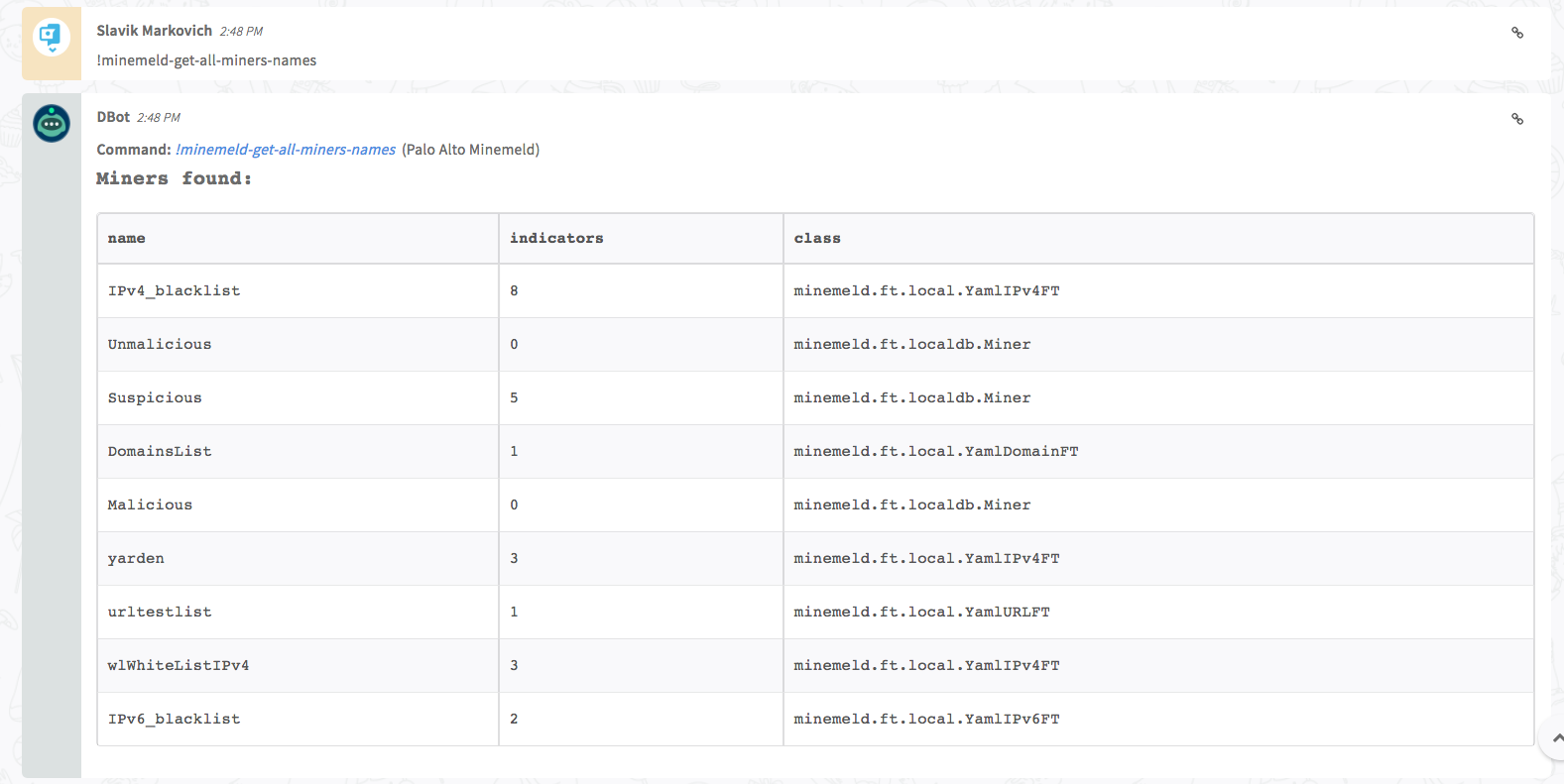
- Get a list of all the miners: minemeld-get-all-miners-names
1. Add an indicator to a miner
Adds a specified indicator to a specified miner. Do not add a single indicator to multiple miners.
Base Command
minemeld-add-to-miner
Input
| Argument Name | Description | More Information |
|---|---|---|
| miner | Miner name | To find the miner name, search for List of Supported Nodes on your MineMeld environment. |
| indicator | Indicator to add to miner |
Any type of indicator. Examples of valid indicators:
|
| comment | Textual description or comment for the indicator | - |
Context output
There is no context output for this command.
Command example
!minemeld-add-to-miner miner=Supicious indicator=7.7.7.7
War Room Output

2. Remove an indicator from a miner
Removes a specified indicator from a specified miner.
Base Command
minemeld-remove-from-miner
Input
| Argument Name | Description | More Information |
|---|---|---|
| miner | Miner name | To find the miner name, search for List of Supported Nodes on your MineMeld environment. |
| indicator | The indicator to remove |
Any type of indicator. Examples of valid indicators:
|
Context output
There is no context output for this command.
Command example
!minemeld-remove-from-miner miner=Suspicious indicator=7.7.7.7
War Room Output

3. Get miner details
Retrieves information about a specified miner.
Base Code
minemeld-retrieve-miner
Input
| Argument Name | Description | More Information |
|---|---|---|
| miner | Miner name | To select all miners type miner=all. |
Context Output
| Path | Description |
|---|---|
| MineMeld.Miner | Entire miner object |
| MineMeld.Miner.name | Miner name |
| MineMeld.Miner.class | Miner class |
| MineMeld.Indicators | Entire indicator object |
| MineMeld.Indicators.miner | Miner of indicator |
| MineMeld.Indicators.type | Indicator type |
| MineMeld.Indicators.indicator | Indicator value |
| MineMeld.Indicators.comment | Indicator comment |
Command Example
!minemeld-retrieve-miner miner=Suspicious
War Room Output
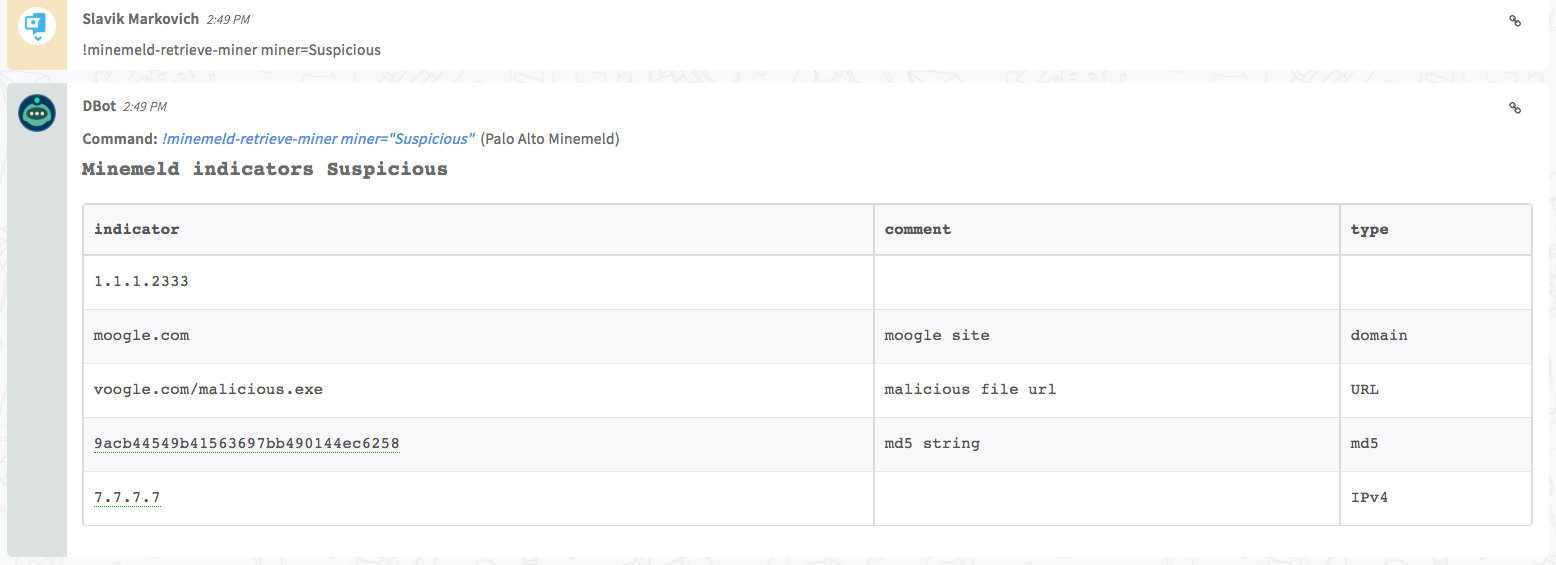
4. Get an indicator within a miner
Retrieves information about a specified indicator associated with a specified miner.
Base Command
minemeld-get-indicator-from-miner
Input
| Argument Name | Description |
|---|---|
| miner | Miner name |
| indicator |
Any type of indicator. Examples of valid indicators:
|
Context Output
| Path | Description |
|---|---|
| MineMeld.Miner | Entire miner object |
| MineMeld.Miner.name | Miner name |
| MineMeld.Indicators | Entire indicator object |
| MineMeld.Indicators.miner | Miner of the indicator |
| MineMeld.Indicators.type | Indicator type |
| MineMeld.Indicators.indicator | Indicator value |
| MineMeld.Indicators.comment | Indicator comment |
Command Example
!minemeld-get-indicator-from-miner miner=Suspicious indicator=7.7.7.7
War Room Output
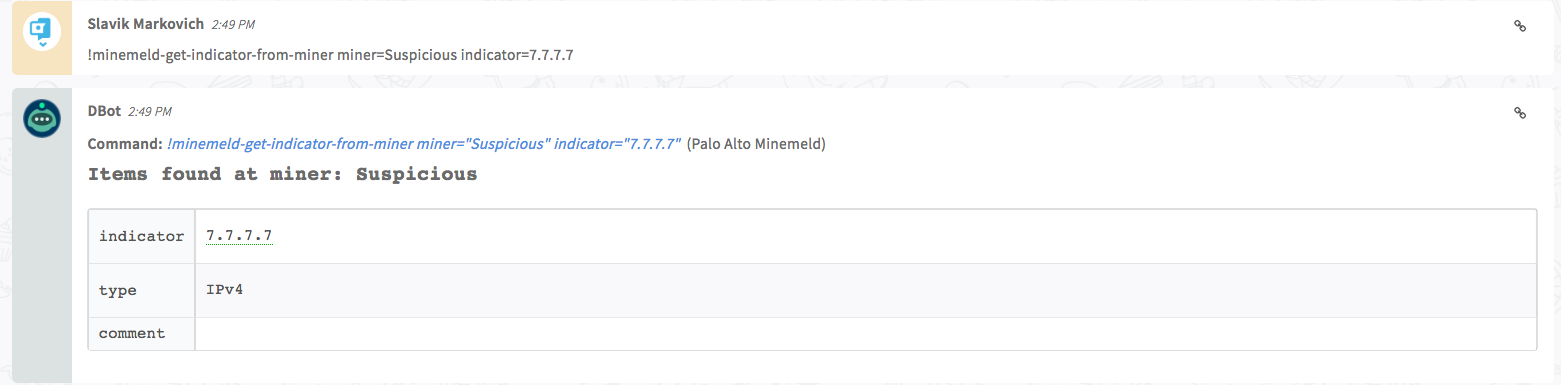
5. Get IP address indicator
Retrieves all occurrences of the specified IP address, including the context in which it is found.
For this command to succeed, the miner (associated with the IP address indicator) has to be on a Cortex XSOAR block list or allow list.
Base Command
ip
Input
| Argument Name | Description |
|---|---|
| ip | IP address |
Context Output
| Path | Description |
|---|---|
| DBotScore.Indicator | The Indicator |
| DBotScore.Type | The Indicator type |
| DBotScore.Vendor | The DBot score vendor |
| DBotScore.Score | The DBot score |
| IP.Malicious.Vendor | For malicious IP addresses, the vendor defined the IP address as malicious |
| IP.Malicious.Description | For malicious IP addresses, the reason why the vendor defined the IP address as malicious |
| IP.Address | IP address |
| IP.MineMeld.Indicators | Entire indicator object |
| IP.MineMeld.Indicators.indicator | Indicator value |
| IP.MineMeld.Indicators.miner | Miner of the indicator |
| IP.MineMeld.Indicators.type | Indicator type |
| IP.MineMeld.Indicators.comment | Indicator comment |
| MineMeld.Indicators | Entire indicator object |
| MineMeld.Indicators.indicator | Indicator value |
| MineMeld.Indicators.miner | Miner of the indicator |
| MineMeld.Indicators.type | Indicator type |
| MineMeld.Indicators.comment | Indicator comment |
| MineMeld.Miner | Entire miner object |
| MineMeld.Miner.name | Miner name |
Command Example
!ip ip=7.7.7.7 using-brand="Palo Alto Minemeld"
War Room Output
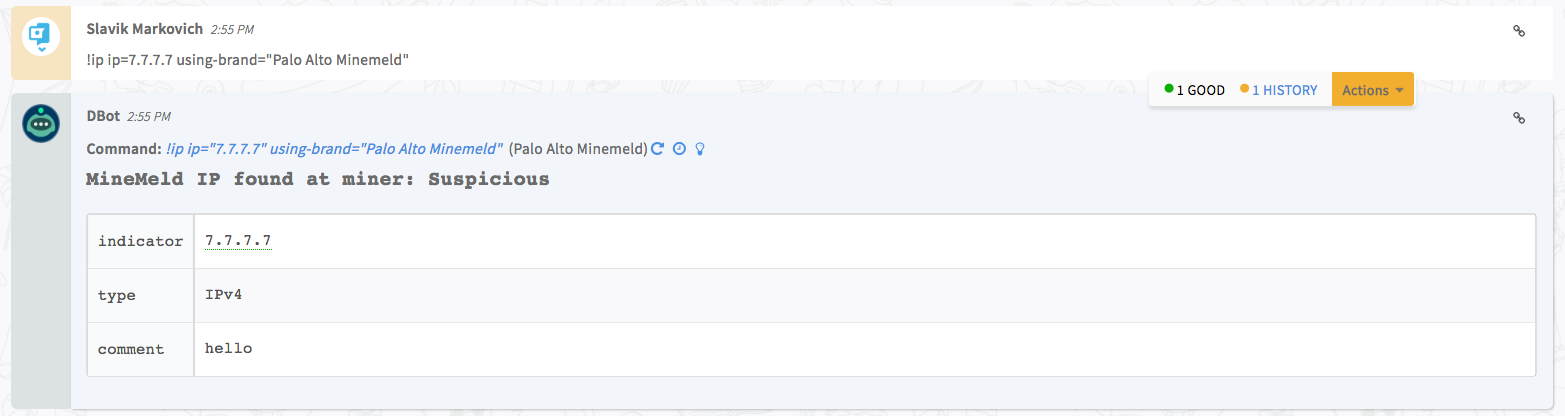
6. Get file indicator
Retrieves all occurrences of the specified file, including the context in which it is found.
For this command to succeed, the miner (associated with the file indicator) has to be on a Cortex XSOAR block list or allow list.
Base Command
file
Input
| Argument Name | Description |
|---|---|
| file | Any type of file hash |
Context Output
| Path | Description |
|---|---|
| DBotScore.Indicator | The Indicator |
| DBotScore.Type | The Indicator type |
| DBotScore.Vendor | The DBot score vendor |
| DBotScore.Score | The DBot score |
| File.Malicious.Vendor | For malicious files, the vendor that defined the file as malicious |
| File.Malicious.Description | For malicious files, the reason why the vendor defined the file as malicious |
| File.MineMeld.Indicators | Entire indicator object |
| File.MineMeld.Indicators.indicator | Indicator value |
| File.MineMeld.Indicators.miner | Miner of the indicator. |
| File.MineMeld.Indicators.type | Indicator type |
| File.MineMeld.Indicators.comment | Indicator comment |
| MineMeld.Indicators | Entire indicator object |
| MineMeld.Indicators.indicator | Indicator value |
| MineMeld.Indicators.miner | Miner of the indicator |
| MineMeld.Indicators.type | Indicator type |
| MineMeld.Indicators.comment | Indicator comment |
| MineMeld.Miner | Entire miner object |
| MineMeld.Miner.name | Miner name |
| File.MD5 | MD5 hash of the file |
| File.SHA1 | SHA-1 hash of the file |
| File.SHA256 | SHA-256 hash of the file |
Command example
!file file=9acb44549b41563697bb490144ec6258 using-brand="Palo Alto Minemeld"
War Room Output
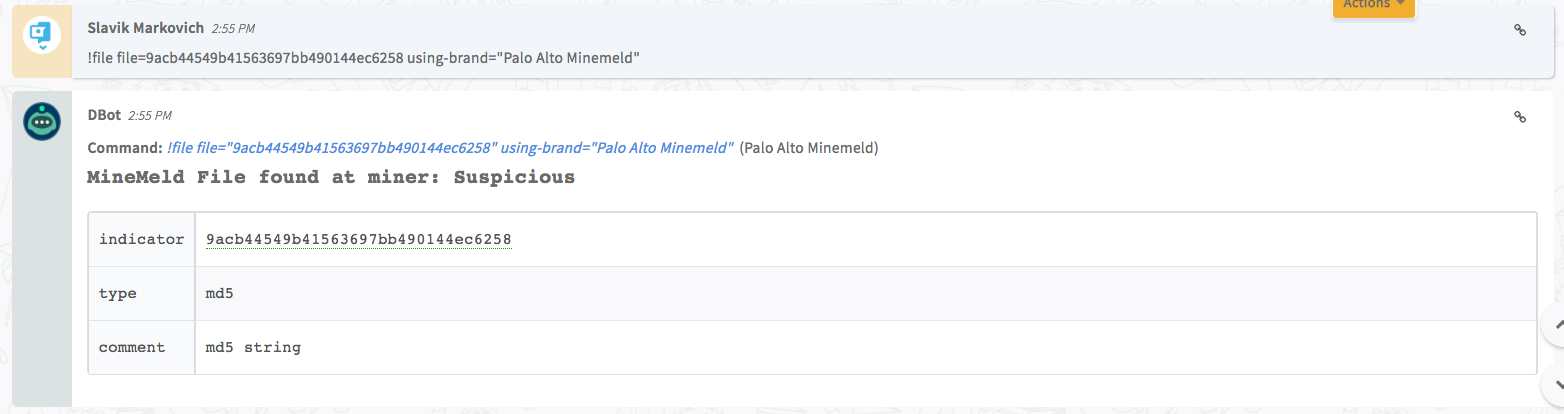
7. Get domain indicator
Retrieves all occurrences of the specified domain, including the context in which it is found.
For this command to succeed, the miner (associated with the domain indicator) has to be on a Cortex XSOAR block list or allow list.
Base Command
domain
Input
| Argument Name | Description |
|---|---|
| domain | Domain |
Context Output
| Path | Description |
|---|---|
| DBotScore.Indicator | The Indicator |
| DBotScore.Type | The Indicator type |
| DBotScore.Vendor | The DBot score vendor |
| DBotScore.Score | The DBot score |
| Domain.Malicious.Vendor | For malicious domains, the vendor that defined the domain as malicious |
| Domain.Malicious.Description | For malicious domains, the reason that the vendor defined the domain as malicious |
| Domain.Name | Domain name (value) |
| Domain.MineMeld.Indicators | Entire indicator object |
| Domain.MineMeld.Indicators.indicator | Indicator value |
| Domain.MineMeld.Indicators.miner | Indicator miner |
| Domain.MineMeld.Indicators.type | Indicator type |
| Domain.MineMeld.Indicators.comment | Indicator comment |
| MineMeld.Indicators | Entire indicator object |
| MineMeld.Indicators.indicator | Indicator value |
| MineMeld.Indicators.miner | Miner of the indicator |
| MineMeld.Indicators.type | Indicator type |
| MineMeld.Indicators.comment | Indicator comment |
| MineMeld.Miner | Entire miner object |
| MineMeld.Miner.name | Miner name |
Command example
!domain domain=moogle.com using-brand="Palo Alto Minemeld"
War Room Output

8. Get URL indicator
Retrieves all occurrences of the specified URL, including the context in which it is found.
For this command to succeed, the miner (associated with the URL indicator) has to be on a Cortex XSOAR block list or allow list.
Base Command
url
Input
| Argument Name | Description |
|---|---|
| url | URL to retrieve instances for |
Context Output
| Path | Description |
|---|---|
| DBotScore.Indicator | The Indicator |
| DBotScore.Type | The Indicator type |
| DBotScore.Vendor | The DBot score vendor |
| DBotScore.Score | The DBot score |
| URL.Malicious.Vendor | For malicious URLs, the vendor that defined the URL as malicious |
| URL.Malicious.Description | For malicious URLs, the reason that the vendor defined the URL as malicious |
| URL.Data | URL data (value) |
| URL.MineMeld.Indicators | Entire indicator object |
| URL.MineMeld.Indicators.indicator | Indicator value |
| URL.MineMeld.Indicators.miner | Miner of the indicator |
| URL.MineMeld.Indicators.type | Indicator type |
| URL.MineMeld.Indicators.comment | Indicator comment |
| MineMeld.Indicators | Entire indicator object |
| MineMeld.Indicators.indicator | Indicator value |
| MineMeld.Indicators.miner | Miner of the Indicator |
| MineMeld.Indicators.type | Indicator type |
| MineMeld.Indicators.comment | Indicator comment |
| MineMeld.Miner | Entire miner object |
| MineMeld.Miner.name | Miner name |
Command example
!url url=voogle.com/malicious.exe using-brand="Palo Alto Minemeld"
War Room Output

9. Get a list of all the miners
Retrieves the names of all the miners, the class of each miner, and how many indicators are associated with each miner.
Base Command
minemeld-get-all-miners-names
Input
There is no input for this command.
Context Output
| Path | Description |
|---|---|
| MineMeld.Miner | Entire miner object |
| MineMeld.Miner.name | Miner name |
| MineMeld.Miner.class | Miner class |
| MineMeld.Miner.indicators | Number of miner indicators |
Command example
!minemeld-get-all-miners-names
War Room Output
Configuration parameters
url— MineMeld url e.g.(https://192.0.0.1/) (required)credentials— Username (required)blacklist— Block list names e.g.(BlackListIPv4, BlackListURL,Malicious)stateless— Statelesswhitelist— Whitelist names e.g.(wlWhiteListIPv4,wlWhiteListDomain,Unmalicious)proxy— Use system proxy settings
Commands (9)
-
domainSearches for a specified domain on lists.
-
fileSearch for file on lists
-
ipSearches for IP addresses on miners.
-
minemeld-add-to-minerAdd an indicator to a miner.
-
minemeld-get-all-miners-namesReturns all miner names (with supported classes of custom indicators lists).
-
minemeld-get-indicator-from-minerGets indicators from a miner's list.
-
minemeld-remove-from-minerRemoves an indicator from a miner.
-
minemeld-retrieve-minerGets the indicators list for a miner.
-
urlSearches for the specified URL on lists.
There are 2 list types, each list type holds the names of the miners(lists) that are accounted as threat intel lists (block list, allow list)
Each list type represents different DbotScore on Demisto.
Block list - if indicator is found in one of the block lists then the indicator will get DbotScore  3, which is considered malicious in Demisto.
Allow list - if indicator is found in one of the allow lists then the indicator will get DbotScore 1 which is considered good in Demisto.
If indicator is not found in any list, it will get DbotScore of 0 - unknown severity.