TruSTAR Deprecated
Deprecated. Not supported since TrueSTAR was acquired by Splunk, No available replacement.
Data Enrichment & Threat Intelligence · TruSTAR (Deprecated)
Details
| ID | TruSTAR |
|---|---|
| Provider | Cisco Systems |
| Category | Data Enrichment & Threat Intelligence |
| From Version | 5.0.0 |
| Docker Image | demisto/trustar:20.1.0.8039 |
| Supported Modules | Agentix XSIAM |
README
Deprecated. Use the TruSTAR v2 integration instead.
This integration was integrated and tested with TruSTAR v1.3. (TruSTAR Python SDK.)
Use Cases
- Search for indicators
- Add and remove indicators to the allow list
- Filter reports using indicators
- Submit, update, delete, search, and get reports
Prerequisites
Access your TruSTAR environment to obtain an API key and an API secret.
Navigate to Settings > API > API Credentials.
Configure TruSTAR on Cortex XSOAR
- Navigate to Settings > Integrations > Servers & Services.
- Search for TruSTAR.
- Click Add instance to create and configure a new integration instance.
- Name: a textual name for the integration instance
- Server URL (example: https://192.168.0.1)
- TruSTAR API Key
- TruSTAR API Secret
- Do not validate server certificate (not secure)
- Use system proxy settings
- File Threshold (LOW, MEDIUM, HIGH): minimum TruSTAR priority level to consider the file malicious
- URL Threshold (LOW, MEDIUM, HIGH):minimum TruSTAR priority level to consider the URL malicious
- IP Threshold (LOW, MEDIUM, HIGH):minimum TruSTAR priority level to consider the IP malicious
- Domain Threshold (LOW, MEDIUM, HIGH):minimum TruSTAR priority level to consider the domain malicious
- Click Test to validate connectivity and credentials.
Commands
You can execute these commands from the Cortex XSOAR CLI, as part of an automation, or in a playbook. After you successfully execute a command, a DBot message appears in the War Room with the command details.
- Return a list of related indicators: trustar-related-indicators
- Trending indicators: trustar-trending-indicators
- Find an indicator: trustar-search-indicators
- Submit a report: trustar-submit-report
- Update a report: trustar-update-report
- Return report details: trustar-report-details
- Delete a report: trustar-delete-report
- Generate a report: trustar-get-reports
- Return correlated reports: trustar-correlated-reports
- Search reports: trustar-search-reports
- Add indicators to allow list: trustar-add-to-whitelist
- Remove indicators from allow list: trustar-remove-from-whitelist
- Get all enclaves: trustar-get-enclaves
- Check the reputation of a file: file
- Check the reputation of an IP address: ip
- Check the reputation of a URL: url
- Check the reputation of a domain: domain
1. Return a list of related indicators
Returns a list of indicators related to a specified indicator.
Command Example
!trustar-related-indicators indicators=wannacry.exe
Inputs
| Argument Name | Description |
| indicators |
Example indicator types: IP address, email address, URL, MD5, SHA-1, SHA-256, registry key, malware name, and so on |
| enclave-ids |
CSV of enclave IDs. Returns indicators found in reports from these enclaves only (default - all enclaves you have READ access to) |
| page-number | Page of the result set to get |
| page-size | Number of results per page |
Context Output
| Path | Description |
| File.Name | File name |
| File.MD5 | File MD5 |
| File.SHA1 | File SHA-1 |
| File.SHA256 | File SHA-256 |
| URL.Address | URL address |
| IP.Address | IP address |
| Account.Email.Address | Email address |
| RegistryKey.Path | Registry key path |
| CVE.ID | CVE ID |
Raw Output
 [
    {
       "indicatorType": "SOFTWARE",
       "value": "00000000.res"
    }
 ]
2. Trending indicators
Returns trending indicators.
Command Example
!trustar-trending-indicators type=MALWARE raw-response=true
Inputs
| Argument Name | Description |
| type |
Types of indicators to return (by default, all indicator types except for CVE and MALWARE will be returned) |
| days-back |
Number of days to count correlations for |
Context Output
| Path | Description |
| File.Name | File name |
| File.MD5 | File MD5 |
| File.SHA1 | File SHA-1 |
| File.SHA256 | File SHA-256 |
| URL.Address | URL address |
| IP.Address | IP address |
| Account.Email.Address | Email address |
| RegistryKey.Path | Registry key path |
| CVE.ID | CVE ID |
Raw Output
Formatted JSON Data
[
   {
      "correlationCount":109,
      "indicatorType":"MALWARE",
      "value":"IEXPLORE"
   }
]
3. Find an indicator
Search for a specific indicator.
Command Example
!trustar-search-indicators search-term=IEXPLORE
Inputs
| Argument Name | Description |
| search-term |
Term to search for |
| enclave-ids |
CSV of enclave IDs. Returns indicators found in reports from these enclaves only (default - all enclaves you have READ access to). |
| page-number | Page of the result set to get |
| page-size | Number of results per page |
Context Output
| Path | Description |
| File.Name | File name |
| File.MD5 | File MD5 |
| File.SHA1 | File SHA-1 |
| File.SHA256 | File SHA-256 |
| URL.Address | URL address |
| IP.Address | IP address |
| Account.Email.Address | Email address |
| RegistryKey.Path | Registry key path |
| CVE.ID | CVE ID |
Raw Output
[
   {
      "indicatorType":"SOFTWARE",
      "priorityLevel":"HIGH",
      "value":"iexplore.exe",
      "whitelisted":false
   }
]
4. Submit a report
Creates a new report. This command does not generate content.
Command Example
!trustar-submit-report report-body=1.2.3.4,domain.com title=DailyReport distribution-type=ENCLAVE enclave-ids=3435626a-d0d6-4ba5-a229-1dd645d34da5
Inputs
| Argument Name | Description |
| title |
Title of the report |
| report-body |
Text content of report |
| enclave-ids |
CSV of TruSTAR-generated enclave IDs. Mandatory if the distribution type is ENCLAVE. NOTE: Use the enclave ID, not the enclave name. |
| distribution-type | Distribution type of the report |
| external-url |
URL for the external report that this originated from, if one exists. Limited to 500 alphanumeric characters. Each company must have a unique URL for all of its reports. |
| time-began |
ISO-8601 formatted incident time with timezone (for example: 2016-09-22T11:38:35+00:00) (default is current time) |
Context Output
| Path | Description |
| TruSTAR.Report.reportTitle | Title of the report |
| TruSTAR.Report.reportBody | Body of the report |
| TruSTAR.Report.id | ID of the report |
Raw Output
{
   "id":"ddda0c95-0b87-44b3-b38c-591f387f1be7",
   "reportBody":"1.2.3.4,domain.com",
   "reportTitle":"DailyReport"
}
5. Update a report
Modifies an existing report.
Inputs
| Argument Name | Description |
| report-id |
TruSTAR report ID or external tracking ID |
| title |
Title of the report |
| report-body |
Text content of report |
| enclave-ids |
CSV of TruSTAR-generated enclave IDs. Mandatory if the distribution type is ENCLAVE NOTE: Use the enclave ID, not the enclave name |
| external-url |
URL for the external report that this originated from, if one exists. Limit 500 alphanumeric characters. Each company must have a unique URL for all of its reports. |
| distribution-type |
Distribution type of the report |
| time-began |
ISO-8601 formatted incident time with timezone (for example: 2016-09-22T11:38:35+00:00) Default is current time. |
Context Output
| Path | Description |
| TruSTAR.Report.reportTitle | Title of the report |
| TruSTAR.Report.reportBody | Body of the report |
| TruSTAR.Report.id |
ID of the report |
Raw Output
{
   "id":"ddda0c95-0b87-44b3-b38c-591f387f1be7",
   "reportBody":"email@gmail.com",
   "reportTitle":"UpdateDailyReport"
}
6. Return report details
Returns report metadata.
| Argument Name | Description |
| report-id |
TruSTAR report ID or external tracking ID |
| id-type |
Type of report ID |
Context Output
| Path | Description |
| TruSTAR.Report.reportTitle | Title of the report |
| TruSTAR.Report.reportBody | Body of the report |
| TruSTAR.Report.id | ID of the report |
Raw Output
{
   "created":"2018-04-04 08:09:05",
   "distributionType":"ENCLAVE",
   "enclaveIds":"3435626a-d0d6-4ba5-a229-1dd645d34da5",
   "id":"ddda0c95-0b87-44b3-b38c-591f387f1be7",
   "reportBody":"email@gmail.com",
   "timeBegan":"2018-04-04 08:12:13",
   "title":"UpdateDailyReport",
   "updated":"2018-04-04 08:12:07"
}
7. Delete a report
Deletes specified report.
Input
| Argument Name | Description |
| report-id |
TruSTAR report ID or external tracking ID |
| id-type |
Type of report ID |
Context Output
There is no context output for this command.
Raw output
Report ddda0c95-0b87-44b3-b38c-591f387f1be7 was successfully deleted
8. Generate a report
Generates a report.
Command Example
!trustar-get-reports enclave-ids=3435626a-d0d6-4ba5-a229-1dd645d34da5:
Input
| Argument Name | Description |
| from |
Start of time window. Format is YY-MM-DD HH:MM:SS (example: 2018-01-01 10:30:00) Based on updated time, not created time. (Default is 1 day ago) |
| to |
End of time window Format is YY-MM-DD HH:MM:SS (example: 2018-01-01 10:30:00) Based on updated time, not created time. (Default is current time) |
| distribution-type |
Whether to search for reports only in enclaves, or in the COMMUNITY too |
| enclave-ids |
CSV of enclave IDs to search for reports in. Even if distribution-type is COMMUNITY, these enclaves will still be searched as well (default: all enclaves the user has READ access to) |
| tags |
Names of tags to filter by NOTE: only reports containing ALL of these tags are returned |
| excluded-tags |
Tags excluded from the report NOTE: Reports containing ANY of these tags are excluded from the results. |
Context Output
| Path | Description |
| TruSTAR.Report.reportTitle | Title of the report |
| TruSTAR.Report.reportBody | Body of the report |
| TruSTAR.Report.id | ID of the report |
Raw Output
[
   {
      "created":"2018-04-04 08:23:05",
      "distributionType":"ENCLAVE",
      "enclaveIds":"3435626a-d0d6-4ba5-a229-1dd645d34da5",
      "id":"d445c743-8cd8-4c38-bcf4-7879f31ca6bf",
      "reportBody":"1.2.3.4,domain.com",
      "timeBegan":"2018-04-04 08:23:12",
      "title":"DailyReport",
      "updated":"2018-04-04 08:23:05"
   }
]
9. Return correlated reports
Returns reports correlating to specified indicators.
Command Example
!trustar-correlated-reports indicators=NANOCORE:
Inputs
| Argument Name | Description |
| indicators |
Indicator value of any type (for example: an IP address, email address, URL, MD5, SHA-1, SHA-256, Registry Key, Malware name) |
| enclave-ids |
CSV of enclave IDs. returns indicators found in reports from these enclaves only (default: all enclaves the user has READ access to) |
| page-number |
Which page of the result set to get |
| page-size |
Number of results per page |
| distribution-type |
Distribution type of the report |
Context Output
There is no context output for this command.
Raw Output
{
   "created":"2018-04-04 12:14:31",
   "distributionType":"ENCLAVE",
   "enclaveIds":[

   ],
   "id":"c7343c52-13d8-4125-8693-e0d4648a2e49",
   "reportBody":"",
   "timeBegan":"2018-04-04 12:14:27",
   "title":"hybridanalysispublicfeed-11a5d43169626282dd899a1bb0f96fe0-2018-04-04 11:24:52",
   "updated":"2018-04-04 12:14:31"
}
10. Search reports
Returns reports based on search terms.
Command Example
!trustar-search-reports search-term=CVE
Inputs
| Argument Name | Description |
| search-term |
Term to search for |
| enclave-ids |
CSV of enclave IDs. Returns indicators found in reports from these enclaves only (defaults to all of the user’s enclaves) |
Context Output
There is no context output for this command.
Raw Output
[
   {
      "created":"2018-01-31 20:04:34",
      "distributionType":"ENCLAVE",
      "enclaveIds":[

      ],
      "id":"57bffb4b-bcf7-44c8-9e14-4116a46fcb95",
      "timeBegan":"2018-04-04T14:00:05.636840+00:00",
      "title":"CVE-2018-2714",
      "updated":"2018-01-31 20:04:34"
   }
]
11. Add indicators to allow list
Adds indicators to your allow list.
Inputs
| Argument Name | Description |
| indicators |
CSV of indicators to add to allow list (example: evil.com,101.43.52.224) |
Context Output
There is no context output for this command.
Raw output:
Added to the allow list successfully
12. Remove indicators from allow list
Remove indicator from your allow list.
Inputs
| Argument Name | Description |
| indicator |
Value of the indicator to delete |
| indicator-type |
Type of indicator to delete |
Context Output
There is no context output for this command.
Raw Output
Removed from the allow list successfully
13. Get all enclaves
Returns all enclaves.
Input
There is no input for this command.
Context Output
There is no context output for this command.
Raw output:
[
   {
      "create":false,
      "id":"0e4443fc-2b50-4756-b5e0-4ea30030bcb3",
      "name":"Broadanalysis",
      "read":true,
      "type":"OPEN",
      "updated":false
   }
]
14. Check the reputation of a file
Checks the reputation of a file in TruSTAR.
Base Command
file
Input
| Argument Name | Description | Required |
|---|---|---|
| file | File hash - MD5, SHA-1 or SHA-256 | Required |
| threshold | If ThreatScore is greater or equal than the threshold, then ip will be considered malicious | Optional |
Context Output
| Path | Type | Description |
|---|---|---|
| File.MD5 | string | File MD5 |
| File.SHA1 | string | File SHA-1 |
| File.SHA256 | string | File SHA-256 |
| File.Malicious.Vendor | string | For malicious files, the vendor that made the decision |
| DBotScore.Indicator | string | The indicator we tested |
| DBotScore.Type | string | The type of the indicator |
| DBotScore.Vendor | string | Vendor used to calculate the score |
| DBotScore.Score | number | The actual score |
| TruSTAR.File.Value | string | Indicator value |
| TruSTAR.File.Whitelisted | boolean | Is the indicator on allow list |
| TruSTAR.File.Priority | string | Indicator's priority level by TruSTAR |
Command Example
!file file=84c82835a5d21bbcf75a61706d8ab549 threshold=LOW
Context Example
{
    "DBotScore": {
        "Vendor": "TruSTAR",
        "Indicator": "84c82835a5d21bbcf75a61706d8ab549",
        "Score": 3,
        "Type": "file"
    },
    "TruSTAR": {
        "File": {
            "Priority": "LOW",
            "Whitelisted": false,
            "Value": "84c82835a5d21bbcf75a61706d8ab549"
        }
    },
    "File": {
        "Malicious": {
            "Vendor": "TruSTAR"
        },
        "MD5": "84c82835a5d21bbcf75a61706d8ab549"
    }
}
Human Readable Output

15. Check the reputation of an IP address
Checks the reputation of an IP address in TruSTAR.
Base Command
ip
Input
| Argument Name | Description | Required |
|---|---|---|
| ip | IP address (e.g. 8.8.8.8) or a CIDR (e.g. 1.1.1.0/18) | Required |
| threshold | If ThreatScore is greater or equal than the threshold, then ip will be considered malicious | Optional |
Context Output
| Path | Type | Description |
|---|---|---|
| IP.Address | string | IP Address |
| IP.Malicious.Vendor | string | For malicious IPs, the vendor that made the decision |
| IP.Malicious.Description | string | For malicious IPs, the reason for the vendor to make the decision |
| DBotScore.Indicator | string | The indicator we tested |
| DBotScore.Type | string | The type of the indicator |
| DBotScore.Vendor | string | Vendor used to calculate the score |
| DBotScore.Score | string | The actual score |
| TruSTAR.IP.Value | string | Indicator value |
| TruSTAR.IP.Whitelisted | boolean | Is the indicator on allow list |
| TruSTAR.IP.Priority | unknown | Indicator's priority level by TruSTAR |
Command Example
!ip ip=8.8.8.8 threshold=LOW
Context Example
{
    "IP": {
        "Malicious": {
            "Vendor": "TruSTAR",
            "Description": "LOW"
        },
        "Address": "8.8.8.8"
    },
    "DBotScore": {
        "Vendor": "TruSTAR",
        "Indicator": "8.8.8.8",
        "Score": 3,
        "Type": "ip"
    },
    "TruSTAR": {
        "IP": {
            "Priority": "LOW",
            "Whitelisted": false,
            "Value": "8.8.8.8"
        }
    }
}
Human Readable Output

16. Check the reputation of a URL
Checks the reputation of a URL in TruSTAR.
Base Command
url
Input
| Argument Name | Description | Required |
|---|---|---|
| url | Enter a URL to search | Required |
| threshold | If ThreatScore is greater or equal than the threshold, then ip will be considered malicious | Optional |
Context Output
| Path | Type | Description |
|---|---|---|
| URL.Data | string | URL data |
| URL.Malicious.Vendor | string | For malicious URLs, the vendor that made the decision |
| URL.Malicious.Description | string | For malicious URLs, the reason for the vendor to make the decision |
| DBotScore.Indicator | string | The indicator we tested |
| DBotScore.Type | string | The type of the indicator |
| DBotScore.Vendor | string | Vendor used to calculate the score |
| DBotScore.Score | string | The actual score |
| TruSTAR.URL.Value | string | Indicator value |
| TruSTAR.URL.Whitelisted | boolean | Is the indicator on allow list |
| TruSTAR.URL.Priority | string | Indicator's priority level by TruSTAR |
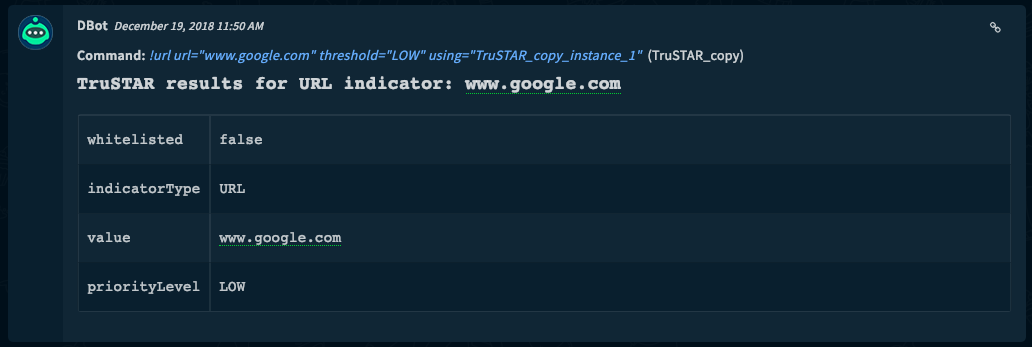
Command Example
!url url=www.google.com threshold=LOW
Context Example
{
    "URL": {
        "Malicious": {
            "Vendor": "TruSTAR",
            "Description": "LOW"
        },
        "Data": "www.google.com"
    },
    "DBotScore": {
        "Vendor": "TruSTAR",
        "Indicator": "www.google.com",
        "Score": 3,
        "Type": "url"
    },
    "TruSTAR": {
        "URL": {
            "Priority": "LOW",
            "Whitelisted": false,
            "Value": "www.google.com"
        }
    }
}
Human Readable Output
17. Check the reputation of a domain
Checks the reputation of a domain in TruStar.
Base Command
domain
Input
| Argument Name | Description | Required |
|---|---|---|
| domain | Enter domain name to search | Required |
| threshold | If ThreatScore is greater or equal than the threshold, then ip will be considered malicious | Optional |
Context Output
| Path | Type | Description |
|---|---|---|
| Domain.Name | string | Domain Name |
| Domain.Malicious.Vendor | string | For malicious domains, the vendor that made the decision |
| Domain.Malicious.Description | string | For malicious domains, the reason for the vendor to make the decision |
| DBotScore.Indicator | string | The indicator we tested |
| DBotScore.Type | string | The type of the indicator |
| DBotScore.Vendor | string | Vendor used to calculate the score |
| DBotScore.Score | string | The actual score |
| TruSTAR.Domain.Value | string | Indicator value |
| TruSTAR.Domain.Whitelisted | boolean | Is the indicator on allow list |
| TruSTAR.Domain.Priority | string | Indicator's priority level by TruSTAR |
Command Example
!domain domain=www.google.com threshold=LOW
Context Example
{
    "DBotScore": {
        "Vendor": "TruSTAR",
        "Indicator": "www.google.com",
        "Score": 3,
        "Type": "domain"
    },
    "TruSTAR": {
        "Domain": {
            "Priority": "LOW",
            "Whitelisted": false,
            "Value": "www.google.com"
        }
    },
    "Domain": {
        "Malicious": {
            "Vendor": "TruSTAR",
            "Description": "LOW"
        },
        "Name": "www.google.com"
    }
}
Human Readable Output

Configuration parameters
server— Server URL (e.g. https://192.168.0.1) (required)key— TruSTAR API Key (required)secret— TruSTAR API Secret (required)insecure— Trust any certificate (not secure)proxy— Use system proxy settingsfile_threshold— File Threshold (LOW, MEDIUM, HIGH). Minimum TruSTAR priority level to consider the file maliciousurl_threshold— URL Threshold (LOW, MEDIUM, HIGH). Minimum TruSTAR priority level to consider the URL maliciousip_threshold— IP Threshold (LOW, MEDIUM, HIGH). Minimum TruSTAR priority level to consider the IP maliciousdomain_threshold— Domain Threshold (LOW, MEDIUM, HIGH). Minimum TruSTAR priority level to consider the domain malicious
Commands (20)
-
domainDeprecatedCheck Domain reputation on TruStar.
-
fileDeprecatedCheck file reputation on TruSTAR.
-
ipDeprecatedCheck IP Reputation on TruSTAR.
-
trustar-add-to-whitelistAdd to allow list a list of indicator values for the user’s company.
-
trustar-correlated-reportsReturns a paginated list of all reports that contain any of the provided indicator values.
-
trustar-delete-reportDeletes a report as specified by given id (id can be TruSTAR report id or external id).
-
trustar-get-enclavesReturns the list of all enclaves that the user has access to, as well as whether they can read, create, and update reports in that enclave.
-
trustar-get-phishing-indicatorsGet phishing indicators that match the given criteria.
-
trustar-get-phishing-submissionsFetches all phishing submissions that fit the given criteria.
-
trustar-get-reportsReturns incident reports matching the specified filters. All parameters are optional: if nothing is specified, the latest 25 reports accessible by the user will be returned (matching the view the user would have by logging into Station).
-
trustar-related-indicatorsSearch all TruSTAR incident reports for provided indicators and return all correlated indicators from search results. Two indicators are considered “correlated” if they can be found in a common report.
-
trustar-remove-from-whitelistDelete an indicator from the user’s company allow list.
-
trustar-report-detailsFinds a report by its internal or external id.
-
trustar-search-indicatorsSearches for all indicators that contain the given search term.
-
trustar-search-reportsSearches for all reports that contain the given search term.
-
trustar-set-triage-statusMarks a phishing email submission with one of the phishing namespace tags.
-
trustar-submit-reportSubmit a new incident report, and receive the ID it has been assigned in TruSTAR’s system.
-
trustar-trending-indicatorsReturns the 10 indicators that have recently appeared in the most community reports. This is analogous to the Community Trends section of the dashboard on Station.
-
trustar-update-reportUpdate the report with the specified ID. Either the internal TruSTAR report ID or an external tracking ID can be used. Only the fields passed will be updated. All others will be left unchanged.
-
urlDeprecatedCheck URL reputation on TruSTAR.
commonfields:
  id: TruSTAR
  version: -1
name: TruSTAR
category: Data Enrichment & Threat Intelligence
provider: Cisco Systems
description: Deprecated. Not supported since TrueSTAR was acquired by Splunk, No available replacement.
display: TruSTAR (Deprecated)
deprecated: true
configuration:
- display: Server URL (e.g. https://192.168.0.1)
  name: server
  defaultvalue: https://api.trustar.co
  type: 0
  required: true
- display: TruSTAR API Key
  name: key
  defaultvalue: ""
  type: 0
  required: true
- display: TruSTAR API Secret
  name: secret
  defaultvalue: ""
  type: 4
  required: true
- display: Trust any certificate (not secure)
  name: insecure
  defaultvalue: ""
  type: 8
  required: false
- display: Use system proxy settings
  name: proxy
  defaultvalue: "false"
  type: 8
  required: false
- display: File Threshold (LOW, MEDIUM, HIGH). Minimum TruSTAR priority level to consider the file malicious
  name: file_threshold
  defaultvalue: MEDIUM
  type: 0
  required: false
- display: URL Threshold (LOW, MEDIUM, HIGH). Minimum TruSTAR priority level to consider the URL malicious
  name: url_threshold
  defaultvalue: MEDIUM
  type: 0
  required: false
- display: IP Threshold (LOW, MEDIUM, HIGH). Minimum TruSTAR priority level to consider the IP malicious
  name: ip_threshold
  defaultvalue: MEDIUM
  type: 0
  required: false
- display: Domain Threshold (LOW, MEDIUM, HIGH). Minimum TruSTAR priority level to consider the domain malicious
  name: domain_threshold
  defaultvalue: MEDIUM
  type: 0
  required: false
script:
  script: ''
  type: python
  commands:
  - name: trustar-related-indicators
    arguments:
    - name: indicators
      required: true
      default: true
      description: Indicator value of any type; i.e. an IP address, email address, URL, MD5, SHA1, SHA256, Registry Key, Malware name, etc.
    - name: enclave-ids
      description: Comma-separated list of enclave ids; only indicators found in reports from these enclaves will be returned (defaults to all of user’s enclaves). Defaults is all enclaves the user has READ access to.
    - name: page-number
      description: Which page of the result set to get.
      defaultValue: "0"
    - name: page-size
      description: The number of results per page.
      defaultValue: "25"
    outputs:
    - contextPath: File.Name
      description: File name.
      type: string
    - contextPath: File.MD5
      description: File MD5.
      type: string
    - contextPath: File.SHA1
      description: File SHA1.
      type: string
    - contextPath: File.SHA256
      description: File SHA256.
      type: string
    - contextPath: File.priorityLevel
      description: File priority level.
      type: string
    - contextPath: URL.Address
      description: URL address.
      type: string
    - contextPath: URL.priorityLevel
      description: URL priority level.
      type: string
    - contextPath: IP.Address
      description: IP address.
      type: string
    - contextPath: IP.priorityLevel
      description: IP priority level.
      type: string
    - contextPath: Account.Email.Address
      description: Email address.
      type: string
    - contextPath: Account.Email.priorityLevel
      description: Email priority level.
      type: string
    - contextPath: RegistryKey.Path
      description: Registry key path.
      type: string
    - contextPath: RegistryKey.priorityLevel
      description: Registry key priority level.
      type: string
    - contextPath: CVE.ID
      description: CVE ID.
      type: string
    - contextPath: CVE.priorityLevel
      description: CVE priority level.
      type: string
    description: Search all TruSTAR incident reports for provided indicators and return all correlated indicators from search results. Two indicators are considered “correlated” if they can be found in a common report.
  - name: trustar-trending-indicators
    arguments:
    - name: type
      auto: PREDEFINED
      predefined:
      - CVE
      - MALWARE
      - other
      description: The types of indicators to be returned. If other, then all indicator types except for CVE and MALWARE will be returned.
      defaultValue: other
    - name: days-back
      description: The number of days back to count correlations for.
      defaultValue: "3"
    outputs:
    - contextPath: File.Name
      description: File name.
      type: string
    - contextPath: File.MD5
      description: File MD5.
      type: string
    - contextPath: File.SHA1
      description: File SHA1.
      type: string
    - contextPath: File.SHA256
      description: File SHA256.
      type: string
    - contextPath: URL.Address
      description: URL address.
      type: string
    - contextPath: IP.Address
      description: IP address.
      type: string
    - contextPath: Account.Email.Address
      description: Email address.
      type: string
    - contextPath: RegistryKey.Path
      description: Registry key path.
      type: string
    - contextPath: CVE.ID
      description: CVE ID.
      type: string
    description: Returns the 10 indicators that have recently appeared in the most community reports. This is analogous to the Community Trends section of the dashboard on Station.
  - name: trustar-search-indicators
    arguments:
    - name: search-term
      required: true
      default: true
      description: The term to search for.
    - name: enclave-ids
      description: Comma-separated list of enclave ids; only indicators found in reports from these enclaves will be returned (defaults to all of user’s enclaves). Defaults is all enclaves the user has READ access to.
    - name: page-number
      description: Which page of the result set to get.
      defaultValue: "0"
    - name: page-size
      description: The number of results per page.
      defaultValue: "25"
    outputs:
    - contextPath: File.Name
      description: File name.
      type: string
    - contextPath: File.MD5
      description: File MD5.
      type: string
    - contextPath: File.SHA1
      description: File SHA1.
      type: string
    - contextPath: File.SHA256
      description: File SHA256.
      type: string
    - contextPath: URL.Address
      description: URL address.
      type: string
    - contextPath: IP.Address
      description: IP address.
      type: string
    - contextPath: Account.Email.Address
      description: Email address.
      type: string
    - contextPath: RegistryKey.Path
      description: Registry key path.
      type: string
    - contextPath: CVE.ID
      description: CVE ID.
      type: string
    description: Searches for all indicators that contain the given search term.
  - name: trustar-submit-report
    arguments:
    - name: title
      required: true
      description: Title of the report.
    - name: report-body
      required: true
      description: Text content of report.
    - name: enclave-ids
      description: CSV of TruSTAR-generated enclave ids. Use the enclave ID, NOT the enclave name. Mandatory if the distribution type is ENCLAVE.
    - name: distribution-type
      auto: PREDEFINED
      predefined:
      - COMMUNITY
      - ENCLAVE
      description: Distribution type of the report.
      defaultValue: ENCLAVE
    - name: external-url
      description: URL for the external report that this originated from, if one exists. Limit 500 alphanumeric characters. Must be unique across all reports for a given company.
    - name: time-began
      description: ISO-8601 formatted incident time with timezone, e.g. 2016-09-22T11:38:35+00:00. Default is current time.
    outputs:
    - contextPath: TruSTAR.Report.reportTitle
      description: Title of the report.
      type: string
    - contextPath: TruSTAR.Report.reportBody
      description: Body of the report.
      type: string
    - contextPath: TruSTAR.Report.id
      description: ID of the report.
      type: string
    description: Submit a new incident report, and receive the ID it has been assigned in TruSTAR’s system.
  - name: trustar-update-report
    arguments:
    - name: report-id
      required: true
      description: TruSTAR report id or external tracking id.
    - name: title
      required: true
      description: Title of the report.
    - name: report-body
      required: true
      description: Text content of report.
    - name: enclave-ids
      description: CSV of TruSTAR-generated enclave ids. Use the enclave ID, NOT the enclave name. Mandatory if the distribution type is ENCLAVE.
    - name: external-url
      description: URL for the external report that this originated from, if one exists. Limit 500 alphanumeric characters. Must be unique across all reports for a given company.
    - name: distribution-type
      auto: PREDEFINED
      predefined:
      - COMMUNITY
      - ENCLAVE
      description: Distribution type of the report.
      defaultValue: ENCLAVE
    - name: time-began
      description: ISO-8601 formatted incident time with timezone, e.g. 2016-09-22T11:38:35+00:00. Default is current time.
    outputs:
    - contextPath: TruSTAR.Report.reportTitle
      description: Title of the report.
      type: string
    - contextPath: TruSTAR.Report.reportBody
      description: Body of the report.
      type: string
    - contextPath: TruSTAR.Report.id
      description: ID of the report.
      type: string
    description: Update the report with the specified ID. Either the internal TruSTAR report ID or an external tracking ID can be used. Only the fields passed will be updated. All others will be left unchanged.
  - name: trustar-report-details
    arguments:
    - name: report-id
      required: true
      description: Finds a report by its internal or external id.
    - name: id-type
      auto: PREDEFINED
      predefined:
      - internal
      - external
      description: Type of report ID.
      defaultValue: internal
    outputs:
    - contextPath: TruSTAR.Report.reportTitle
      description: Title of the report.
      type: string
    - contextPath: TruSTAR.Report.reportBody
      description: Body of the report.
      type: string
    - contextPath: TruSTAR.Report.id
      description: ID of the report.
      type: string
    description: Finds a report by its internal or external id.
  - name: trustar-delete-report
    arguments:
    - name: report-id
      required: true
      description: Finds a report by its internal or external id.
    - name: id-type
      auto: PREDEFINED
      predefined:
      - internal
      - external
      description: Type of report ID.
      defaultValue: internal
    description: Deletes a report as specified by given id (id can be TruSTAR report id or external id).
  - name: trustar-get-reports
    arguments:
    - name: from
      description: Start of time window (format is YY-MM-DD HH:MM:SS, i.e. 2018-01-01 10:30:00). Based on updated time, and not created time. Default is 1 day ago.
    - name: to
      description: End of time window (format is YY-MM-DD HH:MM:SS, i.e. 2018-01-01 10:30:00). Based on updated time, and not created time. Default is current time.
    - name: distribution-type
      auto: PREDEFINED
      predefined:
      - ENCLAVE
      - COMMUNITY
      description: Whether to search for reports in the community, or only in enclaves.
      defaultValue: ENCLAVE
    - name: enclave-ids
      description: Comma separated list of enclave ids to search for reports in. Even if distributionType is COMMUNITY, these enclaves will still be searched as well. Default is All enclaves the user has READ access to.
    - name: tags
      description: a list of names of tags to filter by; only reports containing ALL of these tags will be returned.
    - name: excluded-tags
      description: reports containing ANY of these tags will be excluded from the results.
    outputs:
    - contextPath: TruSTAR.Report.reportTitle
      description: Title of the report.
    - contextPath: TruSTAR.Report.reportBody
      description: Body of the report.
    - contextPath: TruSTAR.Report.id
      description: ID of the report.
    description: 'Returns incident reports matching the specified filters. All parameters are optional: if nothing is specified, the latest 25 reports accessible by the user will be returned (matching the view the user would have by logging into Station).'
  - name: trustar-correlated-reports
    arguments:
    - name: indicators
      required: true
      description: Indicator value of any type; i.e. an IP address, email address, URL, MD5, SHA1, SHA256, Registry Key, Malware name, etc.
    - name: enclave-ids
      description: Comma-separated list of enclave ids; only indicators found in reports from these enclaves will be returned (defaults to all of user’s enclaves). Defaults is all enclaves the user has READ access to.
    - name: page-number
      description: Which page of the result set to get.
      defaultValue: "0"
    - name: page-size
      description: The number of results per page.
      defaultValue: "25"
    - name: distribution-type
      auto: PREDEFINED
      predefined:
      - COMMUNITY
      - ENCLAVE
      description: Distribution type of the report.
      defaultValue: ENCLAVE
    description: Returns a paginated list of all reports that contain any of the provided indicator values.
  - name: trustar-search-reports
    arguments:
    - name: search-term
      required: true
      default: true
      description: The term to search for.
    - name: enclave-ids
      description: Comma-separated list of enclave ids; only indicators found in reports from these enclaves will be returned (defaults to all of user’s enclaves).
    description: Searches for all reports that contain the given search term.
  - name: trustar-add-to-whitelist
    arguments:
    - name: indicators
      required: true
      default: true
      description: CSV of indicators to add to allow list, i.e. evil.com,101.43.52.224.
    description: Add to allow list a list of indicator values for the user’s company.
  - name: trustar-remove-from-whitelist
    arguments:
    - name: indicator
      required: true
      description: The value of the indicator to delete.
    - name: indicator-type
      required: true
      auto: PREDEFINED
      predefined:
      - URL
      - IP
      - SHA256
      - SHA1
      - MD5
      - SOFTWARE
      - EMAIL_ADDRESS
      - BITCOIN_ADDRESS
      - CIDR_BLOCK
      - CVE
      - REGISTRY_KEY
      description: The type of the indicator to delete.
    description: Delete an indicator from the user’s company allow list.
  - name: trustar-get-enclaves
    arguments: []
    description: Returns the list of all enclaves that the user has access to, as well as whether they can read, create, and update reports in that enclave.
  - name: file
    deprecated: true
    arguments:
    - name: file
      required: true
      description: File hash - MD5, SHA1 or SHA256.
      default: true
    - name: threshold
      auto: PREDEFINED
      predefined:
      - LOW
      - MEDIUM
      - HIGH
      description: If ThreatScore is greater or equal than the threshold, then ip will be considered malicious.
    outputs:
    - contextPath: File.MD5
      description: File MD5.
      type: string
    - contextPath: File.SHA1
      description: File SHA1.
      type: string
    - contextPath: File.SHA256
      description: File SHA256.
      type: string
    - contextPath: File.Malicious.Vendor
      description: For malicious files, the vendor that made the decision.
      type: string
    - contextPath: DBotScore.Indicator
      description: The indicator we tested.
      type: string
    - contextPath: DBotScore.Type
      description: The type of the indicator.
      type: string
    - contextPath: DBotScore.Vendor
      description: Vendor used to calculate the score.
      type: string
    - contextPath: DBotScore.Score
      description: The actual score.
      type: number
    - contextPath: TruSTAR.File.Value
      description: Indicator value.
      type: string
    - contextPath: TruSTAR.File.Whitelisted
      description: Is the indicator on allow list.
      type: boolean
    - contextPath: TruSTAR.File.Priority
      description: Indicator's priority level by TruSTAR - LOW, MEDIUM or HIGH.
      type: string
    - contextPath: File.Malicious.Description
      description: For malicious files, the reason for the vendor to make the decision.
    description: Check file reputation on TruSTAR.
  - name: ip
    deprecated: true
    arguments:
    - name: ip
      required: true
      description: IP address (e.g. 8.8.8.8) or a CIDR (e.g. 1.1.1.0/18).
    - name: threshold
      auto: PREDEFINED
      predefined:
      - LOW
      - MEDIUM
      - HIGH
      description: If ThreatScore is greater or equal than the threshold, then ip will be considered malicious.
    outputs:
    - contextPath: IP.Address
      description: IP Address.
      type: string
    - contextPath: IP.Malicious.Vendor
      description: For malicious IPs, the vendor that made the decision.
      type: string
    - contextPath: IP.Malicious.Description
      description: For malicious IPs, the reason for the vendor to make the decision.
      type: string
    - contextPath: DBotScore.Indicator
      description: The indicator we tested.
      type: string
    - contextPath: DBotScore.Type
      description: The type of the indicator.
      type: string
    - contextPath: DBotScore.Vendor
      description: Vendor used to calculate the score.
      type: string
    - contextPath: DBotScore.Score
      description: The actual score.
      type: string
    - contextPath: TruSTAR.IP.Value
      description: Indicator value.
      type: string
    - contextPath: TruSTAR.IP.Whitelisted
      description: Is the indicator on allow list.
      type: boolean
    - contextPath: TruSTAR.IP.Priority
      description: Indicator's priority level by TruSTAR - LOW, MEDIUM or HIGH.
    description: Check IP Reputation on TruSTAR.
  - name: url
    deprecated: true
    arguments:
    - name: url
      required: true
      description: Enter a URL to search.
    - name: threshold
      auto: PREDEFINED
      predefined:
      - LOW
      - MEDIUM
      - HIGH
      description: If ThreatScore is greater or equal than the threshold, then ip will be considered malicious.
    outputs:
    - contextPath: URL.Data
      description: URL data.
      type: string
    - contextPath: URL.Malicious.Vendor
      description: For malicious URLs, the vendor that made the decision.
      type: string
    - contextPath: URL.Malicious.Description
      description: For malicious URLs, the reason for the vendor to make the decision.
      type: string
    - contextPath: DBotScore.Indicator
      description: The indicator we tested.
      type: string
    - contextPath: DBotScore.Type
      description: The type of the indicator.
      type: string
    - contextPath: DBotScore.Vendor
      description: Vendor used to calculate the score.
      type: string
    - contextPath: DBotScore.Score
      description: The actual score.
      type: string
    - contextPath: TruSTAR.URL.Value
      description: Indicator value.
      type: string
    - contextPath: TruSTAR.URL.Whitelisted
      description: Is the indicator on allow list.
      type: boolean
    - contextPath: TruSTAR.URL.Priority
      description: Indicator's priority level by TruSTAR - LOW, MEDIUM or HIGH.
      type: string
    description: Check URL reputation on TruSTAR.
  - name: domain
    deprecated: true
    arguments:
    - name: domain
      required: true
      description: Enter domain name to search.
    - name: threshold
      auto: PREDEFINED
      predefined:
      - LOW
      - MEDIUM
      - HIGH
      description: If ThreatScore is greater or equal than the threshold, then ip will be considered malicious.
    outputs:
    - contextPath: Domain.Name
      description: Domain Name.
      type: string
    - contextPath: Domain.Malicious.Vendor
      description: For malicious domains, the vendor that made the decision.
      type: string
    - contextPath: Domain.Malicious.Description
      description: For malicious domains, the reason for the vendor to make the decision.
      type: string
    - contextPath: DBotScore.Indicator
      description: The indicator we tested.
      type: string
    - contextPath: DBotScore.Type
      description: The type of the indicator.
      type: string
    - contextPath: DBotScore.Vendor
      description: Vendor used to calculate the score.
      type: string
    - contextPath: DBotScore.Score
      description: The actual score.
      type: string
    - contextPath: TruSTAR.Domain.Value
      description: Indicator value.
      type: string
    - contextPath: TruSTAR.Domain.Whitelisted
      description: Is the indicator on allow list.
      type: boolean
    - contextPath: TruSTAR.Domain.Priority
      description: Indicator's priority level by TruSTAR - LOW, MEDIUM or HIGH.
      type: string
    description: Check Domain reputation on TruStar.
  - name: trustar-get-phishing-submissions
    arguments:
    - name: priority_event_score
      description: Score of email submission.
      isArray: true
      defaultValue: -1,0,1,2,3
    - name: from_time
      description: Start of time window (defaults to 24 hours ago) (YYYY-MM-DD HH:MM:SS).
    - name: to_time
      description: End of time window (defaults to current time) (YYYY-MM-DD HH:MM:SS).
    - name: status
      auto: PREDEFINED
      predefined:
      - UNRESOLVED
      - CONFIRMED
      - IGNORED
      description: A list of triage statuses for submissions (UNRESOLVED,CONFIRMED,IGNORED); only email submissions marked with at least one of these statuses will be returned.
      isArray: true
      defaultValue: UNRESOLVED
    outputs:
    - contextPath: TruSTAR.PhishingSubmission.submissionId
      description: The submission ID.
      type: string
    - contextPath: TruSTAR.PhishingSubmission.title
      description: Submission title.
      type: string
    - contextPath: TruSTAR.PhishingSubmission.priorityEventScore
      description: Submission triage score.
      type: number
    - contextPath: TruSTAR.PhishingSubmission.context.indicatorType
      description: Indicator type.
      type: string
    - contextPath: TruSTAR.PhishingSubmission.context.sourceKey
      description: Indicator source.
      type: string
    - contextPath: TruSTAR.PhishingSubmission.context.normalizedIndicatorScore
      description: Indicator score.
      type: number
    - contextPath: TruSTAR.PhishingSubmission.context.originalIndicatorScore.name
      description: Original Indicator score name.
      type: string
    - contextPath: TruSTAR.PhishingSubmission.context.originalIndicatorScore.value
      description: Original Indicator score value.
      type: string
    description: Fetches all phishing submissions that fit the given criteria.
  - name: trustar-set-triage-status
    arguments:
    - name: submission_id
      required: true
      description: ID of the email submission.
    - name: status
      required: true
      auto: PREDEFINED
      predefined:
      - CONFIRMED
      - IGNORED
      description: Submission status.
    description: Marks a phishing email submission with one of the phishing namespace tags.
  - name: trustar-get-phishing-indicators
    arguments:
    - name: normalized_indicator_score
      description: Intel score of the indicator.
      isArray: true
      defaultValue: -1,0,1,2,3
    - name: priority_event_score
      description: Score of email submission.
      isArray: true
      defaultValue: -1,0,1,2,3
    - name: from_time
      description: Start of time window (defaults to 24 hours ago) (YYYY-MM-DD HH:MM:SS).
    - name: to_time
      description: End of time window (defaults to current time) (YYYY-MM-DD HH:MM:SS).
    - name: status
      auto: PREDEFINED
      predefined:
      - UNRESOLVED
      - CONFIRMED
      - IGNORED
      description: A list of triage statuses for submissions; only email submissions marked with at least one of these statuses will be returned. Options are 'UNRESOLVED', 'CONFIRMED', 'IGNORED'.
      isArray: true
      defaultValue: UNRESOLVED,CONFIRMED,IGNORED
    outputs:
    - contextPath: TruSTAR.PhishingIndicator.indicatorType
      description: Indicator Type.
      type: string
    - contextPath: TruSTAR.PhishingIndicator.normalizedIndicatorScore
      description: Indicator normalized score.
      type: number
    - contextPath: TruSTAR.PhishingIndicator.originalIndicatorScore.name
      description: Indicator original score name.
      type: string
    - contextPath: TruSTAR.PhishingIndicator.originalIndicatorScore.value
      description: Indicator original score value.
      type: string
    - contextPath: TruSTAR.PhishingIndicator.sourceKey
      description: Indicator source key.
      type: string
    - contextPath: TruSTAR.PhishingIndicator.value
      description: Indicator value.
      type: string
    description: Get phishing indicators that match the given criteria.
  dockerimage: demisto/trustar:20.1.0.8039
  subtype: python2
fromversion: 5.0.0
tests:
- No tests (auto formatted)