Add context data to an issue ↗
Abstract
Use a script, command, or playbook to add context data to an issue to be used in playbooks or other automations.
You can add keys and values to an issue's context data to be used in playbooks or other automations.
To add context data to an issue, run the Set command in CLI, in a script, or in a playbook task. The Set command enables you to set a value under a specific key. For more information about the Set command, see Set.
Use the Set script in a standard task.
Example 105. Example
An issue's context data contains the following values:
{
   "Account":
    {
      "firstName": "Bob",
      "lastName": "Jones",
    }
}
For an automation, you need to use the full name value. You can use the Set script to add an new fullName value to the JSON:
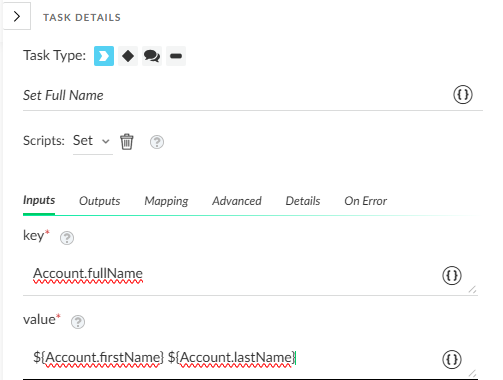
Result:
{
   "Account":
    {
      "firstName": "Bob",
      "fullName": "Bob Jones"
      "lastName": "Jones",
    }
}