Python code conventions ↗
All new integrations and scripts should be written in Python 3.
Follow these Python code conventions for consistency and best practices.
Python integration and script code conventions
Python imports
Define imports and disable insecure warning at the top of the file.
import demistomock as demisto
from CommonServerPython import *
from CommonServerUserPython import *
''' IMPORTS '''

import json
import urllib3

# Disable insecure warnings
urllib3.disable_warnings()
Constants
Define constants in the file below the imports. Do not define global variables in the constants section.
''' CONSTANTS '''
DATE_FORMAT = "%Y-%m-%dT%H:%M:%SZ"
Important
Do NOT name constants as follows:
apiVersion = "v1"
url = demisto.params().get("url")
Python main function
Define the main function as follows:
- Create the
mainfunction and extract all the integration parameters usingdemisto.params()in it. - Implement the
_commandfunction for each integration command, for examplesay_hello_command(client, demisto.args()). - Wrap the commands with
try/exceptin themainto properly handle exceptions. Thereturn_error()function receives error messages and returns error entries back into Cortex XSIAM. It also prints the full error to the Cortex XSIAM logs. - For logging, use the
demisto.debug("write some log here")function. - In the
mainfunction, initialize the client instance and pass that client to_commandfunctions.
def main():
    params = demisto.params()

    client = Client(params.get('insecure'),
                    params.get('proxy'))

    command = demisto.command()
    demisto.info(f'Command being called is {command}')
    # Switch case
    try:
        if demisto.command() == 'fetch-events':
            events, last_run = fetch_events_command(client)
            # we submit the indicators in batches
            send_events_to_xsiam(events=events, vendor='MyVendor', product='MyProduct')
        else:
            results = get_events_command(client)
            return_results(results)
    except Exception as e:
        raise Exception(f'Error in {SOURCE_NAME} Integration [{e}]')
Integration Client class
Follow these best practices for defining the Client class.
- The
Clientclass should inherit fromBaseClient, which is defined inCommonServerPython. - The
Clientclass should contain the_http_requestfunction. - The
Clientclass should implement the third party service API. - The
Clientclass should contain all the necessary parameters to establish connection and authentication with the third party API.
class Client(BaseClient):
    """
    Client will implement the service API, should not contain Cortex XSIAM logic.
    Should do requests and return data
    """

    def get_ip_reputation(self, ip: str) -> Dict[str, Any]:
        """Gets the IP reputation using the '/ip' API endpoint

        :type ip: ``str``
        :param ip: IP address to get the reputation for

        :return: dict containing the IP reputation as returned from the API
        :rtype: ``Dict[str, Any]``
        """

        return self._http_request(
            method='GET',
            url_suffix=f'/ip',
            params={
                'ip': ip
            }
        )

    def get_alert(self, alert_id: str) -> Dict[str, Any]:
        """Gets a specific HelloWorld alert by id

        :type alert_id: ``str``
        :param alert_id: id of the alert to return

        :return: dict containing the alert as returned from the API
        :rtype: ``Dict[str, Any]``
        """

        return self._http_request(
            method='GET',
            url_suffix=f'/get_alert_details',
            params={
                'alert_id': alert_id
            }
        )
Client instance using an API key
api_key = demisto.params().get('apikey')

# get the service API url
base_url = urljoin(demisto.params()['url'], '/api/v1')

# if your Client class inherits from BaseClient, SSL verification is
# handled out of the box by it, just pass ``verify_certificate`` to
# the Client constructor
verify_certificate = not demisto.params().get('insecure', False)

headers = {
    'Authorization': f'Bearer {api_key}'
}

client = Client(
    base_url=base_url,
    verify=verify_certificate,
    headers=headers,
    proxy=proxy
)
Client instance using basic authentication
username = demisto.params().get('credentials', {}).get('identifier')
password = demisto.params().get('credentials', {}).get('password')

# get the service API url
base_url = urljoin(demisto.params()['url'], '/api/v1')

# if your Client class inherits from BaseClient, SSL verification is
# handled out of the box by it, just pass ``verify_certificate`` to
# the Client constructor
verify_certificate = not demisto.params().get('insecure', False)

client = Client(
    base_url=base_url,
    verify=verify_certificate,
    auth=(username, password),
    proxy=proxy
)
HTTP call retries
sleep can cause performance issues so do not use it in the code. Instead, use the retry mechanism implemented in the BaseClient with the _http_request function retries and backoff_factor arguments.
Integration command functions
Follow these best practices for defining the command functions.
- Each integration command should have a corresponding
_commandfunction. - Each
_commandfunction should use Client class functions. - Each
_commandfunction should be unit testable. This means you should avoid using global functions such asdemisto.results(),return_error(), orreturn_results(). - The
_commandfunction will receive the Client instance and theargs(demisto.args()dictionary). - The
_commandfunction will return an instance of the CommandResults class. - To return results to the War Room, in the Main use
return_results(say_hello_command(client, demisto.args()).
def say_hello_command(client, args):
    """
    Returns Hello {somename}

    Args:
        client: HelloWorld client
        args: all command arguments

    Returns:
        Hello {someone}

        readable_output: This will be presented in Warroom - should be in markdown syntax - human readable
        outputs: Dictionary/JSON - saved in incident context in order to be used as input for other tasks in the
                 playbook
        raw_response: Used for debugging/troubleshooting purposes - will be shown only if the command executed with
                      raw-response=true
    """
    name = args.get('name')

    result = client.say_hello(name)

    # readable output will be in markdown format - https://www.markdownguide.org/basic-syntax/
    readable_output = f'## {result}'
    outputs = {
        'name': name,
        'hello': result
    }

    results = CommandResults(
        outputs_prefix='HelloWorld.Result',
        outputs_key_field='name',
        outputs=outputs,

        readable_output=readable_output,
        raw_response=result
    )

    return results


def main():
    """
    SOME CODE HERE...
    """
    try:
        client = Client(
            base_url=server_url,
            verify=verify_certificate,
            auth=(username, password),
            proxy=proxy)

        """
        SOME CODE HERE...
        """
        if demisto.command() == 'helloworld-say-hello':
            return_results(say_hello_command(client, demisto.args()))

    # Log exceptions
    except Exception as e:
        return_error(f'Failed to execute {demisto.command()} command. Error: {str(e)}')
IOC reputation commands
There are two implementation requirements for reputation commands (!file, !email, !domain, !url, and !ip) that are enforced by checks in the Demisto SDK.
- The reputation command's argument of the same name must have
defaultset to True. - The reputation command's argument of the same name must have
isArrayset to True.
For more details on these two command argument properties, see Integration metadata YAML file.
Integration test-module command
The test-module executes when users click the Test button in the integration instance settings page.
If the test module returns the string "ok" then the test will be green (success). Any other string will be red.
if demisto.command() == 'test-module':
    # This is the call made when pressing the integration Test button.
    result = test_module(client)
    return_results(result)
def test_module(client):
    """
    Returning 'ok' indicates that the integration works like it suppose to. Connection to the service is successful.

    Args:
        client: HelloWorld client

    Returns:
        'ok' if test passed, anything else will fail the test
    """

    result = client.say_hello('DBot')
    if 'Hello DBot' == result:
        return 'ok'
    else:
        return 'Test failed because ......'
Fetch-events integration command
The fetch-events function initiates a fetch events request to specific external product endpoint(s) using the relevant chosen parameters, and sends the fetched events to the Cortex XSIAM dataset. If the integration instance setting is configured to Fetch events, then this command is executed at the specified Events Fetch Interval. By default, it runs every minute to retrieve and import events into Cortex XSIAM.
Follow these best practices for defining the fetch-events function.
- Must be unit testable.
- Should receive the
last_runparam instead of executing thedemisto.getLastRun()function. - Should return
next_runback to Main, instead of executingdemisto.setLastRun()inside thefetch-eventsfunction. - Should return incidents back to main instead of executing
demisto.incidents()inside thefetch-eventsfunction.
def get_events(client, alert_status, args):
    limit = args.get('limit', 50)
    from_date = args.get('from_date')
    events = client.search_events(
        prev_id=0,
        alert_status=alert_status,
        limit=limit,
        from_date=from_date,
    )
    hr = tableToMarkdown(name='Test Event', t=events)
    return events, CommandResults(readable_output=hr)
Event collector parsing rules
When developing an event collector, set the Parsing Rules within the collector code. The most common parsing rule is the _time system property which indicates the event time from the remote system. For example, if we use the following events as an example:
 {
    "id": "1234",
    "message": "New user added 'root2'",
    "type": "audit",
    "op": "add",
    "result": "success",
    "host_info": {
      "host": "prod-01",
      "os": "Windows"
    },
    "created": "1676764803"
  }
We see that the created event property is a str representation of a timestamp (without milliseconds). However, The _time system property expects the result to be an str in format %Y-%m-%dT%H:%M:%S.000Z. So we can can transform it using the timestamp_to_datestring function from CommonServerPython.
from datetime import datetime
from CommonServerPython import *

#  ...
  events: List[Dict[str, Any]] = get_events()

  for event in events:
    event["_time"] = timestamp_to_datestring(float(event.get("created")) * 1000)

# ...
To verify that the parsing rule has been applied and is working as expected, run an XQL search to compare the _time and created fields:
dataset = "MyVendor_MyProduct_raw" |
fields
  _time,
  created
Python exceptions and errors
Follow these best practices for defining exceptions and errors.
- Wrap your command block in a "Try-Catch" to avoid unexpected issues.
- Raise exceptions in the code where needed, but in the Main catch them and use the
return_errorfunction. This enables acceptable error messages in the War Room instead of stack trace. - If the
return_errorsecond argument is error, you can pass an Exception object. -
You can use
demisto.error("some error message")to log your error.def main(): try: if demisto.command() == 'test-module': test_get_session() return_results('ok') if demisto.command() == 'atd-login': return_results(get_session_command(client, demisto.args())) except Exception as e: return_error(f'Failed to execute {demisto.command()} command. Error: {str(e)}')
Integration command unit tests
Every integration command must be covered with a unit test.
Python variable naming
When naming variables, use Snake case, not Pascal case or camel case.
Integration command outputs
See Context and outputs.
Follow Context Standards when naming indicator outputs
Link integration command context
Linking context together prevents a command from overwriting existing data or from creating duplicate entries in the context.
Example to link context:
ec = ({
    'URLScan(val.URL && val.URL == obj.URL)': cont_array,
    'URL': url_array,
    'IP': ip_array,
    'Domain': dom_array
})
In this example, val.URL && val.URL == obj.URL links the results retrieved from this integration with results already in the context where the value of the URL is the same. For more information about linking syntax and Cortex XSIAM see Transform Language (DT).
Integration logging
You can pass information to the logs to assist future debugging.
To post to the logs:
demisto.debug('DEBUG level - This is some information we want in the logs')
demisto.info('INFO level - This is some information we want in the logs')
demisto.error('ERROR level - This is some information we want in the logs')
You can also use the @logger decorator in Cortex XSIAM. When the decorator is placed at the top of each function, the logger prints the function name as well as all the argument values to the LOG.
@logger
def get_ip(ip):
    ip_data = http_request('POST', '/v1/api/ip' + ip)
    return ip_data
Important
Do not print sensitive data to the log. When an integration is ready to be used as part of a public release (meaning you are done debugging it), always remove print statements that are not absolutely necessary.
Date and time formats
Cortex XSIAM does not use epoch time for customer facing results (for example context and human readable). If the API you are working with requires the time format to be in epoch, then convert the date string into epoch as needed. Where possible, use the human readable format of the date %Y-%m-%dT%H:%M:%S.
time_epoch = 499137720
formatted_time = timestamp_to_datestring(time_epoch, "%Y-%m-%dT%H:%M:%S")
print(formatted_time)
>>> '1985-10-26T01:22:00'
Note
If the response returned is in epoch, best practice is to convert it to %Y-%m-%dT%H:%M:%S.
Pagination in integration commands
When working on a command that supports pagination (usually has API parameters like page and/or page size) with a maximal page size enforced by the API, best practice is to create a command that supports two different use cases with the following three integer arguments:
pagepage sizelimit
Pagination use cases
- Manual Pagination: The user wants to control the pagination by using the
pageandpage sizearguments, usually as part of a wrapper script for the command. The command passes thepageandpage sizevalues on to the API request. If the limit argument is also provided, it is redundant and should be ignored. - Automatic Pagination: Useful when the user prefers to work with the total number of results returned from the playbook task rather than implementing a wrapper script that works with pages. In this case, the
limitargument aggregates results by iterating over the necessary pages from the first page until collecting all the needed results. This implies a pagination loop mechanism is implemented behind the scenes. For example, if the limit value received is 250 and the maximal page size enforced by the API is 100, the command performs 3 API calls (pages 1,2, and 3) to collect the 250 requested results. Note that when a potentially large number of results may be returned and the user wants to perform filters and/or transformers on them, we still recommend creating a wrapper script for the command for better performance.
Pagination recommendations
- Page Tokens - If an API supports page tokens, instead of the more common 'limit' and 'offset'/'skip' as query parameters:
- The arguments that are implemented are:
limit,page_size, andnext_token. -
The retrieved
next_tokenshould be displayed in human readable output and in the context. It is a single node in the context and overwritten with each command run.{ "IntegrationName": { "Object1NextToken": "TOKEN_VALUE", "Object2NextToken": "TOKEN_VALUE", "Objects1": [], "Objects2": [] } }
- The arguments that are implemented are:
- Standard argument defaults:
limitis a default of '50' in the YAML.page_sizeshould be defaulted in the code to '50', if onlypagewas provided. - There should be no maximum value for the
limitargument. This means that users should be able to retrieve as many records as they need in a single command execution. - When an integrated API doesn't support pagination parameters at all - then only
limitwill be applied, and implemented internally in the code. An additional argument will be added to allow the user to retrieve all results by overriding the defaultlimit: all_result=true. - If the API supports only 'limit' and 'offset'/'skip' as query parameters, then all 3 standard Cortex XSIAMpagination arguments should be implemented.
Integration credentials
When working on integrations that require user credentials (such as username/password and API token/key) best practice is to use the credentials parameter type.
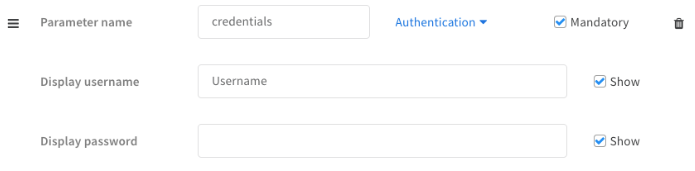
Username and password credentials
-
In the UI:
-
In the YAML file:
- display: Username
  name: credentials
  type: 9
  required: true
-
In the code:
params = demisto.params() username = params.get('credentials', {}).get('identifier') password = params.get('credentials', {}).get('password') -
In demistomock.py:
return {
        "base_url": "...",
        "credentials": {"identifier": "<username>",
                        "password": "<password>"},
        ...
    }
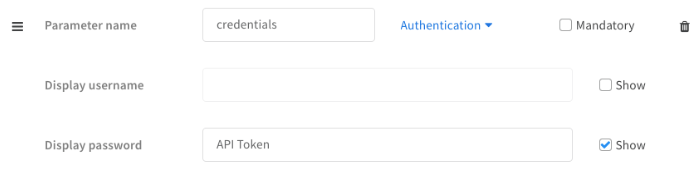
API token or key credentials
-
In the UI:
-
In the YAML file:
- displaypassword: API Token
  name: credentials
  type: 9
  required: false
  hiddenusername: true
Using the credentials parameter type is recommended (even when working with API token/key) because it enables using the Cortex XSIAM credentials vault feature when configuring the integration for the first time.
Cortex XSIAM CommonServerPython helper functions
Check the script helper for common predefined functions to facilitate script development. The following are some examples.
fileResult
Returns a file to the War Room by using the following syntax:
filename = "sample.txt",
file_content = "hello sample"

return_results(fileResult(filename, file_content))
You can specify the file type, but it defaults to "None" when not provided.
create_indicator_result_with_dbotscore_unknown
Used when the API response to an indicator is not found and returns a verdict with an unknown score (0).
A generic response is returned to the War Room and to the context path by using the following syntax:
indicator = "www.google.com",
indicator_type = DBotScoreType.URL
reliability = DBotScoreReliability.C

return_results(create_indicator_result_with_dbotscore_unknown(indicator, indicator_type, reliability))
The War Room result shows:

The Context Path shows:
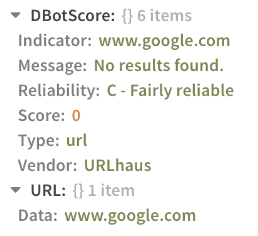
If the integration has a reliability it should be noted, but it defaults to None when not provided.
Note
- If the indicator type is
CustomIndicator, you need to provide thecontext_prefixargument. - If the indicator type is
Cryptocurrency, you need to provide theaddress_typeargument.
tableToMarkdown
Transforms your JSON, dict, or other table into a Markdown table.
name = 'Sample Table'
t = {'first':'Foo', 'second': 'bar', 'third': 'baz', 'fourth': ''}
headers = ['Input', 'Output']
tableToMarkdown(name, t, headers=headers, removeNull=True)
This sample code snippet creates this table:
| Input | Output |
|---|---|
| first | Foo |
| second | bar |
| third | baz |
| fourth |
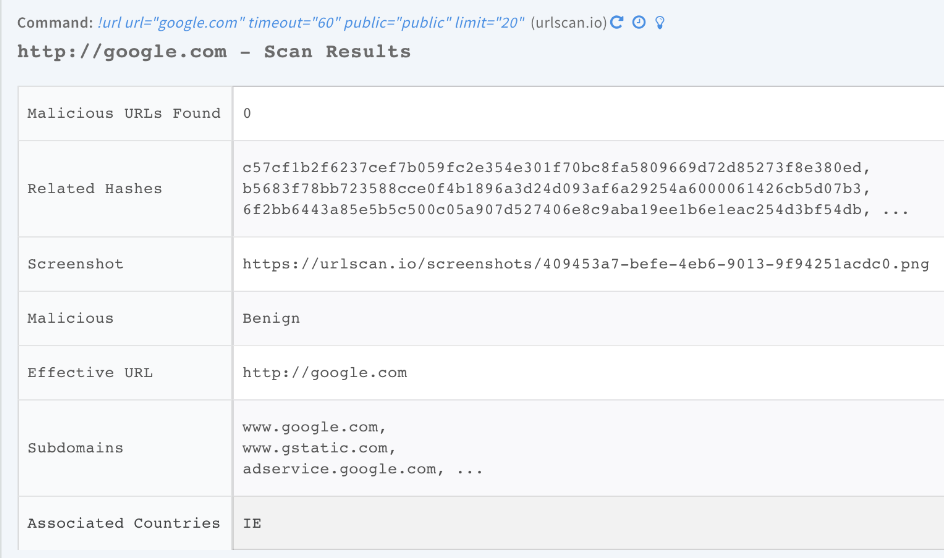
In the War Room, tables appear as follows:
Add table headers
Use headerTransform to convert existing keys into formatted headers.
t = {'header_1': 'a1', 'header_2': 'b1', 'header_3': 'c1'}
tableToMarkdown('headerTransform Example', t, headerTransform=underscoreToCamelCase)
|Header1|Header2|Header3|
|---|---|---|
| a1 | b1 | c1 |
#
You may also use ```removeNull``` to remove empty columns in the table. Default is False.
```python
headers = ['header_1', 'header_2']
data = {
    'header_1': 'foo',
}
tableToMarkdown('removeNull Example', data, removeNull=True, headers=headers)
|header_1|
|---|
| foo |

You may also use ```metadata``` to add text above the table as a secondary title.
#
Use the ```url_keys``` argument to specify a list of keys whose value in the MD table should be a clickable url. This list may contain keys of inner dicts\list of dicts in the data given to the tableToMarkdown function.
For example, for the following data with some of the keys nested:
d = { "id": "23", "url1": " https://url1.com", "result": { "files": [ { "filename": "Screen.jpg", "url2": "https://url2.com" } ] }, "links": { "url3": "https://url2.com" } }
and using ` url_keys=('url1', 'url2', 'url3')
` ```python tableToMarkdown('Data Table', d, headers=('id', 'url1', 'result', 'links'), headerTransform=string_to_table_header, url_keys=('url1', 'url2', 'url3')) `
The resulting table is:

Format date fields
Use the date_fields argument (list) of date fields to format date values to human-readable output.
data = [
    {
        "docker_image": "demisto/python3",
        "create_time": '1631521313466'
    }
]
tableToMarkdown('tableToMarkdown date_fields example', data, headers=["docker_image", "create_time"],
                date_fields=['create_time'])
|---|---|
| demisto/python3 | 2021-09-13 08:21:53 |

#
Use the ```json_transform_mapping``` argument (Dict[str, JsonTransformer]), to map between a header key to the corresponding JsonTransformer.
```python
data_with_list = {
  "Machine Action Id": "5b38733b-ed80-47be-b892-f2ffb52593fd",
  "MachineId": "f70f9fe6b29cd9511652434919c6530618f06606",
  "Hostname": "desktop-s2455r9",
  "Status": "Succeeded",
  "Creation time": "2022-02-17T08:20:02.6180466Z",
  "Commands": [
    {
      "startTime": null,
      "endTime": "2022-02-17T08:22:33.823Z",
      "commandStatus": "Completed",
      "errors": ["error1", "error2", "error3"],
      "command": {
        "type": "GetFile",
        "params": [
          {
            "key": "Path",
            "value": "test.txt"
          }
        ]
      }
    },
    {
      "startTime": null,
      "endTime": "2022-02-17T08:22:33.823Z",
      "commandStatus": "Completed",
      "errors": [],
      "command": {
        "type": "GetFile",
        "params": [
          {
            "key": "Path",
            "value": "test222.txt"
          }
        ]
      }
    }
  ]
}
table = tableToMarkdown("tableToMarkdown test", data_with_list,
            json_transform_mapping={'Commands': JsonTransformer(keys=('commandStatus', 'command'))})
For example, this code snippet generates the following table:
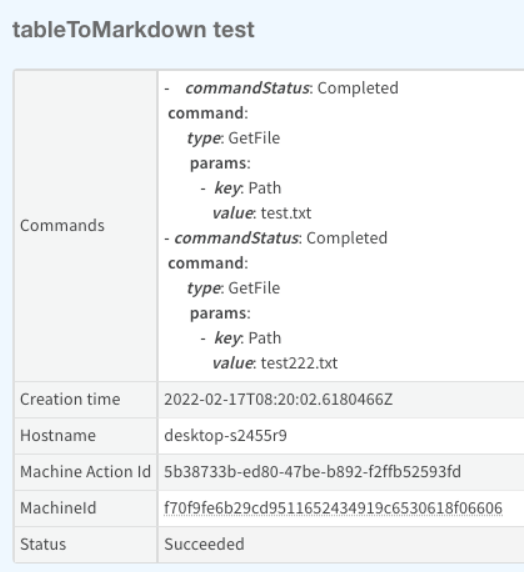
Transform JSON data into a table
Use the is_auto_json_transform argument (bool), to auto-transform a complex JSON.
nested_data_example = {
  "name": "Active Directory Query",
  "changelog": {
    "1.0.4": {
      "path": "",
      "releaseNotes": "\n#### Integrations\n##### Active Directory Query v2\nFixed an issue where the ***ad-get-user*** command caused performance issues because the *limit* argument was not defined.\n",
      "displayName": "1.0.4 - R124496",
      "released": "2020-09-23T17:43:26Z"
    }
  },
  "nested": {
    "item1": {
      "a": 1,
      "b": 2,
      "c": 3,
      "d": 4
    }
  }
}
table = tableToMarkdown("tableToMarkdown test", nested_data_example,
                    headers=['name', 'changelog', 'nested'],
                    is_auto_json_transform=True)
For example, this code snippet generates the following table:
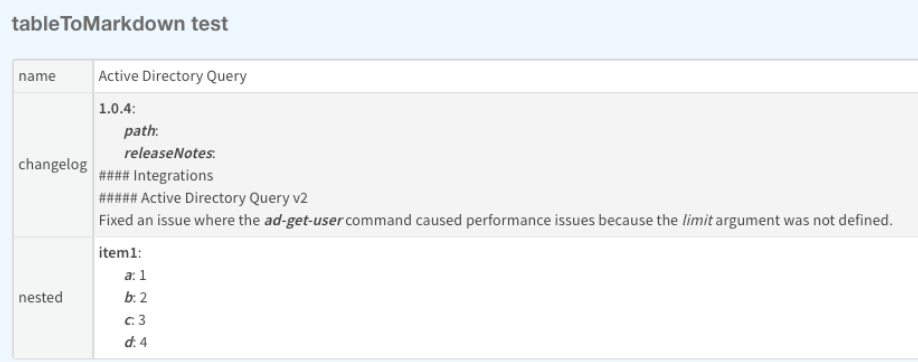
demisto.command()
demisto.command() ties a function to a command in Cortex XSIAM, for example:
    if demisto.command() == 'ip':
        ip_search_command()
demisto.params()
demisto.params() returns a dictionary of parameters for a given integration to grab global variables in an integration, for example:
    APIKEY = demisto.params().get('apikey')
    ACCOUNT_ID = demisto.params().get('account')
    MODE = demisto.params().get('mode')
    INSECURE = demisto.params().get('insecure')
demisto.args()
demisto.args() returns a dictionary of arguments for a given command to get non-global variables, for example:
url = demisto.args().get('url')
This argument can be seen in the integration settings as shown below:
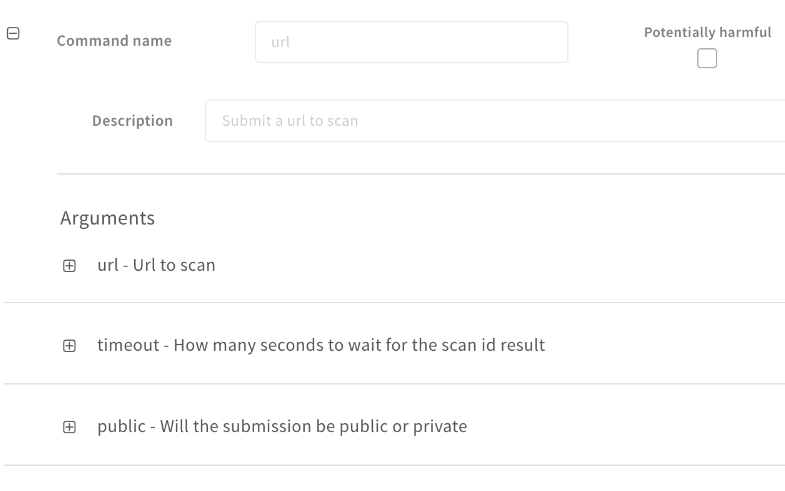
After the command is executed, the arguments are displayed in the War Room as part of the command, for example:
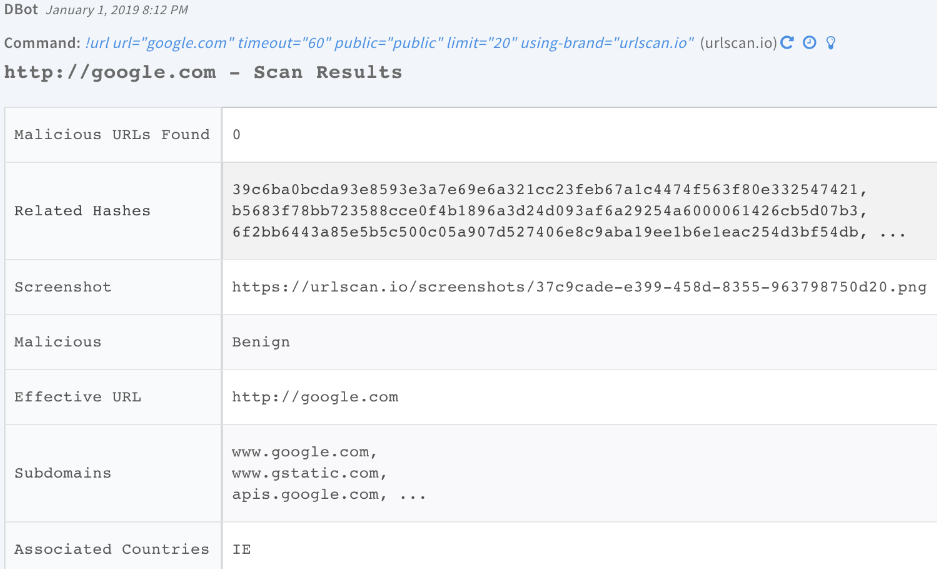
IndicatorsTimeline
IndicatorTimeline is an optional object, applicable only for commands that operate on indicators. It is a dictionary (or list of dictionaries) in the following format:
{
'Value': '127.0.0.1',
'Message': 'System marked the indicator 127.0.0.1 as Benign',
'Category': 'Benign'
}
When IndicatorTimeline data is returned in an entry, the timeline section of the indicator whose value was noted in the timeline data will be updated and is viewable in the indicator's view page in Cortex XSIAM.
Choose a category for timeline data
Any Cortex XSIAM integration command or script that returns timeline data may include the Category value. If not given, when returning timeline data from a Cortex XSIAM integration or script, the value will be Integration Update or Automation Update accordingly.
Include timeline data in War Room entries
A timeline object should be included when a command operates on an indicator. For example, if the command returns a DBotScore or entities as described in context standards documentation to the entry context. A common case is reputation commands, such as !ip, !url, and !file. When implementing these commands in integrations, timeline data should be included in the returned entry.
| Argument | Type | Description |
|---|---|---|
| indicators | list | Expects a list of indicators, if a dictionary is passed it will be put into a list. |
| category | string | Indicator category. |
| message | string | Indicator message. |
For example:
results = [
    CommandResults(
        outputs_prefix='VirusTotal.IP',
        outputs_key_field='Address',
        outputs={
            'Address': '8.8.8.8',
            'ASN': 12345
        }
    ),
    CommandResults(
        outputs_prefix='VirusTotal.IP',
        outputs_key_field='Address',
        outputs={
            'Address': '1.1.1.1',
            'ASN': 67890
        }
    )]
return_results(results)
timeline = IndicatorsTimeline(
      indicators=[args.get('ips')],
      message='Important to note'
)

timeline = IndicatorsTimeline(
      indicators=[args.get('ips')],
      category='Some category',
      message='IP was blocked in Checkpoint'
)
CommandResults
This object returns outputs. It represents an entry in the War Room. A string representation of an object must be parsed into an object before being passed into the field.
| Argument | Type | Description |
|---|---|---|
| outputs_prefix | String | Should be identical to the prefix in the YAML contextPath in YAML file. For example: CortexXDR.Incident. |
| outputs_key_field | String | Primary key field in the main object. If the command returns incidents, and one of the properties of the incident is incident_id, then outputs_key_field='incident_id' |
| outputs | List / dictionary | (Optional) The data to be returned and will be set to context. If not set, no data will be added to the context. |
| readable_output | String | (Optional) Markdown string that will be presented in the War Room, should be human readable - (HumanReadable) - if not set, readable output will be generated via tableToMarkdown function. |
| raw_response | Object | (Optional) Must be dictionary, if not provided then will be equal to outputs. Usually must be the original raw response from the third-party service (originally Contents). |
| indicators | List | DEPRECATED: use 'indicator' instead. |
| indicator | Common.Indicator | Single indicator such as Common.IP, Common.URL, Common.File, etc. |
| indicators_timeline | IndicatorsTimeline | Used by the server to populate an indicator's timeline. |
| ignore_auto_extract | Boolean | If set to True prevents the built-in auto-extract from enriching IPs, URLs, files, and other indicators from the result. Default is False. |
| mark_as_note | Boolean | If set to True marks the entry as note. Default is False. |
| relationships | List | A list of EntityRelationship objects representing all the relationships of the indicator. |
| scheduled_command | ScheduledCommand | Manages the way the command result should be polled. |
CommandResults example
results = CommandResults(
    outputs_prefix='VirusTotal.IP',
    outputs_key_field='Address',
    outputs={
        'Address': '8.8.8.8',
        'ASN': 12345
    },
    indicators_timeline = timeline
)
return_results(results)
For more information on how to return results, see Context and outputs.
return_results
return_results() calls demisto.results(). It accept either a list or single item of the CommandResults object or any object that demisto.results can accept. Use return_results to return the CommandResults object or a basic string.
For example:
results = CommandResults(
    outputs_prefix='VirusTotal.IP',
    outputs_key_field='Address',
    outputs={
        'Address': '8.8.8.8',
        'ASN': 12345
    }
)
return_results(results)
results = CommandResults(
    outputs_prefix='VirusTotal.IP',
    outputs_key_field='Address',
    outputs={
        'Address': '8.8.8.8',
        'ASN': 12345
    },
    indicators_timeline = timeline
)
return_results(results)
return_results('Hello World')
return_error
Returns an error entry to the War Room and calls sys.exit(), meaning the script will stop.
return_error(message="error has occurred: API Key is incorrect", error=ex)
It produces an error in the War Room, for example:

CommandRunner
CommandRunner is a class for executing multiple commands, which returns all valid results together with a human readable summary table of successful commands and commands that return errors.
To use this functionality, create a list of commands using the CommandRunner.Command, and then call CommandRunner.run_commands_with_summary(commands).
The following are CommandRunner.Command arguments.
| Argument | Type | Description |
|---|---|---|
commands |
String or List | The command to run. Can be a single command or list of commands. |
args_lst |
Dictionary or List | The command arguments. If provided in a list and the commands argument is a string, run the command with all the arguments in the list. If the commands argument is a list, args_lst should be the same size and the arguments should correspond to the same command index. |
instance |
String | (Optional) The instance the command should run. |
brand |
String | (Optional) The brand the command should run. |
For example, the following code snippet returns all the results of all commands, including a human readable summary table.
commands = [CommandRunner.Command('command1', {'arg': 'val'},
            CommandRunner.Command('command2', [{'arg1': 'val2'}, {'arg2': 'val2'}])),
            CommandRunner.Command(['command3', 'command4'], [{'arg1': 'val2'}, {'arg2': 'val2'}]),
            CommandRunner.Command('command5', {}, instance='some_instance', brand='some_brand')]

return_results(CommandRunner.run_commands_with_summary(commands))
AutoExtract
As part of CommandResults() there is an argument called ignore_auto_extract, which prevents the built-in indicator extraction feature from enriching IPs, URLs, files, and other indicators from the result.
By default, ignore_auto_extract is set to False.
For example:
results = CommandResults(
    outputs_prefix='VirusTotal.IP',
    outputs_key_field='Address',
    outputs={
        'Address': '8.8.8.8',
        'ASN': 12345
    },
    indicators_timeline = timeline,
    ignore_auto_extract = True
)
return_results(results)