Log HTTP data ↗
Configure logging request and response payloads in Azure API Management.
- In your Azure API Management instance, navigate to APIs → Select an API.
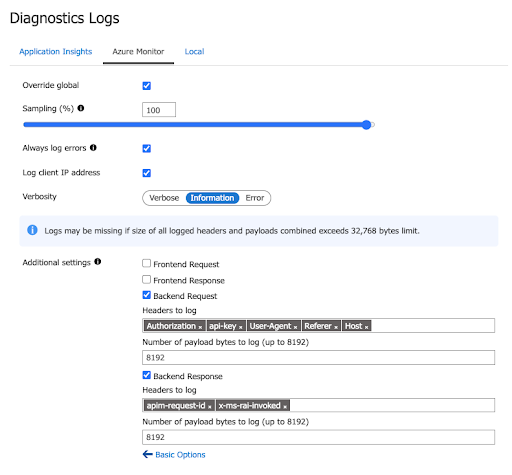
- In the Settings tab, under Diagnostics Settings, select Azure Monitor and select Enable.
- In Advanced Options select the following: Backend Request and Backend Response.
- For Backend Request, enter the following headers:
- Authorization
- Api-key
- User-Agent
- Referer
- Host
- In Number of payload bytes to log, enter:
8192. Click Save. - For Backend Response, enter the following headers:
- apim-request-id
- x-ms-rai-invoked
- In Number of payload bytes to log, enter:
8192. Click Save.