Start case analysis ↗
Note
This section describes the product in default mode and using the Split view. If you are using legacy mode, see Detailed View.
To start analyzing a case, open the case from the main Cases page. In the Split view, click a case to open it in the side panel. To open a case in a full page layout, right-click a case in the list and select View case in new tab.
The case card opens a dedicated workspace where you can fully understand, investigate, and resolve the case from start to finish.
The case card brings together case context, correlated issues, affected assets, and remediation actions in one place. It helps you quickly understand the case context, see how events are connected, and take action with confidence. Click through the view to dive into investigation data, resolution tasks, and AI assistance without switching pages or losing context, keeping your focus on resolution.
Case analysis and resolution process
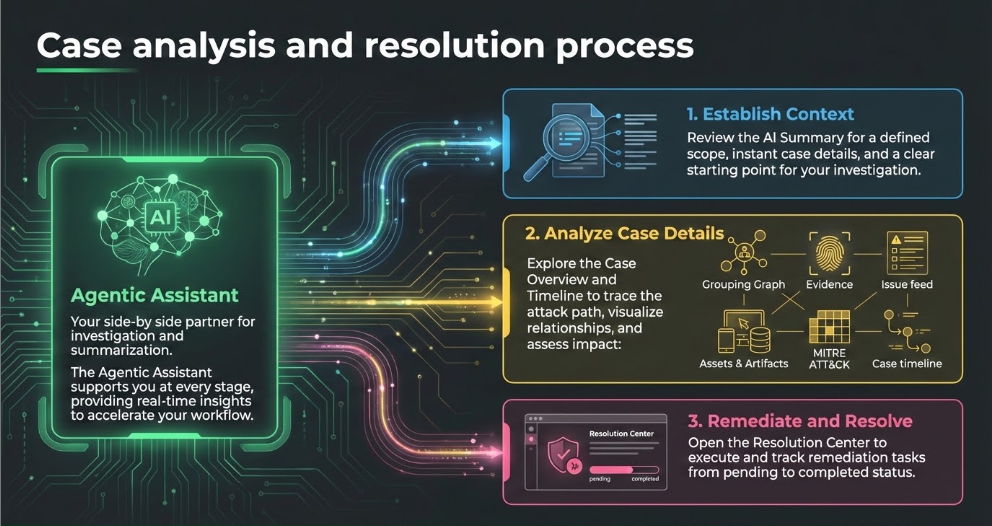
Core components
The following table describes the core components of case analysis and resolution:
| Component | Description | Link to detailed information |
|---|---|---|
| Agentic Assistant | Provides side-by-side support by recognizing case context, delivering advanced summarization, and helping you pivot to additional investigative views. | Agentic Assistant- Case Investigation agent |
| AI-generated case title and description | Helps you quickly understand the scope and nature of the case by summarizing key case details. | AI-generated case summaries |
| Case overview | <p>Breaks down case components to help you understand how the case was built:</p><ul><li>Grouping graph: Illustrates issue relationships</li><li>Evidence: Details casualties and events</li><li>Issue feed: Narrates the case story</li><li>Associated assets, artifacts, and MITRE ATT&CK tactics: Provides additional context and links to detailed views and actions</li></ul> | Analyze case details |
| Case timeline | Provides a chronological record of security events and analyst actions to streamline investigations and evidence management. | Case timeline |
| Detailed view | Provides detailed information about the investigation in a tabular format, for example Timeline and War Room. | Detailed View |
| Resolution Center | Guides you towards resolution by presenting actionable remediation steps and enables you to track all related playbook tasks without opening individual playbooks. | Resolution Center |