Remediation Actions ↗
Review remediation actions to see a prioritized list of steps you can take to resolve posture issues originating from SaaS Applications. Follow the steps below to view all the Remediation options:
- Navigate to Modules > SaaS Security > Security Issues > Posture to view a list of all issues with vulnerabilities originating from SaaS Application Posture.
- Click on any Issue to be taken to the Issue view.
- Select the Issue you wish to investigate. This opens the Remediation Actions side panel.
- The detailed side panel provides the following investigation and remediation options:
- The Overview tab on the Vulnerability Issues panel captures all the relevant details to further investigate the vulnerability including Summary, Details, Affected Assets, and Evidence.
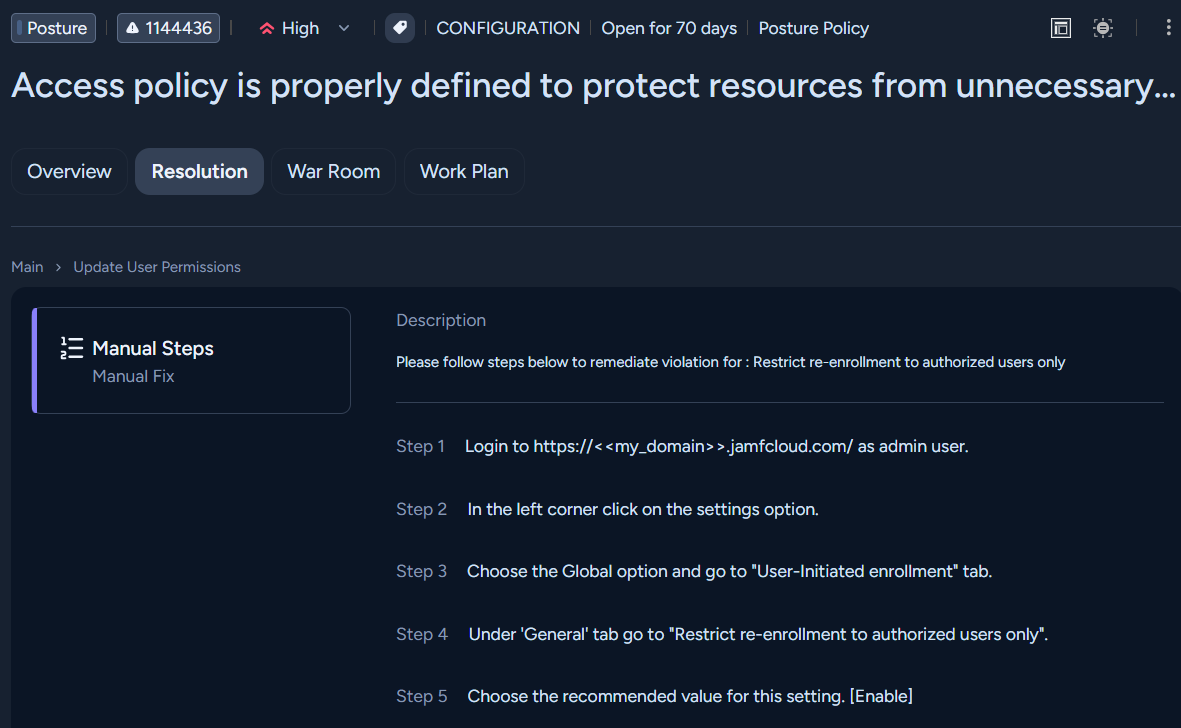
- Select Resolution to view remediation options including Remediation Guidance. Detailed manual steps are listed to resolve the issue.
- Click War Room for real-time investigation capabilities. In the War Room you can capture case context from different sources and collaborate and execute remote actions across integrated products.
- Work Plan is available when you select an autonomous playbook in an issue's resolution tab. This view presents only the executed key tasks and their defined outputs, providing a focused view of resolution actions.
- Ticketing and Notifications: Jira, Slack, and Service Now integrations are available to create a ticket to resolve any issue. Webhook notification routing is also available for your auditing requirements.