Investigate and remediate vulnerabilities ↗
Cortex XSIAM provides several ways to view and track vulnerability data so you can monitor, investigate, and remediate vulnerabilities in your environment.
View all Vulnerabilities
The Vulnerabilities page displays all your vulnerabilities grouped by CVE or other vulnerability ID. This view shows you how prevalent each vulnerability is in your environment. The Vulnerabilities page includes key information about each vulnerability, with links to the related lists of instances (also called findings), related issues, and impacted assets.
Go to Home > Modules > Vulnerability & Exposure Management > Vulnerabilities.
View vulnerability issues
The Vulnerability Issues page displays all vulnerability issues along with critical vulnerability intelligence and context so you can assign an issue to an owner, investigate, remediate, and track progress. Follow the steps below to view Vulnerability Issues and investigate them further:
- Go to Home > Modules > Vulnerability & Exposure Management > Vulnerability Issues. Click on an issue in the table to display the issue details panel. You can also optionally generate a .tsv file export of the data if required from the Vulnerability Issues page.
- The issue details side panel provides the following investigation and remediation options:
- The Overview tab on the Vulnerability Issues panel captures all the relevant details to further investigate the vulnerability including Summary, Details, Linked Cases, and Evidence. Select Evidence to view the technical context necessary for effective action and remediation. Here you can view:
- At the top you can view the compromised asset or packages that led to Vulnerability creation.
- Vulnerability Details Highlights are provided to indicate if a fix is available.
- Vulnerability Summary provides granular details regarding impacted scores such as CVSS and EPSS.
- Vulnerability Asset & Code Details includes additional details regarding Asset Location, Package in Use, and Findings Sources.
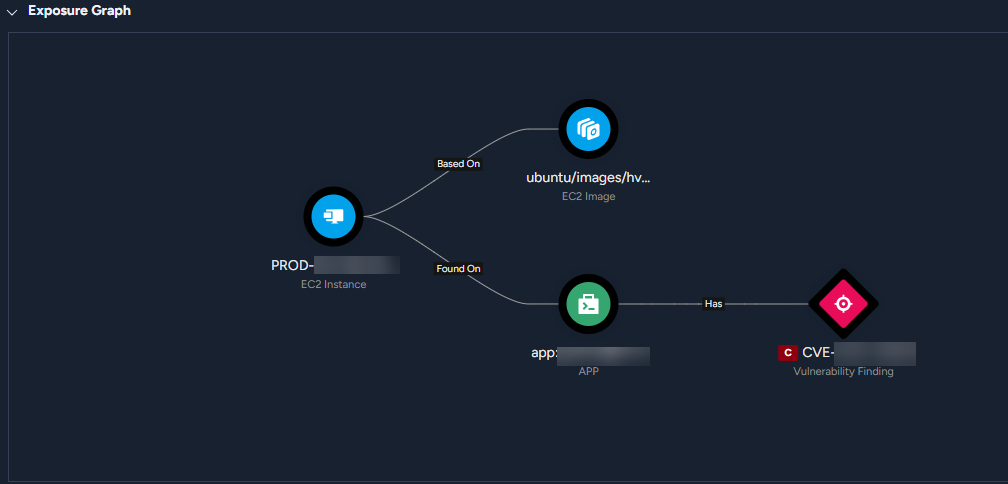
- In addition, you can further isolate the vulnerability by examining the Exposure Graph. Review the Exposure Graph to understand where the vulnerability originates and how it impacts Findings and Assets. Select More Info to view granular details about each of the impacted assets. Use the graph to investigate relationships between K8s Namespaces, Clusters, Workloads, and Container Images. Note that Cortex Attack Surface Management and Cortex Network Scanner do not have graphs associated with them.
- Click Resolution to view remediation options. Here you can select Work Plan if you already have an automation Playbook in place. Learn more about Playbooks. Select Remediation Guidance to view manual steps to resolve the issue. Manual steps include:
- General and LLM generated Step-by-Step instructions to remediate the issue.
- Workarounds are only included for Exposure Management issues.
- Select Risk Details to view the Cortex Vulnerability Risk Score information as well as any existing Compensating Controls in place.
- Click War Room for real-time investigation capabilities powered by ChatOps. In the War Room you can capture context from different sources and collaborate and execute remote actions across integrated products.
- Work Plan is available when you select an autonomous playbook in an issue's resolution tab. This view presents only the executed key tasks and their defined outputs, providing a focused view of resolution actions.
View All Vulnerability Findings
A vulnerability finding is a specific instance of a vulnerability that was discovered in your environment. The All Vulnerability Findings page lists every instance of every vulnerability that was discovered in your environment.
Go to Vulnerabilities and click the All Vulnerability Findings button.
View vulnerable assets
The Vulnerable Assets page displays all assets with a vulnerability finding. This view enables you to prioritize vulnerabilities by asset and asset type and focus on assets most critical to fix. The Vulnerable Assets list provides links to the findings and issues for each asset. Click on an asset in the table to see the asset details.
Go to Home > Modules > Vulnerability & Exposure Management > Vulnerable Assets.